
Master valves can be programmed for direct connection to ports located on the mini-chassis. See the illustration below for the master valve direct connect locations.
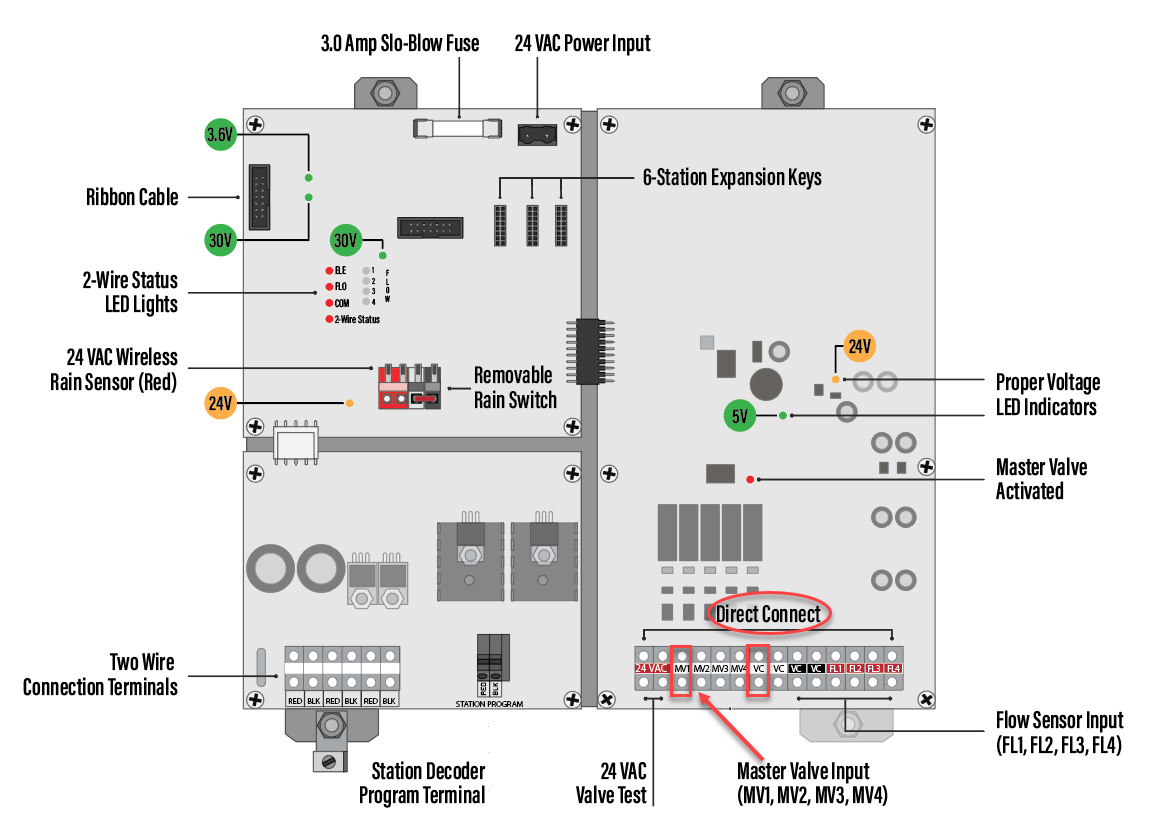
1. Plug the master valve wires into the ports located on the mini chassis board as illustrated above.
2. Press SETUP.
3. Press à until CONFIGURE H2O 2-WIRE displays (setup 15).
4. Press + or - to select Configure Direct Connect.
5. Press SELECT to enter.
6. The direct connect screen defaults to configuring direct connect for master valves. Ensure that the screen reads Master, then press à to underline the correct master valve connection (MV1, MV2, MV3, MV4), as illustrated below.
| Setup: 15 |
1:56pm |
| Master 1 2 3 4 | |
| Valve D1 2W 2W 2W | |
| DI=Direct 2W=2-Wire | |
| ________ |
________ |
7. Press + or - to select DI (direct connection).
8. Press RUN to save and exit.