Update
Table of Contents
Possible Causes:Possible Fixes:To clear a Mainline Break from the controller: To clear a Mainline Break from WeatherTRAK Central:
If a mainline break has occurred, flow has exceeded the mainline break threshold and the controller will close the station valves.
Possible Causes:
- Mainline break: An actual break in the mainline has occurred
- Stuck valve: A station valve is stuck on
- Programming error: The mainline break threshold is set too low
Possible Fixes:
- Locate and fix the break
- Locate and replace the broken fitting
- Change the mainline break threshold. For information about how to do this, read: Setting Mainline Break Threshold and Delay
To clear a Mainline Break from the controller:
1. Turn the Upper Knob to view flow status.
2. Press the * button to clear all flow alerts.
To clear a Mainline Break from WeatherTRAK Central:
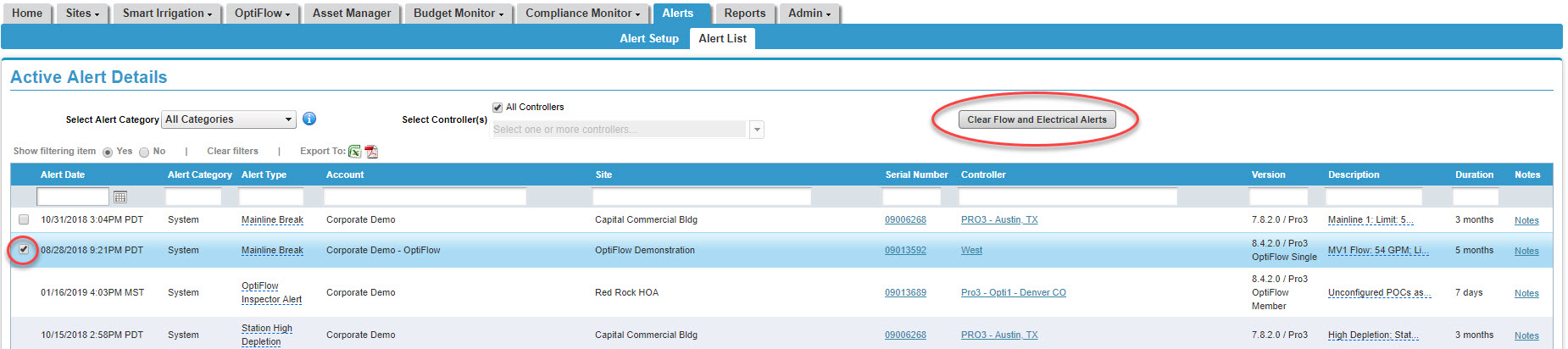
1. Hover over the Alerts tab and click on Alert List. A list of all active alerts will display.
2. Place a checkmark next to the alert you would like to clear.
3. Press the Clear Flow and Electrical Alerts button. A pop-up screen displays asking you to verify the change. Click Yes.