
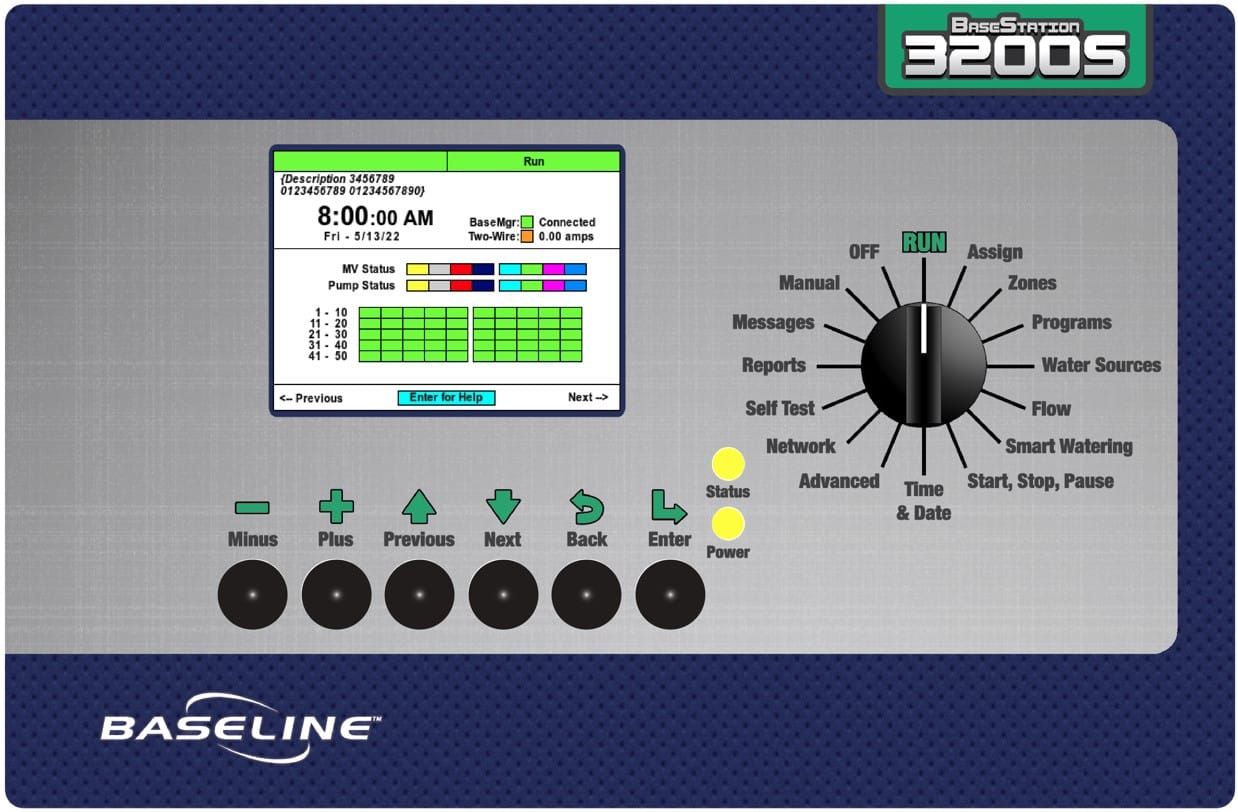
The BaseStation 3200S is a new version of display hardware for the BaseStation 3200 controller family.
Why is there a new hardware version?
- 3200 HW version 3 and 4 status
- Key components are end-of-life
- The 3200 Display (BL-3200X-RD) is no longer avalible for sale
- Current hardware issues
- LED display EOL requires circuit board redesign
- Currently runs on unsupported Windows 6.0
- Currently built using archaic codebase: VB+
- Failure rate nearly 15% with current SOM
- Processing speed maxed out (display “locks up”)
- USB common fail point
What changed with the new hardware?
- Solution overview
- Migrate current firmware base to a new processor
- Use unified BaseStation 1000 code as core “trunk” then build the 3200 features on top
- BaseStation 1000 code also used for SubStation and FlowStation
- Move away from unsupported Windows 6.0 platform
- Use PIC32MZ processor instead of SOM to get a massive increase in “horsepower” and reduce failure rate
- Source new LED display
- Move the USB port to inside the swing panel to mitigate corrosion
- Key changes
- Faster bootup
- More responsive dial and keys
- Faster network
- 10x improvement in reliability
- Full Spanish support (both screens and help text)
- Format of “backup” file is different (there is a “converter” for moving from V18 to 3200S).
- Supports existing SubStations, RVs, and CPs
- Works in an existing FlowStation system (FlowStation with a mix of V18 and 3200S controllers).
- Can upgrade by exchanging the new 3200S faceplate on an existing 3200V18 controller - physical and cable compatibility.
- Programming conversion tool makes it easy to convert old programming backups to new v19 format
- https://hydropoint.helpjuice.com/3200s/convert-v18-firmware-to-v19-firmware
- Native boot loader provides fail-safe and protects against “brick” events. Advanced tools for support.
- Does not work with Munro Pump Station integration
- If customer has a RMA for a BaseStation 3200 with v18 or older firmware, the new 3200S will not work with the Munro Pump Station
- We are holding safety stock of hardware with v18 firmware for customers with Munro Pump Stations
- We can use the existing 3200 replacement part numbers for the RMA so MFG knows which hardware to use
- 3200 v18 replacement part numbers
- BL-3200PSS-RTA
- BL-3200X-RDA
- BL-3200X-RD
- BL-3200XS-RDA
- BL-3200P-RDA
- 3200S v19 replacement part numbers
- BL-3200S-PSS-RTA
- BL-3200S-X-RDA
- BL-3200S-X-RD
- BL-3200S-XS-RDA
- BL-3200S-P-RDA
- 3200 v18 replacement part numbers
Are we changing everything so it says 3200S?
No…because it's a new hardware rev and not an entirely new solution, we are going to leverage the current documentation, part number convention, and support materials.
- There will be new part numbers for the replacement display options
- Release new display assembly to include new name and label: BL-3200S
- The label has to be updated anyway to remove the USB port cutout
- Gives easy to find visual to client and support that this is a new display assembly
New hardware is a “drop-in” replacement for current 3200 platform. It uses the same system architecture, watering engine and programming methodology which allows us to continue shipping 3200 platform without interruption. The new 3200 display works with the SubStation, FlowStation, and all communication modules. FlowStations can work with a mix of old 3200 displays and new 3200S displays.
Where are the changes location in the 3200S display:
Dial Position |
Key Differences |
RUN |
|
ASSIGN |
|
ZONES |
|
PROGRAMS |
|
WATER SOURCES |
|
FLOW |
|
SMART WATERING |
|
START, STOP, PAUSE |
|
TIME & DATE |
|
ADVANCED |
|
NETWORK |
|
SELF TEST |
|
REPORTS |
|
MESSAGES |
|
MANUAL |
|
OFF |
|
3200S system default:
System |
factory set serial number two-wire always on time zone = MST, enable day light saving |
|---|---|
Zone |
zero runtime for all programs assigned to mainline 1 |
Primary Zone |
moisture sensor assignment: mode = lower limit lower limit = 24 % upper limit = 32 % calibration mode = never limit offset = 0 % |
Program |
program 1 is enabled and has one start time at 8 AM water each day of week no water window hours 1 concurrent zone seasonal adjust = 100% no booster pump priority = 5 include in program concurrent zones = yes obey global conditions = yes |
Network |
use internal Ethernet connector, DHCP BaseManager use DNS to baselineapps.net, connect IOT use DNS to iot.baselineapps.net, do not connect FlowStation not connected SubStations not connected |
Mainline |
no manage by flow, no dynamic allocation no flow variance design flow = 0 GPM mainline 1 is enabled pipe fill/flow stabilize by time, 1 minute no zone delay times or pressure |
Control Point |
control point 1 is enabled and assigned to mainline 1 no devices: master valve, pump, flow meter, pressure sensor no flow limits no pressure limits design flow = 0 GPM |
Water Source |
water source 1 is enabled and assigned to control point 1 no water budget no empty condition priority = 5 |
Pressure Sensor |
4mA = 0.0 psi 20 mA = 150.0 psi |
Additional Reference Materials
- ERS
- User Manual
- Quick Start Guide