Before Troubleshooting any FlowLink Issue:
- Confirm if they are using an EXT. If so, confirm what station is the converted station
- Use installation guide or Flow Solutions Guide to check ALL the FlowLink connections.
No Flow
- Check flow sensor setting to make sure FS1 is on
- Does the FlowLink have power?
- Confirm that FFXT & MVFXT (or FXT2) are within 4,000ft of the controller
- Once all connections are checked and confirmed to be correct, tap test can be done with the red and black wires on the FFXT (or FXT2).
(When tap test is done:
If the white light on the FFXT blinks and the controller detects flow, issue is most likely the FS or connections between the FFXT and FS.
If the white light on the FFXT does not blink and flow is not detected, issue is most likely the FFXT)
Valve Alert (MV)
- Does the FlowLink have power? If so, what are the lights doing? (Power/Activity lights (Blue LED) should flicker every 10 sec)
- Verify that the MV solenoid is properly connected to the white wires on the MVFXT or FXT2. If needed, have them redo the connection.
- Connect solenoid directly to the MV1 and VC terminals and run a valve test to confirm if controller chassis is the issue
- To isolate the field wires, have LMC wire all FlowLink components (CT, MVFXT & FFXT or FXT2) and a solenoid on the white MV wires directly to the controller. If the NC does not come back after a the valve test is ran, issue is in the field wires. Recommend LMC to check field wires and redo connections.
Valve Alert (Converted Valve)
- Does the FlowLink have power? If so, what are the lights doing? (Power/Activity lights (Blue LED) should flicker every 10 sec)
- Verify that the station solenoid is properly connected the to white wires on the EXT. If needed, have them redo the connection.
- Connect solenoid directly to the appropriate station terminal and VC terminal and run a valve test to confirm if controller chassis is the issue
- To isolate the field wires, have LMC remove the EXT and connect the solenoid directly to the field wires that run back to the controller. Then head to the controller, remove the field wire from the green CT wire, remove the white CT wire from the corresponding station terminal, reconnect the field wire to the corresponding station terminal and run a valve test. If the NC goes away is could be the EXT or connections.
- To confirm if issue is EXT or connections, re-add the EXT but redo the connections between the EXT and the field wires that go back to the controller, the EXT and the solenoid and the field wire and the CT green wire. Run Valve test. If NC comes back again issue is EXT.
Read FlowLink Hardware Changes (Q4 2022) for replacement part numbers and to gain insight into the hardware updates that occurred.
Remember!
When troubleshooting any FlowLink issue, the FlowLink components can always be wired directly to the controller to confirm if the issue is in the field or not.
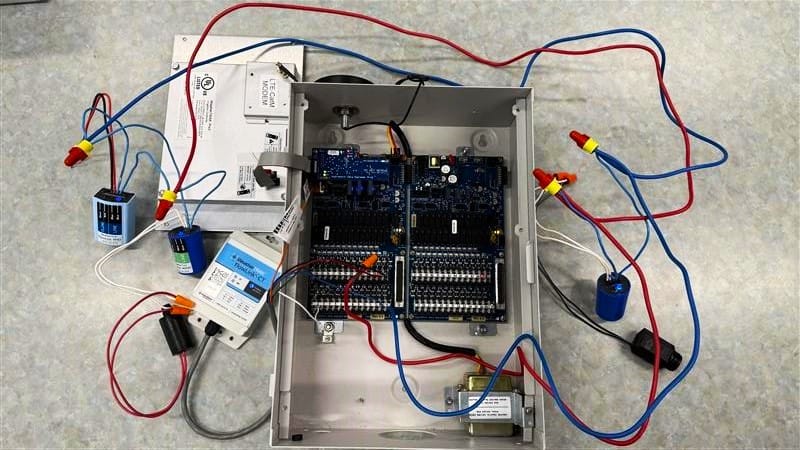
Below are examples of how to wire the FlowLink components directly to the controller, with and without the EXT.
🚨The EXT, MVXT, FFXT and FXT2 CANNOT communicate with the controller without the CT. When wiring the FlowLink directly to the controller it needs to be done one of these 2 ways, depending on if the EXT is being used or not.
Without EXT (capped white wire)
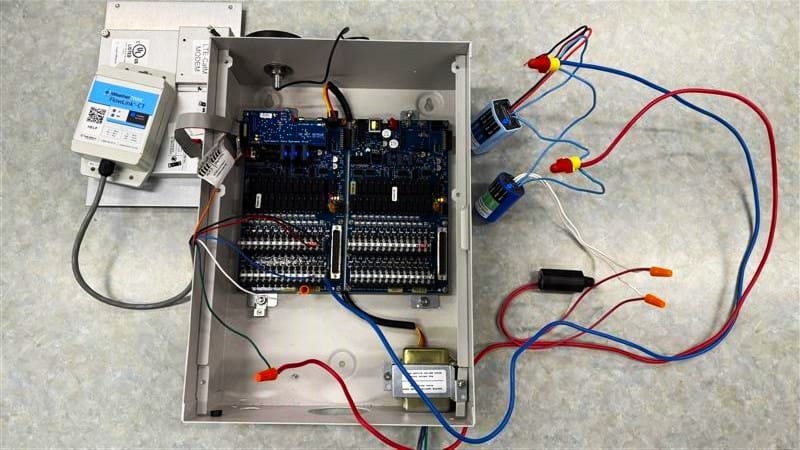
With EXT (station 2 is converted station)