
These instructions will assist you in receiving a promotional code for a discount when you upgrade to a Rachio controller. You will need to know the serial number from your WeatherTRAK ET plus controller. You will also need to visit the HydroPoint and Rachio websites to complete your purchase.
Step 1
Finding Your Serial Number
1. Turn the MAIN knob to HELP.
2. Turn the Upper Line knob until SERIAL # displays.
3. Write the number down.
4. To finish, turn the MAIN knob back to RUN.
Step 2
Getting Your Promotional Code for a Discount
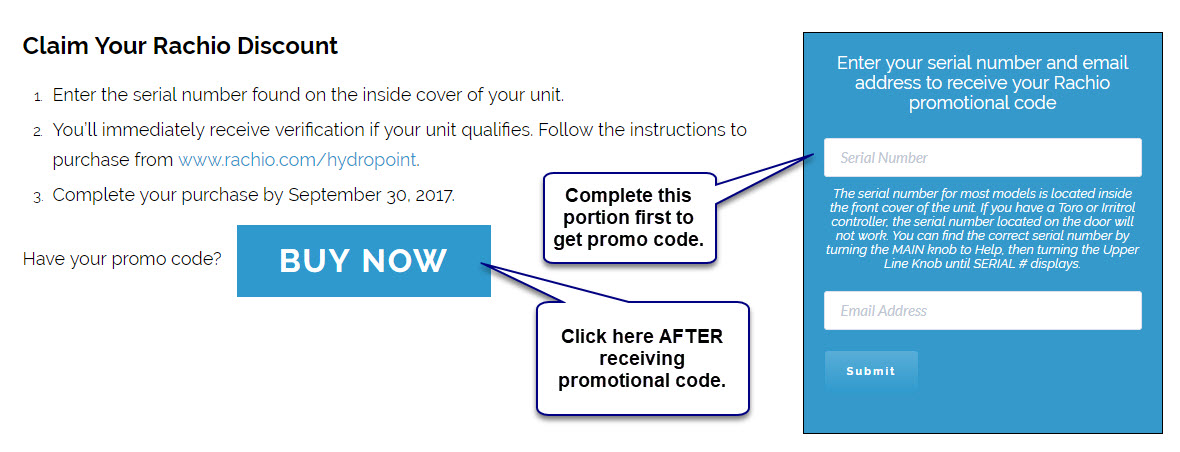
Next, click on the link below and follow the prompts to get your discount code. You will be asked to enter in the serial number from your controller and your email address.
http://www.hydropoint.com/rachio-offer/
Step 3
Receiving Your Discount and Buying Your New Controller
When you have your discount code, write it down. Use the BACK button on your browser to return to the previous screen. Click on the blue Buy Now button. You will be directed to Rachio’s website. From here, you can purchase your controller. You will be asked to put in your promotional code for your discount during the check out process.
You can also visit the Rachio website directly to make your purchase.