
Overlays are maps or images customers can place on their BaseManager map to better manage their site and controller(s). Map overlay requests will come through to support as a JotForm. The form will contain the Company, Site and MAC address the overlay is for along with the coordinates of where the image needs to be and the image itself.
Payment
Map overlays come with a one time fee of $100 PER overlay. Before placing the overlay confirm with the accounting/finance team (Angel Cruz) that we have received the payment.
Once payment has been confirm overlay can be placed.
Note
To be able to place overlays your AppManager username must contain the “@baselinesystems.com” or @hydropoint.com".
Placing an Overlay
- Open AppManager and locate the “Manage Map Overlays” option through the Admin menu in the left hand side.
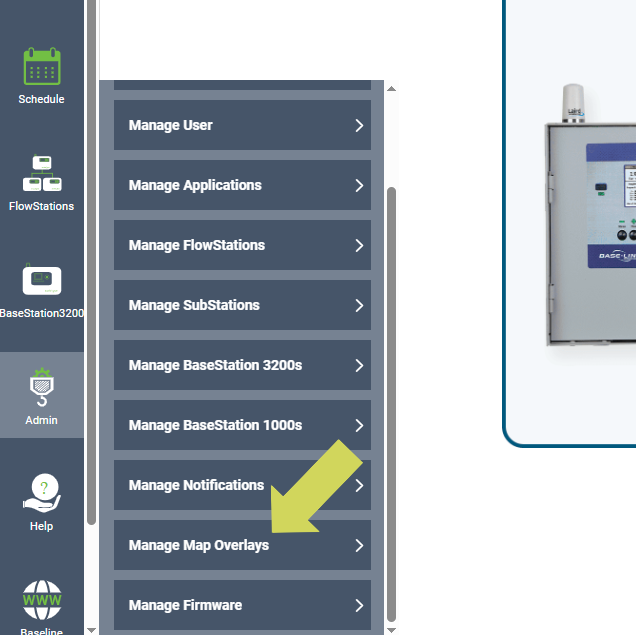
2. Once in the Manage Map Overlays page, scroll down and select the “Add New Map Overlay” option.
3. Fill out the Map Overlay Information with the information provided in the JotForm along with the file attached in the form.
Note
The acceptable file formats are: PNG, TIF or JPG
If the file the customer provided is not one of those formats the file will need to be converted.
The file being attached to the Map Overlay Information cannot be larger than 3MB. If the file the customer provided is too big you will need to resize the file.
For the Description field enter the Site Name the customer provided in the form.
4. Once the Map Overlay information is save go to the BaseManager menu on the top left and find the company, site and controller.
5. Once you have selected the controller the overlay is for, select the “Maps” menu and then select the “Current Controller” option.
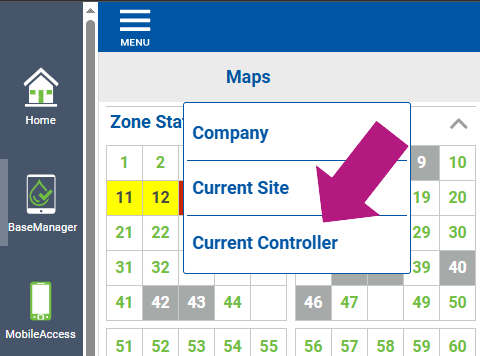
6. After selecting the “Current Controller” option you will be taken to a map of the entire globe. Find the exact location of the coordinates and save. After saving that location you have completed. Now every time the customer pulls up a the map for that controller they will be taken to the overlay you have placed.
Tip
Before location for the location on the map, select the “Edit” button on the bottom left.
If needing help finding the exact location on the map you can use Google maps or a coordinate finder tool online.