
Customers will call in if there controller is offline of not connecting to the internet.
- Please make sure the customer has first gone through these steps Troubleshooting Cell Modem & Network Connections (Baseline)
- Check the MAC address in the Salesforce case. If the MAC address presents all zeros (0000000000000) this is an indicator of controller hardware failure and not a modem issue. An RMA for the display, if under warranty, should be completed.
- Gather from the customer and add to SF case:
- Modem Information: model number, serial number, and sim number (on the sticker on them)
- CloudGate Nano CM0126 (no RMA) or CloudGate Micro CM0125 (BL-CM4G-GW-AT (Or VZ) )
- Cloud Network Module Information: LTE, Wi-Fi or Cellular?
- Site information: site signal strength, where the modem is located. To see historical connection statuses:
- refer to Controller log files.
- For this purpose, we would specifically look for - Category.
- BM = BaseManager and Subcategory: CN = Connect, DC = Disconnect
- Check SIM (activating sim article) for validating this step. For ATT, Connection history and the Audit Trail can give us important indicators to potential causes to an issue.
- refer to Controller log files.
- Modem Information: model number, serial number, and sim number (on the sticker on them)
- Confirm Cloud Network Module Firmware up to date
- Confirm no cable connection issues: have they used a camp meter to confirm it is not the power cable?
- Ask what the cell status was
- Ask what the LED colors are.
- What Color is the Cloud Network Module (red = not connected, green = good)
- What Colors are the Modem
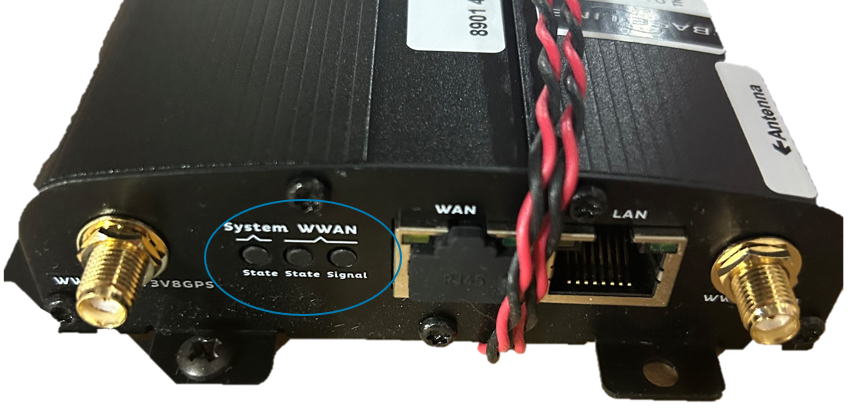
| System State - Indicates successful power on and device readiness. |
Off: no power Orange: booting Red: error Green: on |
| WWAN State - indicates 3G/4G interface availability and use |
Off: no power, not connected Orange: on, not connected Red: WWAN error Green: on, connected Green Flashing: data traffic |
| WWAN State - indicates 3G/4G interface signal strength |
Off: no power, not connected Orange: moderate signal strength 4G ≥ -111 dmb & ≤ -94 dbm 3G ≥ -104 dmb & ≤ -94 dbm Red: Bad strength (3G ≤ -104 dmb) Green: on, connected (≥ 94 dbm) Green Flashing: data traffic |
If the modem or the cloud network module are not working then issue a replacement.
To see if the Cloud Network Module is in warranty _.
To see if the modem is in warranty __.