
Description
Precip Sensor measures effective rainfall. You’ll understand how much rain made it into the soil, as well as rain rate, volume, and frequency.
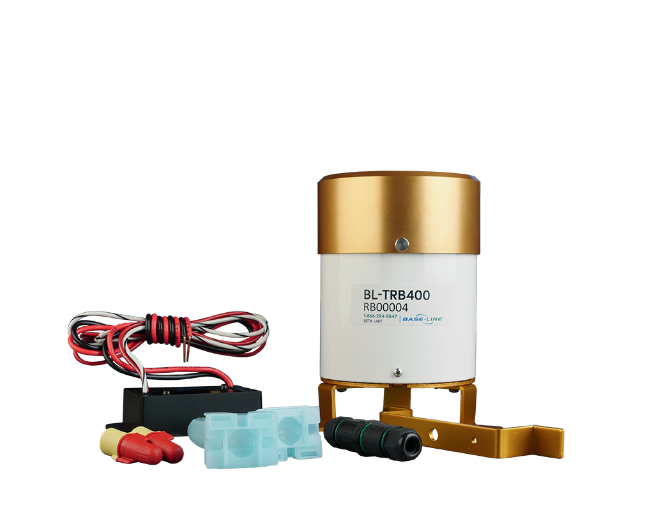
General Specs
Basic Tech Specs
- All biCoders are fully sealed, submersion-proof, and approved for direct bury.
- Shock resistant
- Freeze/heat resistant -4oF to 140oF (-20°C to 60°C)
- Manufactured with 24 inches of 16-gauge PVC jacketed solid core wire to connect to the two-wire
- All biCoders have built-in LEDs that blink during communications.
- The rain gauge biCoder has an additional LED that blinks when it's raining
- Built-in surge protection
- All biCoders carry Baseline's standard conditional five-year exchange warranty.
- Decoder hardware type = 5.32
- Default "R-value" is 100 (100 pulses per inch).
- Max Wire Length Decoder to Tipping Rain Bucket Sensor = 250 feet, 22 gauge
- Current= 8-24mA
Firmware Requirements
- Firmware MUST be on 18.0 to be compatible with the Tipping Rain Bucket.
- We should always recommend being on the latest Firmware
Troubleshooting Steps
Issue: The precipitation rate (amount of rain) is measuring incorrectly. ex: 5000 inches of rain in less than 24 hours or not reading any rain despite it raining. OR not reading any precipitation when it should be.
- Gather pictures to review proper installation, wiring, and condition.
- Pictures of the splices in the box for the rain sensor
- Pictures of the Placement of the Bucket
- Pictures of the Surrounding area of the Bucket
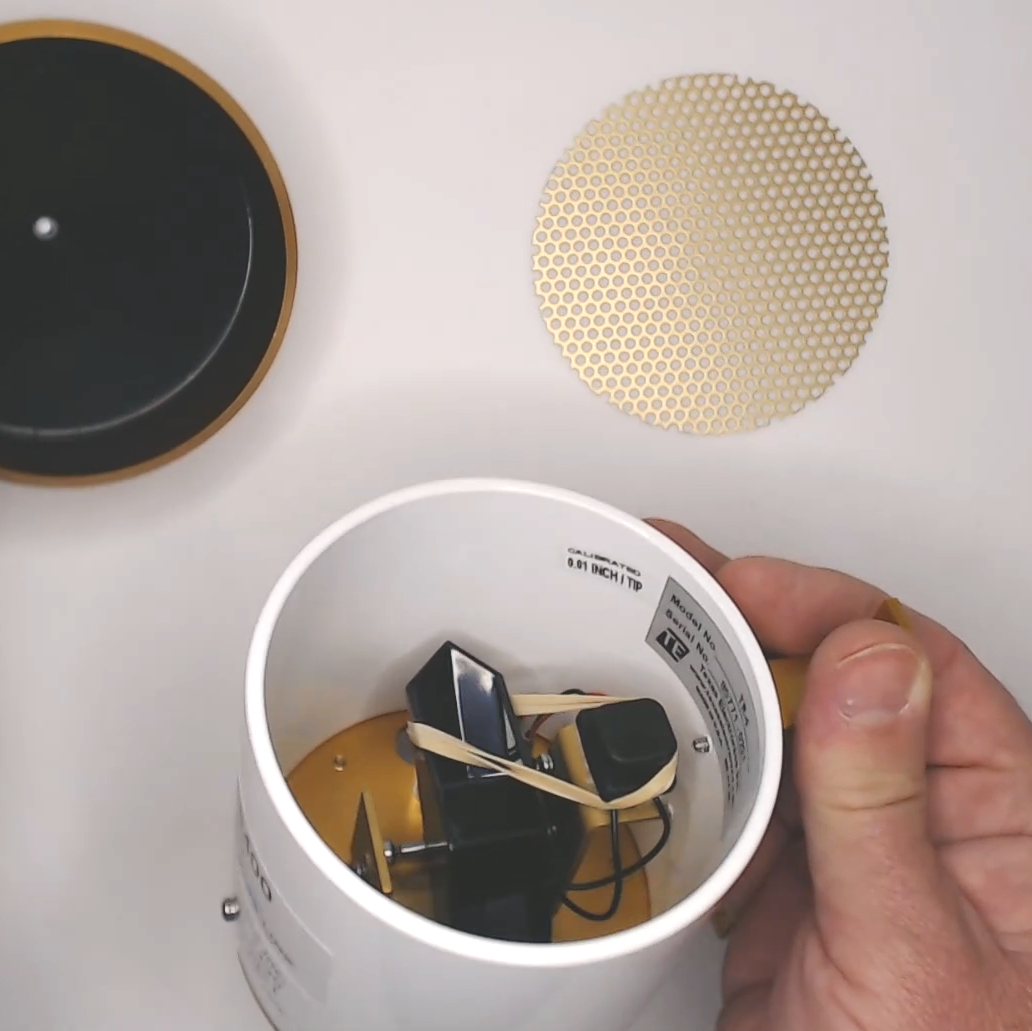
- Pictures of inside the Bucket (in case of wild animals got in or something blocking it from tipping to read properly)
- Make sure the Rubber Band has been removed
- Clients may forget to remove this part causing it to not read rain correctly
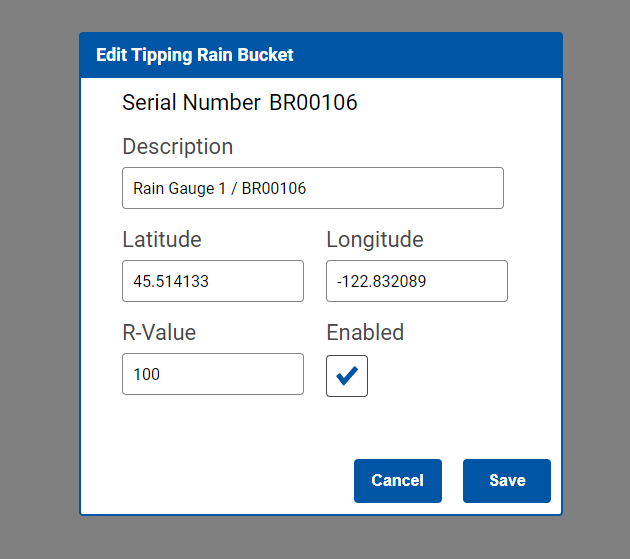
- Confirm the R-value In BaseManager or the controller.
- It should automatically default to 100 pulses per inch.
- If this is not set to 100 pulses per inch, correct that value.
- In BaseManager, this is under the devices tab, in the corresponding device.
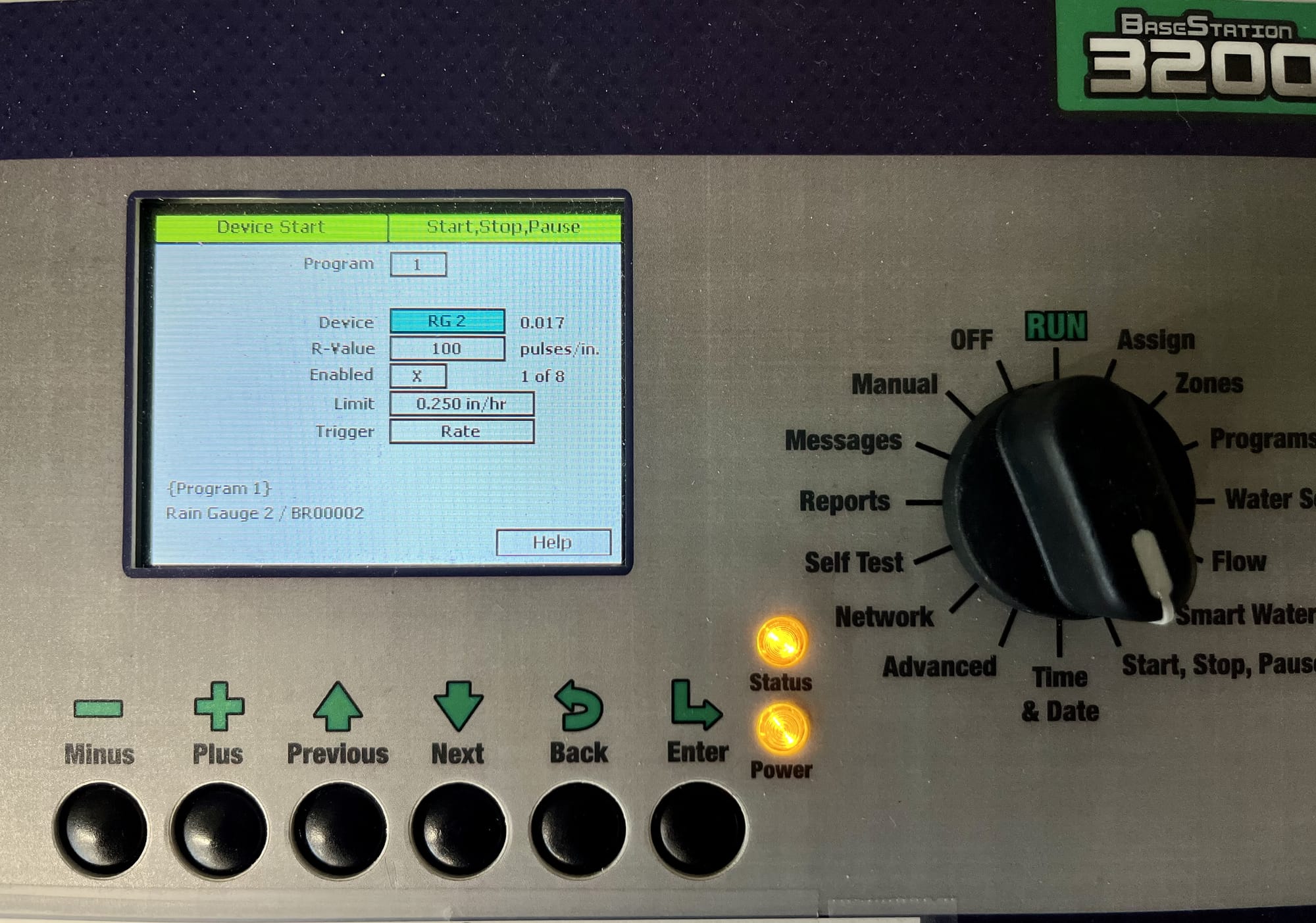
- At the controller, this is in the “Start, stop, pause” menu in the “device start” option. The device must be enabled.
- If this is not set to 100 pulses per inch, correct that value.
- It should automatically default to 100 pulses per inch.
Isolate the issue to the Field wiring, Rain bucket, or biCoder.
- Power off the controller
- Remove the 2-wire path at the corresponding controller terminals. Take the biCoder and bucket components back to the controller
- Connect the biCoder directly to the two-wire terminals by itself.
- Connect the decoder to the rain bucket wires if not already. (It is not possible to test the rain bucket independently of the biCoder because the biCoder is necessary to collect readings for the controller.)
- Power on the Controller
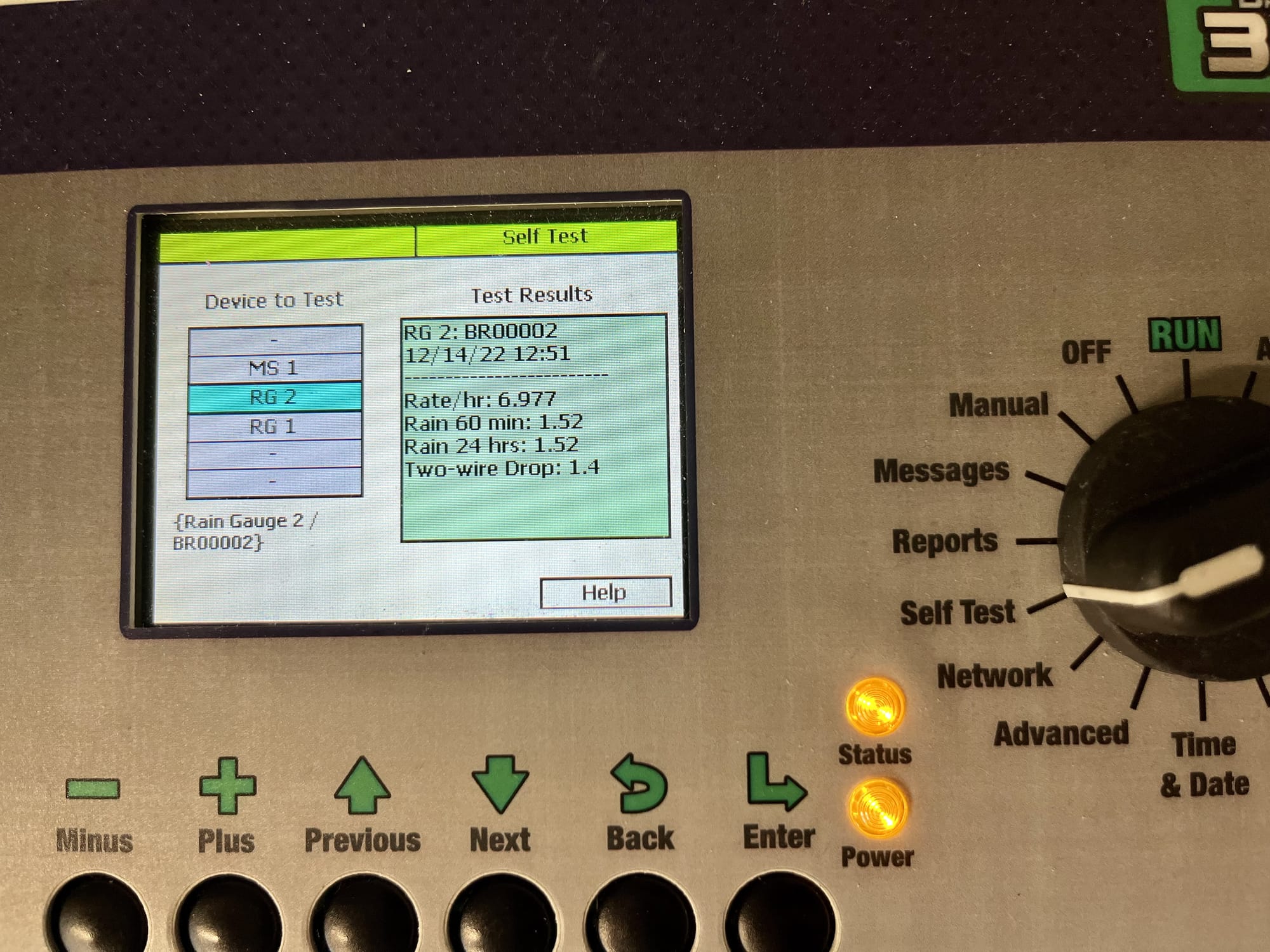
- In BaseManager, locate the device and choose the “test” option. At the controller, choose the self test menu, select the correct device and press enter. Tip the lever inside the Bucket back and forth steadily for a few seconds. If you do not see a reading, it may be necessary to press enter to run the test several times until you see readings from manually tipping the gauge.
- Faster tipping should increase the numbers vs slower tipping providing a smaller numbers
- Rate/hr = current rainfall reading / rain 60 min: = total rainfall within the hour / Rain 24 hrs: = total rainfall within 24 hours.
- If there are no readings or an unrealistically large or inconsistent numbers based on tipping speeds, we'll need to test the biCoder by itself without the bucket attached in the same way however, instead of tipping the gauge, we will tap the red and white wires together to simulate rainfall. If the readings are normal - the biCoder is functional but the rain bucket is not - replace the rain bucket. If the readings are not normal, replace the biCoder.
- If the readings are normal with both the bucket and biCoder testing at the controller, Follow the Field Testing steps next.
Field Testing
- Power controller off
- Take the bucket and biCoder back out to the field location
- Connect the biCoder first without the Bucket to the Two-Wire path
- biCoder Testing
- The biCoder LED on the bucket wires side should not be blinking with just it connected to the two-wire path.
- If you tap test the biCoder wires that connect to the Bucket then it should blink since its reading “rain”.
- Confirm that rainfall was recorded at the controller from that tap test. (BaseManager or at the controller)
- BiCoder and Bucket in Field Testing
- Connect the sensor side biCoder wires one at a time to the Tipping Rain Bucket 22 Gauge wire
- Signs to look for 1 wire at a time: Flashing from the biCoder on its own without tipping the lever in the bucket
- If there are false rain readings from this test, we first need to rule out that grounding or noise isn't the issue.
- Make sure there is nothing that can cause Noise in the 22 Gauge wire around the Bucket
- Electrical boxes or electrical equipment can cause False Readings
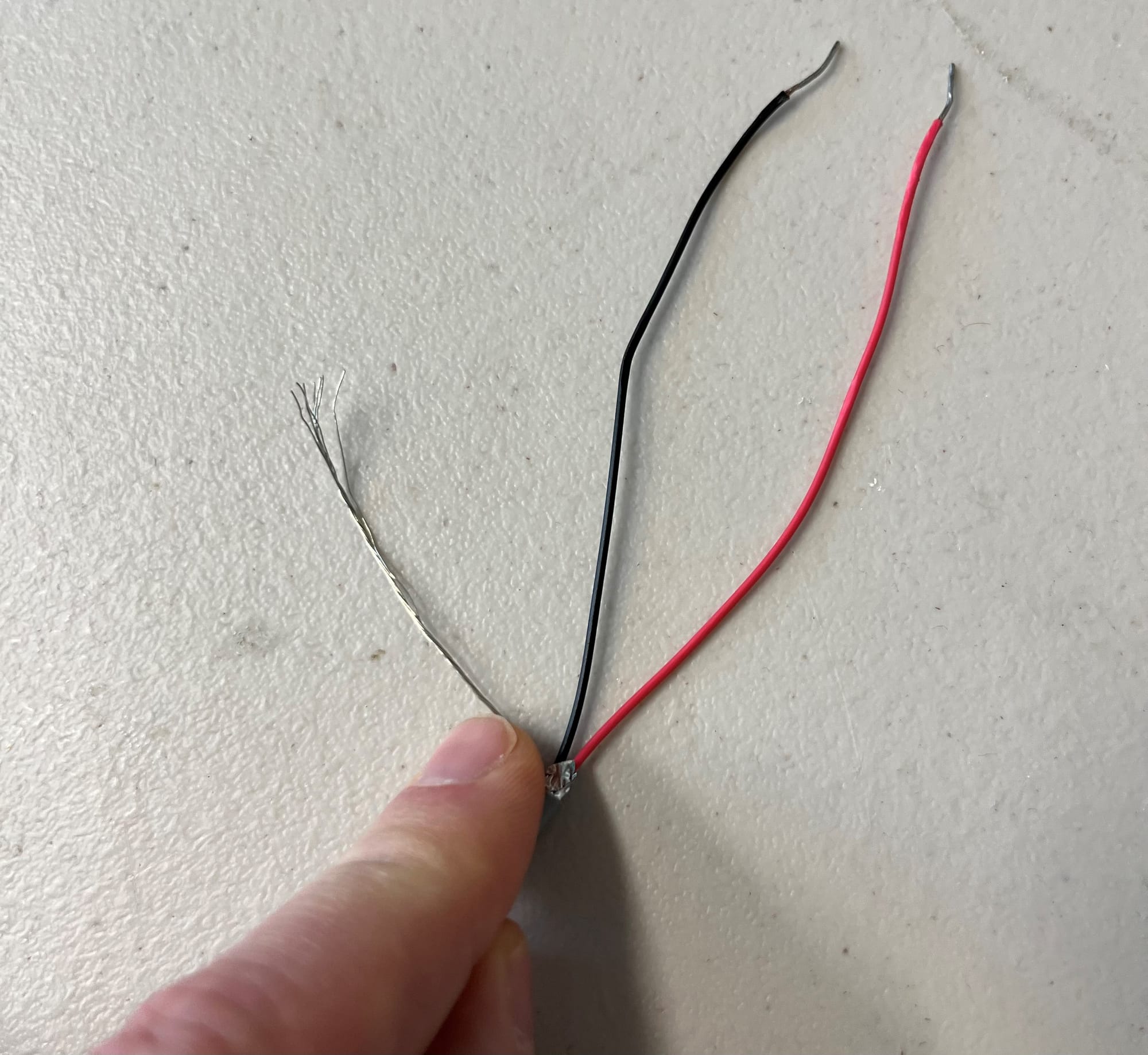
- The fix for that is to ground the drain wire that is apart of the 22 gauge. (silver wire pictured below) Then perform the field test steps again to validate if that fixed it. If not, confirm wire gauge and lengths used below.
- Confirm the Specs
- Get the length of the wiring in the field
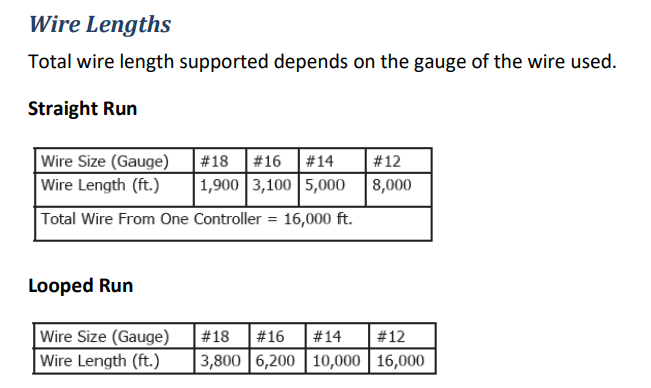
- Max Length Decoder to Tipping Rain Bucket Sensor = 250 FT, 22 Gauge
- How far in the field is the bucket and biCoder?
- What Gauge wire is the two wire? Compare and confirm they're within spec of wire length limits below.
- Is it 14, 16, or 22?
- Get the length of the wiring in the field
If all of the troubleshooting steps and testing listed above have been completed and there are still unrealistically large or inconsistent numbers, replace the tipping rain bucket and biCoder.
Part Number
Part numbers and the Descriptions
- Parts:
- BL-RB400
- Precip Sensor
- BL-5407
- Precip Sensor Decoder
- BL-5407-KIT
- Precip Sensor Kit. Includes Precip Sensor, Precip Sensor Decoder, DBR/Y Wire-Connectors.
- BL-5407-KIT-PRO
- Precip Sensor Kit Pro. Includes Precip Sensor, Precip Sensor Decoder, BL-5311 Moisture Sensor, DBR/Y Wire-Connectors
- BL-RB400
Related Resources
https://hydropoint.atlassian.net/wiki/spaces/HDW/pages/883589285/5407+Rain+Bucket+ERS
https://hydropoint.helpjuice.com/en_US/179527-video/909677-installation-and-setup-video