
Escalation Process
Escalations can be originated externally as part of a customer-impacting incident, or internally from Support, Success, Sales, and Manufacturing. Customer Support Team will be the first line of defense, collecting as much information as possible regarding the issue raised, and troubleshooting as far as they can, before escalating. The most traditional path for escalations would be when a customer calls Customer Support and they escalate to a level II escalations team member.
However, escalation issues can also originate via customers reaching out directly to a level II team member, a Product Manager, a member from HPDS sales team, a distribution partner, customer success, or even an engineer in the team. Once an escalation has been created, the resolution path remains the same.
All escalations regardless of origination require a Salesforce case for tracking and reporting.
Standard Terms Glossary:
Issue – An incident or condition is identified that seems problematic
Case – An "Issue" that is created as a service case in Salesforce for troubleshooting or resolution
Feature – An aspect of how the product works that either exists today or we wish to have built to enhance the product
Bug – Something that causes the product to respond to conditions in a way that is contrary to its design
Escalation – A condition that impacts service performance and requires immediate attention
Abeyant – A temporary holding place for "Issues" to see if more instances appear
Levels of Escalation:
There are 3 levels of internal support for addressing reported issues:
Level I: Customer Support:
- This team handles daily monitoring and first level technical support questions over email and phone call. This team is also responsible for providing timely updates to the customer and ensuring that HydroPoint maintains a high level of customer satisfaction.
- Once a support request is raised via email or a phone call, this team will create an originating Salesforce service case. Escalations originated internally (e.g. Web Server down, etc), also require a Salesforce case.
- All issues reported via email must be sent to support@baselinesystems.com or support@hydropoint.com
- If the customer issue cannot be handled by the Level I Customer Support team, in most cases due to the technical complexity, the issue will be escalated to a Level II Escalations Team Member
Level II: Internal Escalations Tier 2
- A Level II internal escalation team member will address issues brought up by customers that are beyond the technical capabilities or scope of the Customer Service Level I team.
- Internal escalations can also come to the team through Sales, Distribution, Customer Success, Product Management, Product Specialist, Engineering, Manufacturing.
- Engineering consult with Engineering Support.
- If the issue cannot be handled by the Level II Support Team, then the issue will be escalated to the Level III Operations / Engineering Support team following escalation procedures.
- The Internal Escalations team will ensure all the necessary information from the Escalation Template is collected and logged in the Salesforce case before engaging the Level III Escalations team.
Level III: Operations / Engineering Support Tier 3
- Operations Managers and Engineering Managers are Level 3 within the internal escalation chart and provide the final level of operations assistance and first level engineering assistance.
- This team, along with IT team, is also responsible for proactive management and 100% uptime of our core devices and customer devices under management.
- This team is responsible for creating a Jira ticket in Escalations Project, if required. Jira -> Escalations
- Make sure to select the appropriate Product
- If product unknown yet, select Unknown
- The originating case continues to be tracked in Salesforce and operations will convert this into a linked/related Jira Ticket
- At the time of hand-off, the Operations and Engineering teams will work together to identify the teams/owners that will need to be involved in resolving the issue.
- Problem statement, scope/impact, closure criteria and communications messaging from Product Team will be identified and documented in the Salesforce/Jira tickets.
- If a work around is determined, the Jira ticket is updated with the same.
- If a system change is required, depending on the severity of the Escalation, a Hot Fix, a Patch Release or a Sprint Release might be required to resolve the issue.
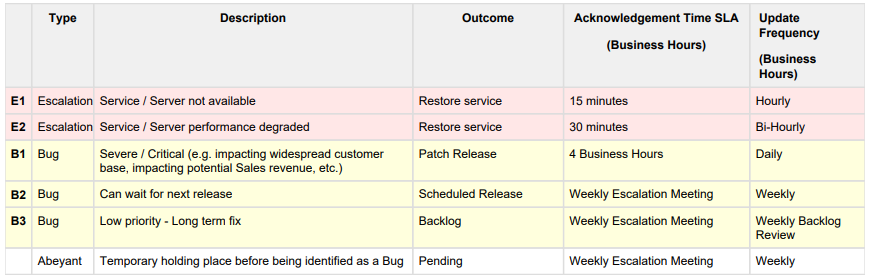
Any disagreements with classifications to be resolved internally and if required by Organization leaders.
- The Operations/Engineering ownership team must constantly monitor the Jira Escalation queue and provide responses on the queued up tickets based on the defined priority timeframes.
- The Product Team will provide updated customer communications and the Operations team will periodically update the internal/external customer(s) about the Escalation status according to the above SLA frequency.
- All open tickets must be updated and reviewed by the owners during the weekly Escalations Meeting.

Level III Escalations Tracking:
Level III Escalations are being tracked in Jira & Salesforce. In Salesforce the notes will remain updated based on Jira input. In Jira they follow the following classifications depending on their status.
E1, E2, B1:
1. Backlog:
- Tickets get into the backlog as soon as they are escalated and created.
- Engineering Manager should review, assign and update based on defined priority timeframes.
2. Engineering:
- Once the Engineering Manager has assigned the ticket to an engineering team member, the tickets will be "Engineering" status.
- During this process engineering troubleshoots the issue and comes up with either a solution or the reporting of a bug in the system.
- If the issue cannot be resolved, and/or no workaround exists, then the engineering team opens a bug. The Severity / Priority of the bug is determined based on the escalation.
3. Operations:
- Once the Engineering team has resolved and tested the solution based on defined closure criteria, the ticket is set to "Operations".
- During this process Operations validates and approves the resolution.
- If Operations team finds that the issue is not resolved, the status is set back to Engineering.
4. Customer Ready:
- Once Engineering team and the Operations team determines that the issue is resolved and the customer can be notified, the ticket is moved to "Customer Ready" status.
- An escalation Level II team member provides the appropriate update/response to the customer based on the outcome of the engineering/operations investigation.
5. Closed:
- Once the customer has been notified about the status and confirms that a resolution has been made based on the defined closure criteria (either a fix or resolved), all related ticket(s) can be updated and closed.
- Operations and Engineering Managers will inform all internal stake holders of resolution and closure.
B2:
This will be associated to a bug under the appropriate Jira Project (WeatherTrak, WaterCompass, BaseManager, etc). The bug ticket will be reviewed by the Engineering Manager and added to the next release commit list.
B3:
This will be associated to a bug under the appropriate Jira Project (WeatherTrak, WaterCompass, BaseManager, etc). The bug ticket will be reviewed by the Engineering Manager and added to a future release commit list.
Flow of Events:
Below chart explains the flow of events in a customer originated escalation path

Sales "Up Leveling” of Escalations Process:
- All issues from Sales begin with an email to support@baselinesystems.com or support@hydropoint.com
- If an issue is not able to be resolved by the Level I Support Team, it moves to the Level II escalations team to validate
- Once validated as a an issue or likely bug, an escalations case is created
- Escalations process and update frequency for communications SLA’s should be expected by Sales from assigned Operations/Engineering Manager or via a report.
- If update frequency is missed an email to escalations@baselinesystems.com or escalations@hydropoint.com copying the Director of Customer Support and the Manager of Engineering would be the next step.
- If that email does not resolve the communications gap within 8 business hours a follow up email to the Director of Customer Support and Manager of Engineering, copying the SVP of Customer Operations and the SVP of Engineering would be the next step.
- If that email does not resolve the communications gap within 8 business hours a follow up email to the SVP of Customer Operations and copying the COO would be the next step.
- Finally if that does not resolve the communications gap within 8 business hours a follow up email to the COO would be the next step.
- If communications is restored at any point the process goes back to #3.
Information required by Engineering for Escalation:
- Required:
Complete the following information indicated in the bullet points below. These main bullet points must be in the description of ALL JIRA cases. This data is expected for the weekly Escalation review meeting and Salesforce status dashboards:
- Issue overview (Clear problem statement)
- All stake holders (Contact information for all external parties should be provided)
- All troubleshooting performed and results of that troubleshooting
- All hardware involved and that hardware’s firmware version
- Expected behavior (how it should work)
- Customer Impact (what problems does the customer experience)
- Scope of Issue/Impact (how widespread is the issue)
- Customer reported (Y/N – if yes provide details)
- Recurring (Y/N – if yes provide details)