New Hire Playbook

Support Methods
Inbound calls, voicemails, and emails.
Greeting example: “Hello thanks for calling Hydropoint support. This is _your name_, Can I get your name?”
Case Notes
Because information and details are so vital in a support case, especially if they are escalated to the highest level of support (engineering) below is the info we want to collect for every call, and place in every case's notes.
What to Gather
- Contact info (if different than what the sales force contact contains.)
- Full name
- Phone #
- The Company the contact works for.
- Their Role (if necessary)
- Base Manager / WeatherTrak info
- Company/Account name
- Site name
- Controller model / Serial Number (Mac address if Baseline)
- Summary Detail
- Do they already have a case #? (If so, we should search for and link it to a parent case or make it the parent case.)
- What is the problem statement? (Description of the issue) additionally, what is the customer trying to accomplish?
- Did you validate and see the issue happening? (Use pictures, AppManager, WeatherTRAK Central, a teams meeting, devices in office etc.)
- Steps you have followed and their results. (This should reflect resources/articles.)
- What’s the Urgency? (Can they water if needed?)
- Next Steps: Expectations/plan set with the customer if not resolved. Example - Researching/reproducing issue. Calling customer with update or to continue troubleshooting on 3/15/22 around 1 pm. (This should be discussed and agreed upon before disconnecting.)
Responding to Voicemails
“Hello this is ____ from Hydropoint, Sorry we missed you, you can reach back to us via phone or email. We recommend setting up a support appointment so we can most effectively help you. “
Responding to Emails
When a support case is generated, it will email the contact email on file if there is one associated when the case is opened, assigned to a team member and when it is closed. It is important to create work emails carefully, professionally, and with the right information. If it is our first response to a customer, be sure to acknowledge, align and assure the customer. We should be offering to speak over the phone every chance we get for efficiency and clarity.
Email signature set up –
We have made it as easy as possible to get you up and running:
- Pick an Option Below – most of you will use #1, those that ONLY sell or service Baseline products use #2
- Copy and Paste that option into your outlook signature & REMOVE any of the phone options not relevant for your position – see attached how-to instructions if needed
- If you send emails via your mobile device - Copy and Paste one of the mobile options below
- Click here and send an email to Zane showing off your fancy new email signature
OUTLOOK EMAIL SIGNATURE 1:
Josh Brooks Technical Support, BASELINE
office 707 285 3366 | support 866 294 5847 | hydropoint.com/baseline
(not for customer support tiers) MOBILE SIGNATURE 1:
Your Name
Your Title
office 123-456-7890
mobile 123-456-7890
support 800-362-8774
Outlook Tips! (please use)
Resources and learning
(Subscribe to our YouTube channels with your Hydropoint email for quicker access.)
Baseline Youtube:
Baseline YouTube (troubleshooting and training)
For everyone’s benefit, we want to encourage and have customers utilize self-help resources when possible – Videos and manuals.
WeatherTrak Youtube:
WeatherTrak YouTube (troubleshooting and training)
For everyone’s benefit, we want to encourage and have customers utilize self-help resources when possible – Videos, articles and manuals.
Support Articles To Start With
Sharing a document using Links
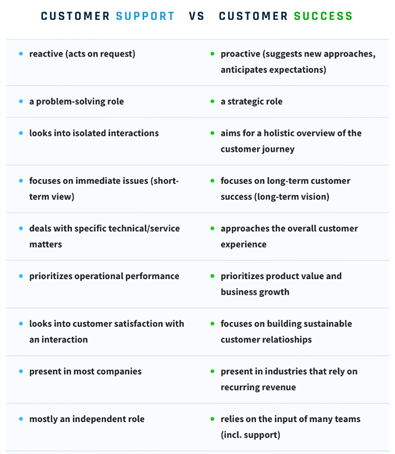
Customer Support playbook (Group of relevant and popular articles.)
Account roles and responsibilities
Understanding Hydraulic system components
Tools
Chrome Bookmarks
Email/Calendar Best practices
MS Teams
Weekly Team and KPI Updates
Online trainings to complete
TalkDesk Agent Certification: https://academy.talkdesk.com/paths
In the "Learning" tab in Paylocity, locate and complete the following trainings.
-Self Service Portal: Request time off
-Time & Labor: Submit Time off requests
-Time and Labor Punching in and out in Time and Labor
Mineral HR (contact HR for registration)
Trainings to complete that will be assigned.
- Designing a Customer Service Strategy (30m)
- Providing Telephone Customer Service (30 minutes)
- Communicating Effectively with Customers (30 minutes)
- Rapport Building in Customer Service (30 minutes)
- Facing confrontation in Customer Service (24 minutes)
- Harassment Prevention Training for US Employees. (40 minutes)
Videos to watch during your first 2 weeks. (Youtube.)
How an Irrigation System Works
How a home irrigation system works
How Do Irrigation Valves Work?
Troubleshooting Sprinkler Wiring In Your Yard
Soil, Moisture, and Flow Sensors.
Pressure VS Flow When Designing & Installing Irrigation Systems
Hydropoint University learn upon
Recommended order –
- Basic WeatherTRAK System Introduction
- How to Get Started with WeatherTRAK
- Site Assessment Training
- CSP Certified WeatherTRAK Controller Installation Training
- Understanding Grounding
- WeatherTRAK H20 2 Wire – Decoders
- HPDS Internal Testing – 2 Wire
- WeatherTRAK Advanced Programming Tools – part 1 – User NoET
- WaterCompass Installation V3
- Opti flow introduction
- OptiFlow site assessment
Baseline University Learn upon
Recommended order –
- Fundamentals Online
- Baseline Installation Training
- Baseline For Specifiers
- Baseline Value Clarity
- App Manager and Base Manager basics
- Ethernet Radio Training
Hydropoint Learn Upon Knowledge Checks
- Understanding Irrigation Industry Operational Roles (30 days)
- Customer Service and KPI goals Proficiency (30 days)
- WeatherTRAK and AppManager Tool Proficiency (30 days)
- HPDS Internal Testing - Manual Irrigation and Adding Map Assets in the Mobile App (60 days)
- HPDs Internal Testing - Mobile App Programming (60 days)
- HPDS Internal Testing - Mobile App Alerts Review (60 days)
- HPDS Internal Testing - WeatherTrak Hardware and Network Troubleshooting (60 days)
- Support Case Management, Process, and Resource Proficiency (60 days)
- Product Knowledge, Controller Components, and Basic Irrigation Theory Proficiency (90 days)
Tools Skill Demo Checklist
- Completed within First 30 Days.
Practical Application Goals
- WeatherTrak Program Pages ( Level 1, 2, and 3)
- WeatherTrak Scenarios ( J, K, L, M, N, O, and P)
- Baseline Program Pages (Level 1, 2, and 3)
- Baseline Scenarios ( A, B, C, D, E, F, G, H, and I)
For IT technical support within the company – Email Helpdesk@hydropoint.com
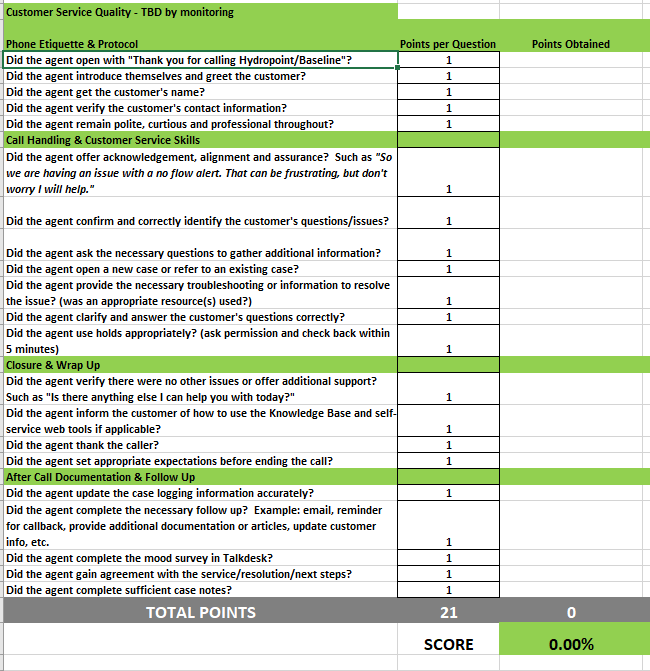
Agent Scorecard
(Scoring 80%+ is the standard proficiency for support agents)
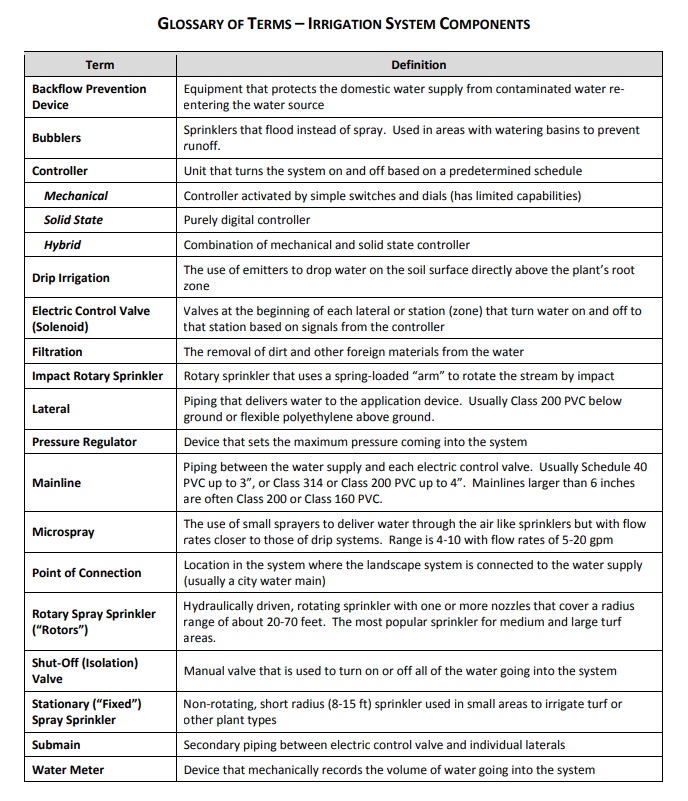
Common Terminology
For a full IA Glossary – Click Here
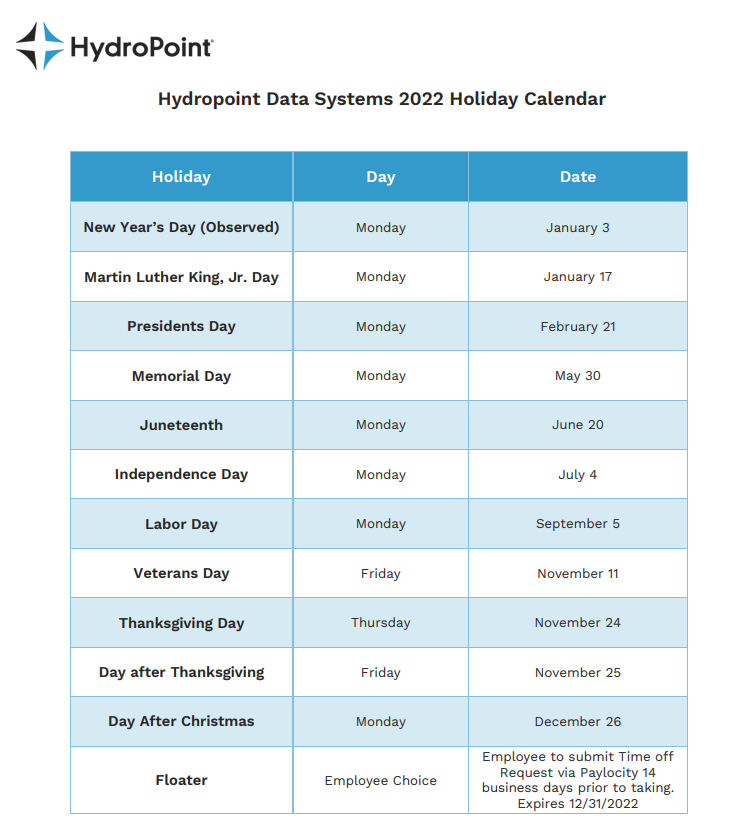
Attendance Policy
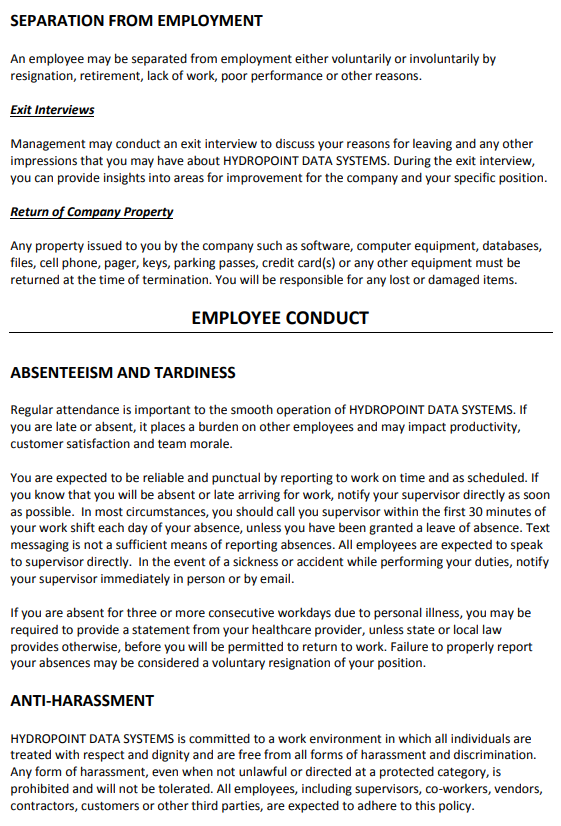
Support Attendance Policy Plan
- Verbal / written warning – We discuss and notate the infraction. Gain agreement on correcting moving forward from here.
- Written warning – We discuss and notate the infraction. We’ll both sign a written agreement on this. We gain agreement on correcting moving forward.
- Final written warning – We discuss and notate this 3rd infraction and employ a probationary period of ~30 days of excellent attendance from that time to show us we can correct the behavior. If there is an infraction in that probationary period, we will implement disciplinary action. This also will include a written and signed agreement.
TELEPHONE MONITORING POLICY
Telephones provided by HydroPoint Data Systems are intended to be used for business purposes. During the course of ordinary business, members of the management team or their designee(s) may monitor customer service lines to ensure employees are providing service to customers in accordance with company standards. Business calls may also be monitored for training purposes to critique customer service skills and provide feedback for job performance as needed. At the point of hire, each employee is notified in writing of this policy and required to provide written consent to this practice under the policy prior to operating customer service lines.
In addition, customers will also be notified of possible monitoring. If at any time during the monitoring process, a personal call is identified, the monitoring will immediately be suspended. However, a continuous excessive level of non-business related phone calls is a basis for disciplinary action.
Employee signature _____________________________Date______________
Employee name _____________________________