Overview
Walmart Exterior Services is partnering with HydroPoint in a joint effort to update all 3G controllers at their stores nationwide. This effort is being coordinated with HPDS Sales (Ed Hodnett) and HPDS Professional Services.
This project will update ~600 controllers over a phased project schedule. Requests and scheduling are being coordinated in Service Channel and the upgrades will be performed by HPDS Pro Services installers.
Details will be finalized and communicated to store management, however as this effort is expected to extend through the summer, we will likely get calls to Support for offline systems.
Important! Use the following talking points.
As Walmart works to communicate this more widely, and resume the projects, we'll need to modify how we handle any related contacts that come our way. For now, here's the current message for customer communications for anyone affected by the 3G upgrade suspension:
We apologize for any inconvenience, but Walmart has informed us that their 3G upgrades at all remaining store sites are currently on hold until further notice. This is a directive from Walmart Corporate while they are reviewing all financial expenditures.
Currently there are several hundred locations/stores nationwide that are affected by this internal decision. Unfortunately at this point, there is no further action that HydroPoint can implement without WM approval.
In the meantime, if you have any additional questions or concerns regarding this issue, we’ve been instructed to have you reach out to your WM/Sam’s Club corporate contact and/or SCA contact directly.
Disregard the rest of this article for the time being.
Purpose
This process guide will cover how to handle Support calls related to the Walmart WFWW Upgrade Project. The expectation is that a phone call will be the typical contact path. However, this same process flow will also apply to email requests and/or redirected requests from other departments.
Answer the inbound call and gather the required information to get started.
Greeting – “Thanks for calling Hydropoint support, this is __<your name>_____. How can I help you today?”
- Information to gather to determine the next steps.
- Contact info (if different than what the sales force contact contains.)
- Full name
- Phone #
- The Company the contact works for.
- WeatherTRAK info
- Serial Number (SN asset information is the most critical piece of data to gather)
- Company/Account name
- Site name
- Walmart Store Number
- Summary detail
- What is the problem statement? (Description of the issue) additionally, what is the customer trying to accomplish? (If this issue does not pertain to being offline due to needing to upgrade a 3g modem, gather the rest of the info below and warm transfer to Tier 1 unless a callback can be scheduled.)
- Did you validate and see the issue happening? (Look up the serial number in salesforce to see WFWW status, and WeatherTRAK.net to see its status and or modem type. Pull a Hardware report)
- What’s the Urgency? (Can they water if needed? This may determine how and who you transfer the call/case.)
Step 1: Confirm the Modem type
- Enter the SN in WeatherTRAK and confirm the controller information is valid (compare to asset record details in Salesforce if needed)
- Run a Hardware Report on the controller (from the Reports tab) to confirm the last registered modem type from the controller.
- Instructions on how to run a hardware report can be found online in our knowledgebase here:
Hardware Reports in WeatherTRAK Central
Verify the firmware version and modem type shown on the hardware report:
- Instructions on how to run a hardware report can be found online in our knowledgebase here:
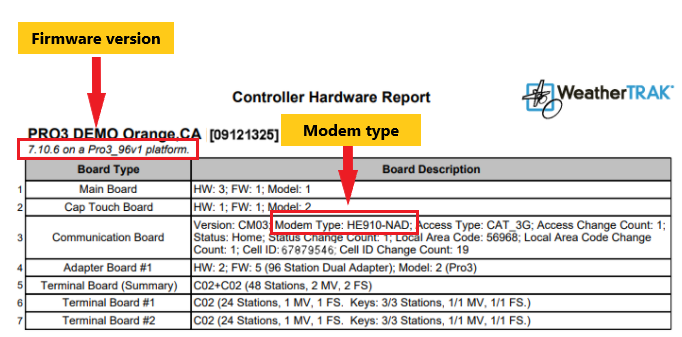
- If the installed modem type is 3G based on the key above, proceed to Step 2.
- If the installed modem type is 4G or 5G based on the key above, the case will need to be reassigned to the Support Team to troubleshoot further (refer to reassignment instructions in the Index)
Step 2: Verify if the Walmart store number is on the planned project list
- Consult the master project list below and search for the store number provided.
Click Here:Master Project List - If the store number is ON the list
- No further action is needed
- Advise the customer that this store is part of our Walmart modem upgrade project and is already in the process of being scheduled
- Inform them that the controllers will continue to irrigate and are fully functional manually, they simply will not have online accessibility
- If they have additional questions or require more information about the upgrade, let them know we will have someone from our Walmart project team contact them to assist further
- No further action is needed
- If the store number is NOT ON the list
- Verify we have all the following information noted in our SF case:
- SN
- Store number
- Contact name/phone number/email
- Shipping information
- Determine if this is a Sam's club store. (Use netsuite or any other avenue possible.) If it is and they need a WFWW, Subscription, and/or a modem upgrade - inform Ed Hodnett and Scott Dezotell of the current situation details. (Advise that our internal colleagues will reach out with further direction once we've updated them with these details.) Once Ed, Scott or anyone else has updated support on the next actions that do not require customer support, we can close the case.
- Advise the customer that this store will be reviewed by our Walmart modem upgrade project team and someone will contact them back to schedule a modem shipment
- Update and document the SF case and then notify Jennifer Snowden via Teams message to provide her with the case number (see details in INDEX)
- Reassign the SF case to Jennifer Snowden and be sure that it is left in OPEN STATUS for visibility (see details in INDEX)
- Verify we have all the following information noted in our SF case:
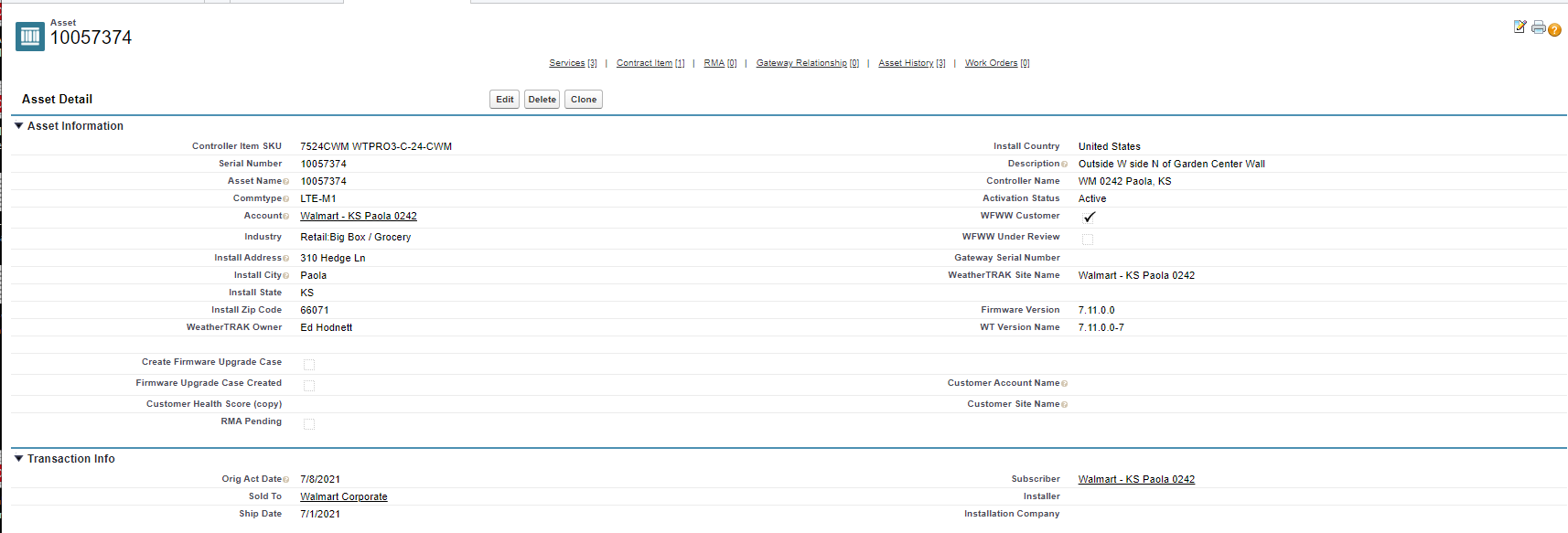
Check the Asset record for the controller serial number to confirm the associated store location
INDEX: Appendices
Important General Resources:
Modem upgrades install instructions link
MAIN GO TO LANDING PAGE to find out which controllers are impacted
How to find the Firmware version of a controller
Other 3G & WFWW Landing Pages:
Information about 3G Cellular Connectivity: https://www.hydropoint.com/3g-faq/
This describes the situation high level, information about how to determine what type of modem they have, and what happens if they don’t upgrade their modem. This page includes a link to the AT&T notice of shut down date.
CTAs on this page email SUPPORT directly.
Worry-Free Wireless Warranty Promotion – with reference to end of 3G: https://www.hydropoint.com/wfww-3g/
This page is the go-to for Sandi to use with her outreach and promotion to purchase WFWW for the exact purpose of 3G end of life.
CTAs on this page email SANDI directly.
Logging the Salesforce Case Types and Subtypes
Use the following “Type” to log all cases related to 3G sunset:
- 3G Offline
Use the following "Subtypes" based on the scenario:
- No WFWW
- No Subscription
- Needs Project
- Modem Delivered / Not Installed
- Modem Delivered / Lost
- Modem Installation Issue
- Shipping Issue
- Modem Replaced / Online
Transferring Ownership to Support
- Warm transfer (speaking with the agent who is taking over.)
- Set the expectation and determine the best option.
- EX: “Customer/contact, now that we have determined your situation requires technical support, I’d like to transfer you over to them.”
- If the contact cannot water and expresses a need for an urgent resolution - Reach out to the Teams group chat to request whoever is available, take a warm transfer. If you do not get a response within 1-2 minutes, tag the supervisor in chat via @.
- Once you have confirmed a team member will take ownership, click the “change” option to enter their name and reassign ownership of that case. If a warm transfer takes place but after the customer disconnects the call, ensure the support agent has the details necessary of when and why to reach out to that contact.
- EX: “Customer/contact, now that we have determined your situation requires technical support, I’d like to transfer you over to them.”
- Cold Transfer (not speaking with who is taking over.)
- Set the expectation and determine the best option.
- EX: “Based on your current situation, your best options are …”
- If the contact can wait and doesn’t need immediate attention, they can contact the support team when they are ready via info in this link.
- You can organize and detail all necessary info into a newly created salesforce case and assign it to the overall WeatherTRAK support inbox que. (Note: this is where cases are autogenerated and live when someone emails WeatherTRAK_Support@hydropoint.com.)
- EX: “Based on your current situation, your best options are …”
- Set the expectation and determine the best option.
- Scheduling a callback. This option is available for when one of the above options warrant it.
- Create an outlook calendar event in your personal calendar. Place the case number in the subject line, copy paste summary/next steps set from case into the body of the event. (If support needs to do the callback and you cannot due to scope of the situation, make sure that is detailed in the event and add the supervisor to the invite so it can be delegated.)
- Additionally, you can put all pertinent details in the case notes and assign case ownership to our "WT SUPPORT QUEUE"
- Set the expectation and determine the best option.
Transferring Ownership to Customer Success team (Jennifer Snowden - Walmart CSS)
- First, notify Jennifer Snowden via teams message and give her the services id number for awareness. Be sure to highlight any urgent need and relay the appropriate expectations from the customer.
- Hovering over a contact's image in teams shows us their status.
- Hovering over a contact's image in teams shows us their status.
- Reassign the services case in SalesForce
- Verify all require information is updated in the case details
- Verify the case status is set to OPEN
- Change the owner to Jennifer Snowden
Walmart internal communication
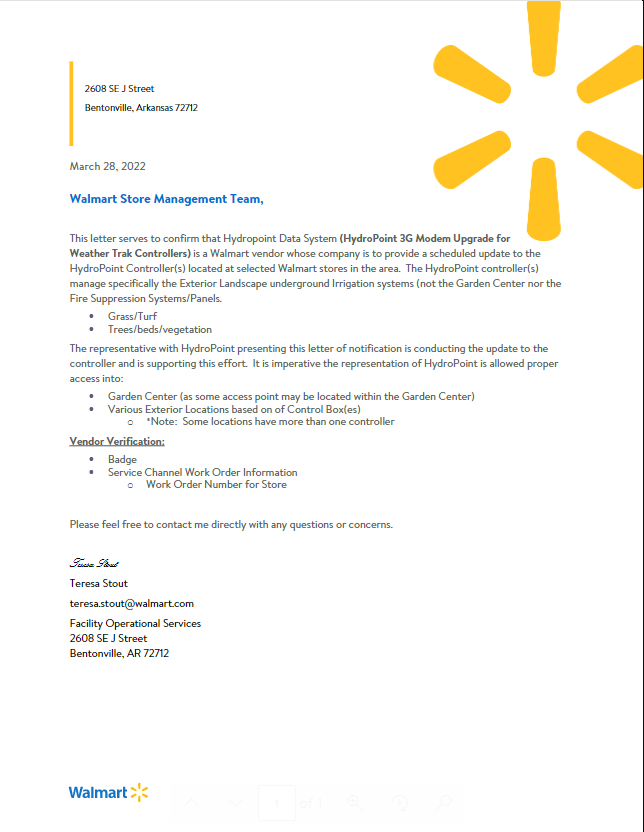
This is a copy of the letter sent to Walmart Store Management Teams giving an overview of the upgrade project