
HydroPoint RMA Procedure
For any questions regarding warranty please see Product Warranty Questions
What is an RMA
An RMA or Return Merchandise Authorization (aka RGA or Returned Goods Authorization) is an internal process required to initiate, track, and receive the return of products (goods and/or services) for refund or replacement.
Warranty policies and coverage details are published in our Product Documentation: WeatherTRAK link, Baseline Link.
All other RMA types (Enterprise, Distributor, Pro Services and Water Compass) are processed by the appropriate departments as outlined in the company program policy here: RMA Policy and Process
This process will guide you through the steps to set up an RMA for warranty replacement.
RMA Process Sequence Overview
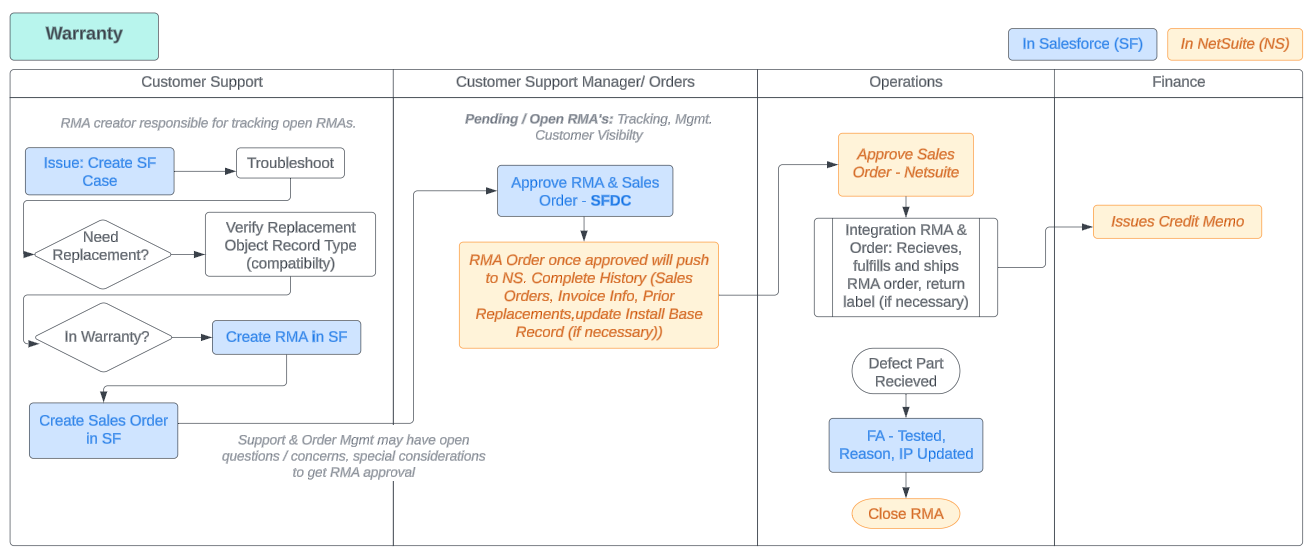
Each step of the RMA Process is owned by a department (in bold), with each department having ownership of their own specific process.
- Customer (distributor) or Sales (enterprise/direct) request to return product with written notification to Orders (contacted via Support@hydropoint.com).
- Support creates a service case in Salesforce to conduct the audit to verify original sales order information, or controller warranty status, etc. and conduct troubleshooting.
- Support Creates an RMA Order in Salesforce.
- Support creator is responsible for tracking their open RMAs
- Support is responsible for deactivating original controller SN and SIM, including updating Install Base Record and “Replaced By” SN field.
- Customer Support Manager (CSM) or Orders approves RMA and RMA Order in Salesforce, which will push to NetSuite via scheduled integration.
- Orders create RMA in NetSuite from original Sales Order (if available) and notifies requesting contact when complete (notification includes RMA number, summary of products on RMA, and instructions on how/when to return RMA (mark all packages with RMA number, return within 10 business days, etc.). Orders will track open RMAs and close after 30 days if not returned.
- Operations receives, fulfills and ships RMA order (issues return shipping labels (if requested by Support Team), product is tested, RMA reason is logged, product received into inventory and applicable Install Base Records are updated) and notifies Finance when complete OR notifies Orders of any discrepancies, damage, etc.
- If RMA is $0, Operations should CLOSE RMA
- If RMA has a credit due, Operations should NOT close RMA
- Finance issues Credit Memo (or credit on account) for RMAs with $$.
- RMA Is Complete
RMA Order Process Flow
For returns related to warranty review and/or replacement due to defective or damaged product, an RMA is initiated and created in Salesforce by the Customer Support Team.
Take note of Workato timing operations, as they will affect when Salesforce data appears in NetSuite and vice versa.
Workato Timing Operations
If there are any questions regarding Workato operations or transit timings, please contact the CRM team.
Workato Operations Timing
Workato timing operations show how long it will take for data to link between Sal
[insert-question 3755554]

Validate Warranty
HPDS Product Warranty Policy

Enter the controllers serial number in new WT Warranty Database to find the original dates: http://hainsights.hydropoint.net/warranty_ui/
For a WeatherTRAK controller: go to NetSuite → type in Serial Number (make sure if begins with 9 there is a preceding 0) → go to Install Base Record → check if controller item sku is New or PAN.
if New scroll to Warranty info (see below):
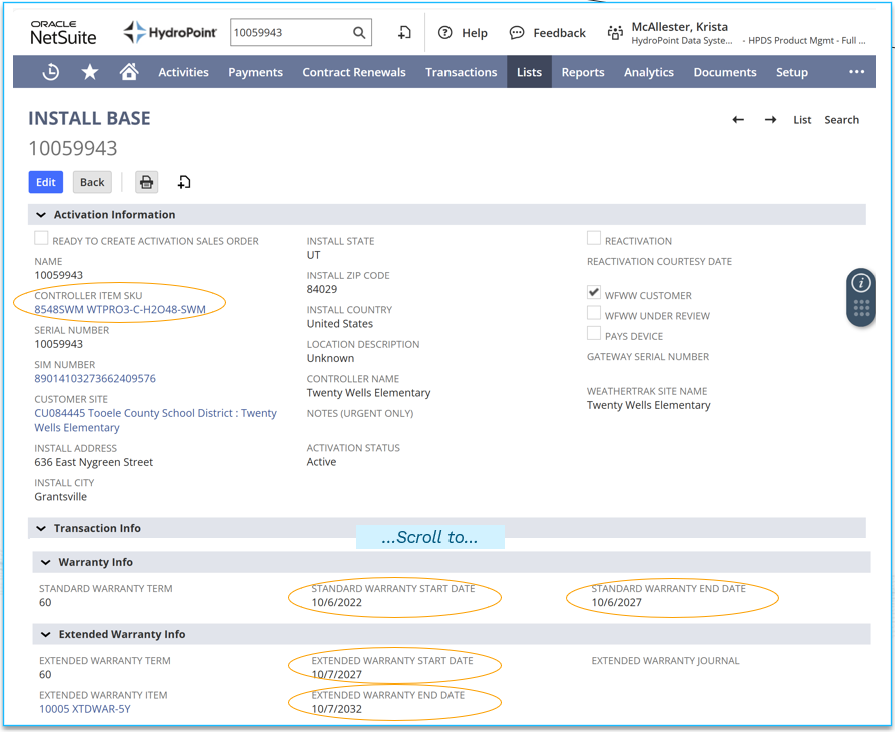
if PAN scroll to Deactivation → go to Old Install Base Record → check if controller item sku = New (if not repeat) → scroll to Warranty Info.
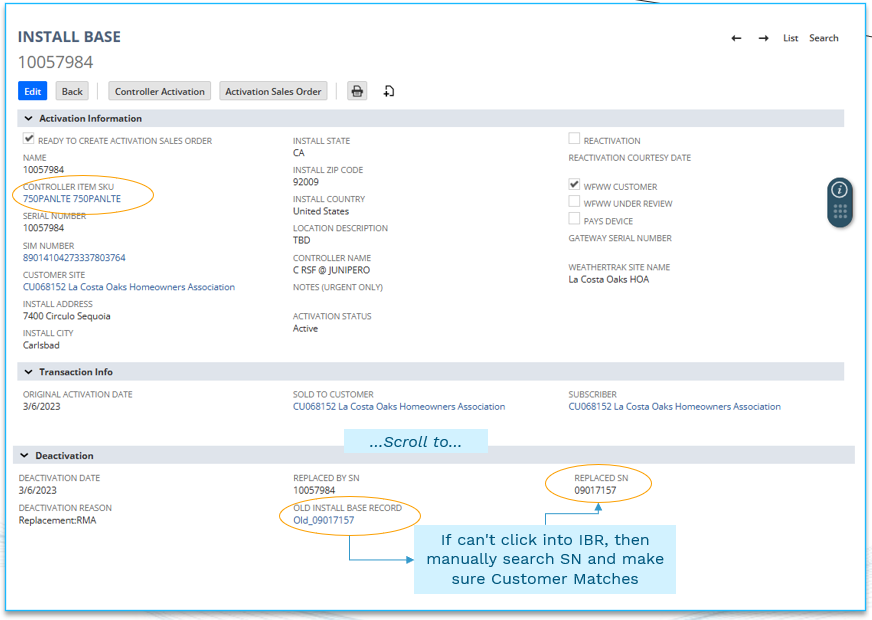
Note: If the Install Base record is missing dates, then search the serial number in Warranty Database
For a Baseline Controller
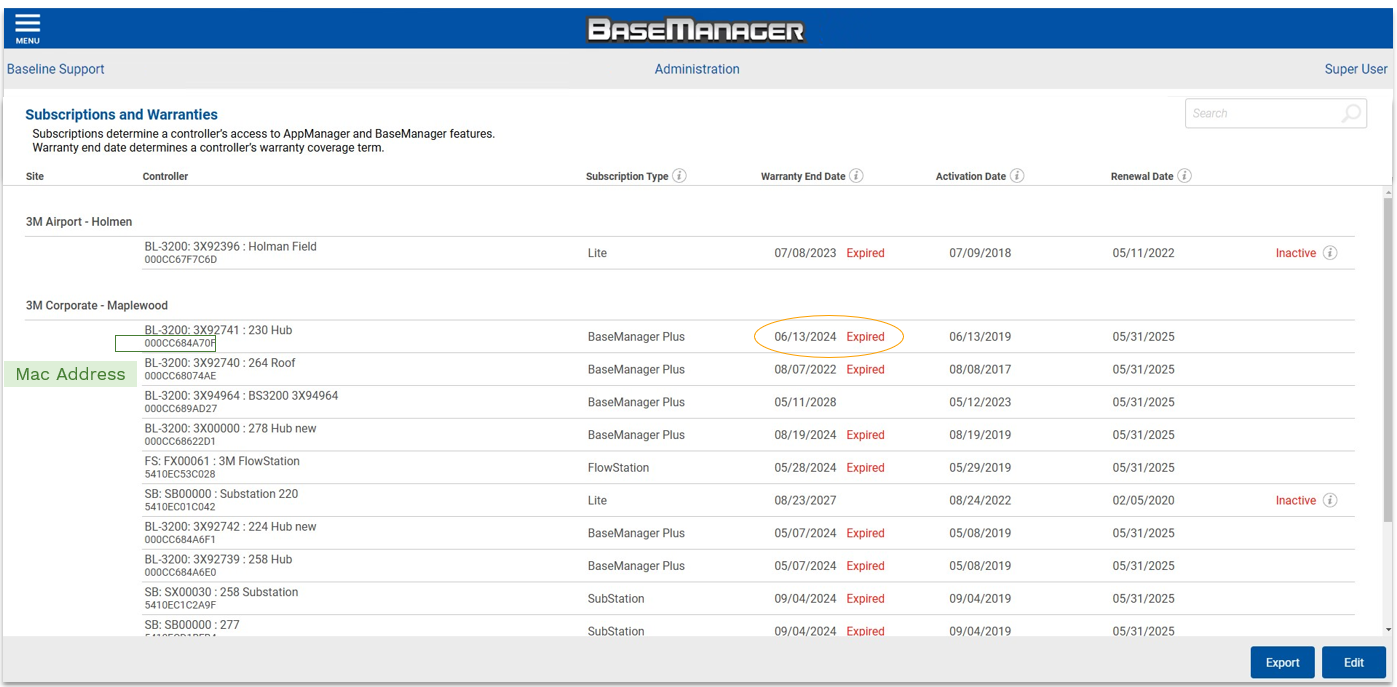
- Salesforce Asset field→ enter the Mac Address.
- the mac address is a unique and permanent serial number assigned to a device when it registers with BaseManager. BPM uploads mac addresses into SalesForce so Support can track warranty & relevant tickets.
- Else BaseManager → go to Admin Subscription Page→ Warranty End Date
- Else, have customer provide proof of purchase. Get a picture of the purchase order/ receipt and attach it to support case.
- Else, use Kool Grid software to see if the purchase order record is in there. If you aren't already familiar with Kool Grid, ask Tier 2 or a supervisor for help.

For Peripheral/ Accessory: ex: biCoders, flow sensors, pressure sensors, moisture sensors
Important Note: Attach all pictures of receipts, purchase orders, or serial number labels to the support case. Make sure to compare age of device with the warranty length.
Use Product Warranty Questions for warranty length, if HPDS v OEM, and if part is serialized.
- Customer to provide proof of purchase.
- Else Customer to provide part serial number (SN). Search the SN in NetSuite for when Sales Order (SO) was initiated. Note, items are only traceable through NetSuite SO if a) the part is serialized and b) it was ordered through HPDS (as an RMA via Support/ HPM or was initially installed by Pro Services). Anything ordered through distribution won't show in NS (which includes all OOW replacements).
- Important Note: If the SN of the part appears as a previous RMA check that the prior replacement was not also an RMA. This could be a sign the account is abusing warranty policy, so ask the caller why this part has already be re-ordered 2+ times or escalate to manager.
- else use product label date. Use Identifying Serial Numbers to identify mfg. date. Not all parts have label. If part is in area that is occasionally submerged by water, label could be washed off or corrupted.
- else use KoolGrid Software (BL products) to see if PO record is there.
- else use parent controller's warranty coverage unless the peripheral is manufactured by OEM
NetSuite Sales Order:
- The customer will need to provide the part SN
- Log into NetSuite, search for the SN, and it will populate the related Sales Order with the date and all parts included on SO.
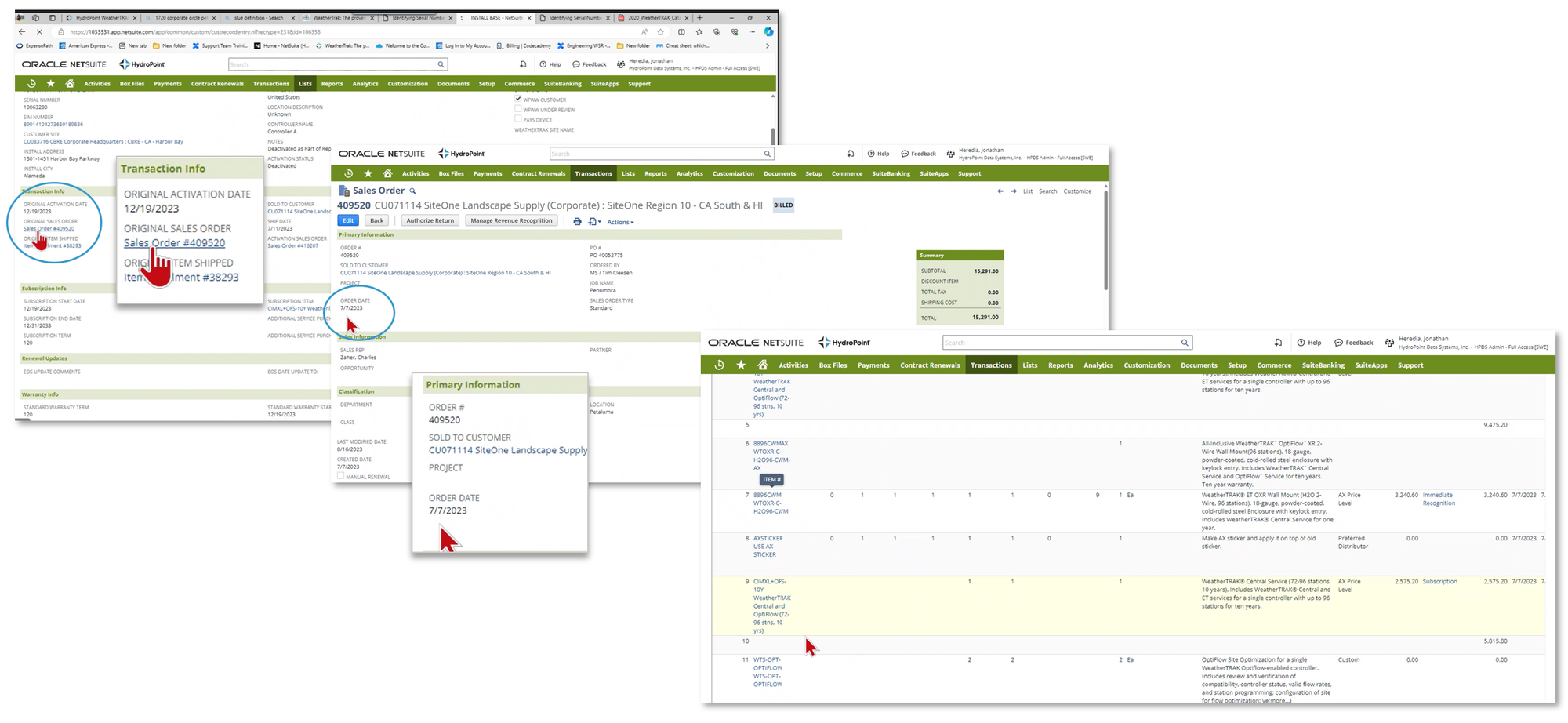
For WT/ BL Replacements
- Replacement panels will receive 1 year warranty or the remainder of the original warranty, whichever is longer.
- All other replacement devices will either be given 90 days or the remainder of the original part's warranty, whichever is longer.
For Products where Warranty Begin Date Not Found:
If the customer argues the product is in warranty (but the controller is not in warranty and its not a serialized part) then tell customer: "Unfortunately our product warranty policy states a proof of purchase must be provided by the customer, else we will use the manufacturing date on record. Please see if your distributor may have the corresponding receipt as we do not have the access/ ability to track distributors sales. Our lower cost components do not have serialization, so we have to assume this is an older system. We apologize for the inconvenience."
If the customer is adamant the product is within warranty coverage, please escalate to sales.
Create RMA Order in Salesforce
If determined to require warranty review, Orders summarizes return and notifies customer contact of RMA requirements and restocking fee (if applicable).
It's important to keep in mind the Workato timing required to update data from Salesforce to NetSuite and vice versa. Update one system to ensure data integrity and not create duplicate requests.
Required details to initiate RMA Request:
- Original PO, Sales Order or Quote number
- Date of original order
- Return requested by
- Reason for return or exchange request
- List of product(s) by SKU, Part Id or Model # requested to return or exchange
- List of existing product Serial Number(s) if serialized product
Applicable Restocking Fees:
- If return is related to Distributor Inventory Balancing or Stock Inventory Exchange, approval is required by Executive/Management Team. Inventory Balancing and Stock Inventory Exchange RMAs are not subject to restocking fee per IMP Agreements.
- If return is related to a product exchange (wrong product ordered, changed configurations, etc.), RMA is not subject to restocking fee if an offsetting PO of equal value is received.
- If return is related to product ordered in error, no longer needed, etc., RMA is subject to a 15% restocking fee applies and will be deducted from potential credit value if an off-setting PO is not received.
- If Direct, no restocking fee applies. Terms to be determined by Sales
Creating an RMA in Salesforce for
Shipping Address Guidelines
Avoid abbreviations; Spell out Street, Lane, Road, etc.
Use figures for an address number; Spell out and capitalize First through Ninth when used as street names; use figures for 10th and above.
Ensure that City State and Zip are in the appropriate fields.
When shipping to multi-use, commercial locations ensure detailed information is provided.
A phone number is REQUIRED for all ship to addresses (as required by the freight carrier)
Always assume it is the delivery persons first day on the job/route. Accurate and detailed information will ensure product is delivered to the appropriate address, location AND contact.
Bill to if a business:
- Business Name
- Street Address
- Attn: Accounts Payable
- c/o Company or Department Name
- City State Zip
- Phone Number
Ship to if a business
- Company Name
- Street Address
- Attn: Onsite Contact Name
- c/o: (if applicable, i.e, department)
- City State Zip
- Phone number
NOTE: When shipping to commercial, multi-use, or similar locations, ensure detailed information is provided.
- If an apparent complex: Attn: Community Manager or Attn: Leasing/Management Office. etc.
- If a shopping mall/center: Attn: Leasing/Management Office, Attn: Facilities/Landscaping, etc.
- If a FedEx Office, UPS Store or similar: Attn: John Smith (HOLD FOR PICK UP)
- If a hotel: Attn: John Smith (HOLD FOR GUEST)
Bill to and Ship to if a residence:
- Contact Name
- Street Address
- c/o Business Name (if applicable)
- City State Zip
- Phone Number
- (NetSuite only) - If the ship to is a residence, check the Residential Address box and select a “Home Delivery” shipping method.
RMA Return Instructions & Approval Process
Note
This process does not apply to direct/turn-key or distributor inventory returns requests. All Return RMA requests related to turn-key installations (not warranty related), distributor inventory balancing or exchanges, etc. should be submitted Orders@hydropoint.com.
RMA Entry
The following fields and criteria must be met before an RMA record is approved in NetSuite:
Created From: RMA should be created from the original sales order (Salesforce). A returning request (upon review and approval) use the original NetSuite Sales Order. Exceptions to this are on a case-by-case basis and only if an original sales order is not available.
• If RMA is initiated in Salesforce PO field = RMA-1234567
Click Authorize Return
Customer Account: Must match source document (PO, RMA #, SF Case #, etc.) and be the company eligible to receive credit for products and/or services to be returned.
PO field: Must follow standardized formatting as follows (length less than 40 characters)
- If referencing the original customer PO, should use “PO <customer PO #>”
- If referencing the original signed quote, should use “Signed Quote <quote #>”
- If referencing the original work order, should use “Work Order <work order #>”
- If a Salesforce RMA or Service/Case, should use “SF RMA <SF RMA #> or SF Case <SF case #>”
- If an internal request, “Internal Request <MMDDYYYY-##>”
- If a PILOT, should include “Pilot” or “NRT”
Memo/Ordered By: Initials of who internally created the order and who is responsible for returning product(s) listed on on the RMA:
- Example: AZ/John Smith, no spaces
- RMA Reason (select applicable option from drop down menu)
FA Notes: Include brief description of the return for Manufacturing to reference upon receipt of the returned product. Include a note if a restocking fee does or does not apply, or to list offsetting order information (include both the offsetting PO AND offsetting Sales Orders numbers.
- For Example: No trouble reported. The customer no longer needed the controller as originally ordered. No restocking fee.
Items to be returned. Products ordered must match PO and/or quote (if provided) and must be compatible, still offered/available, etc. Delete any line items that are not approved for return.
- When changing quantities, always review Allocation Amount/VSOE to verify value has updated.
- If item included service, appropriate service line item must be included as an RMA line item
- If any OptiFlow products, WTS-OPT must be included 1:1 (pricing may vary)
- If installation services, must sync with controller station counts, flow sizes, etc. to be returned
- If HPM, PSPM-Set Up, PSPM-CTRL-#Y and PSPM-SITE-#Y must be included and match quantity of controllers to be returned.
- If a Restocking Fee applies, add WT-RESTOCK and enter the line-item price as a negative dollar value. Restocking fee should be calculated based original order line-item prices(s) and does not apply to sales tax and/or shipping.
Comments - Customer Account Message field
- Email/ contact information for person responsible for return
- Date product return is expected
Comments - User Note field
- Return tracking info (User Note)
- Status updates from distributor/customer (User Note)
- Communication updates when sending follow up emails (User Note)
Attach - backup documents. Back up documentation with appropriate return approval(s) and attachments are required in PDF format unless directly related to a Salesforce RMA (number sequences = RMA-1234567). File naming should follow suggested formatting:
- Original Request = RMA 12345 Info
- Internal Approval = RMA 12345 Approval
- Additional questions asked and clarified email thread: RMA 13245– Add’l Clarification
Click Save
After completing the RMA in NetSuite, an email notification should be sent to the customer/person responsible for returning product and include the following RMA Return Instructions:
- Customer is responsible to return products to HPDS for inspection within 10 business days. If product is not received within 30 days, the RMA may be closed, and no credit will be issued. Customer is subject to invoicing and/or delay of payment.
- Each RMA should be individually packaged and returned separately.
- All return packaging should be marked with RMA number visible on the outside of the package along with the RMA number for proper routing once it is received at our facility.
- Note that product must be returned in new/unused condition in original packaging. Any sign of use, damage, debris, or similar issues may result in a chargeback.
- Please save this information for your records and record tracking number below in the event there are any questions regarding return shipping at a later date.
Approval Steps
- If approval standards have been met and no changes or corrections are required, an RMA can and should be approved by clicking “Approve” button
- If changes or corrections are required, creator shall be notified of the RMA and required updates. Changes/corrections ill be confirmed before an RMA is approved.
Sources: Order Management Policies & Procedures
Shipping Schedules
Shipping Schedules and Transit Times
FedEx map above outlines transit times for Standard Ground shipping from Californ...
[insert-question 981710]
Cancelling a NetSuite Order
Order Cancellations
Objective To maintain data integrity, sales orders should be cancelled, rather th...
[insert-question 980531]