
To validate Baseline warranty, first confirm whether the request is for a controller (which includes all internal components) or a peripheral (such as external devices), then follow the appropriate method below.
Steps for Validating Controller and Component Warranty
Using the Mac address, identify the asset record in Salesforce to confirm the activation date.
- The activation date will serve as the start of the warranty. If the asset is not in Salesforce, gather the mac address and validate the activation date in BaseManager admin "Manage subscriptions". If needed, identifying the controller mac address can be done by knowing which controller is in question, and identifying it in the list of that company's controllers under "manage subscriptions".
If the Mac address, controller name, and/or company name cannot be identified:
- Ask the contact to provide a proof of purchase or if possible, the purchase order number. This can be used to search in "Koolgrid" to find the purchase order. Since the purchase date in Koolgrid will not correctly reflect the actual start date of the warranty, a fringe judgement decision may be necessary.
Steps for Validating Product Warranty
To validate warranty for a peripheral, how we do so depends on the type of product.
- If it is a decoder/moisture sensor/event switch, use the tabs below to validate its serial # in correlation to when it was manufactured.
- If it is a modem, use the serial # or combination of numbers that represent the manufacture date on the modem to correlate when it was manufactured.
If the above methods are not available, ask the contact to provide a proof of purchase or if possible, the purchase order number.
⚠️NOTE: if the part in question is a Cloudgate modem (black enclosure) - there will be a serial # located on a sticker on the product. This can be used to potentially find the purchase order in Koolgrid.
🚨 If there’s no receipt and no record in our system, request a product photo and confirm with Tier 2 or a Team Lead before moving forward.
Meters
Flow3 (both Reed and Photo Diodes)
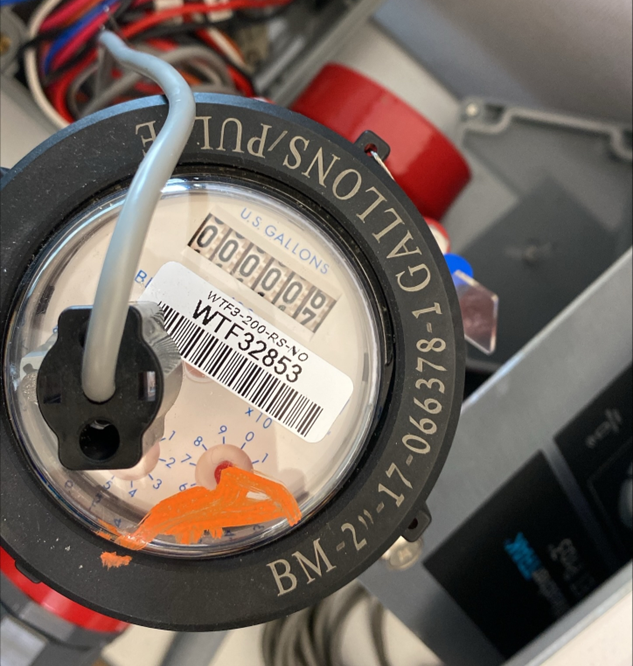
Flow HD Iron
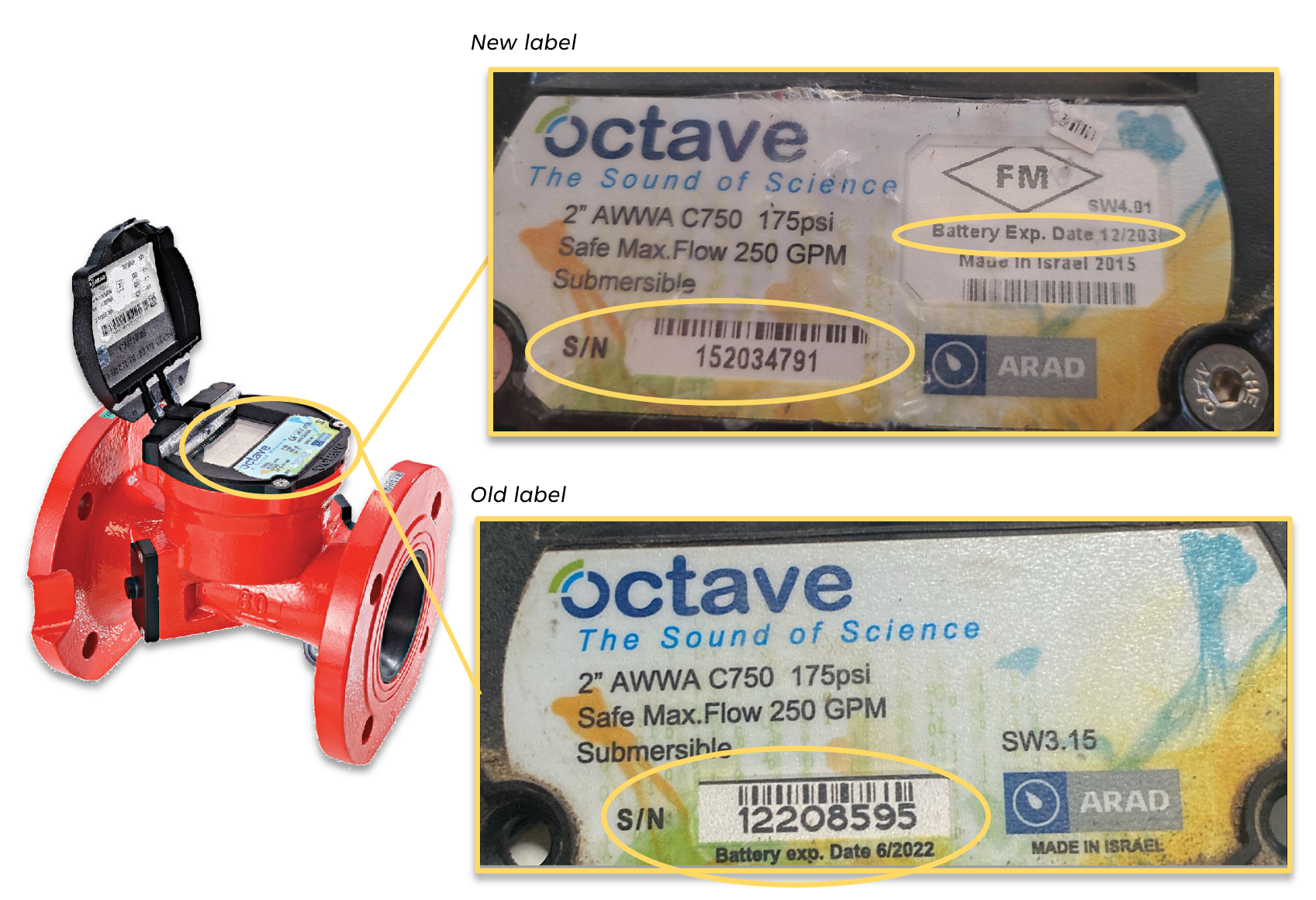
For FlowHD-Iron, if can't find PO date in NetSuite or Salesforce, if battery expiry is 3+ years, then it's out of warranty.
Refer to FlowHD Iron - Battery Replacement.
3200 ,1000 & Substation Displays (Faceplates)
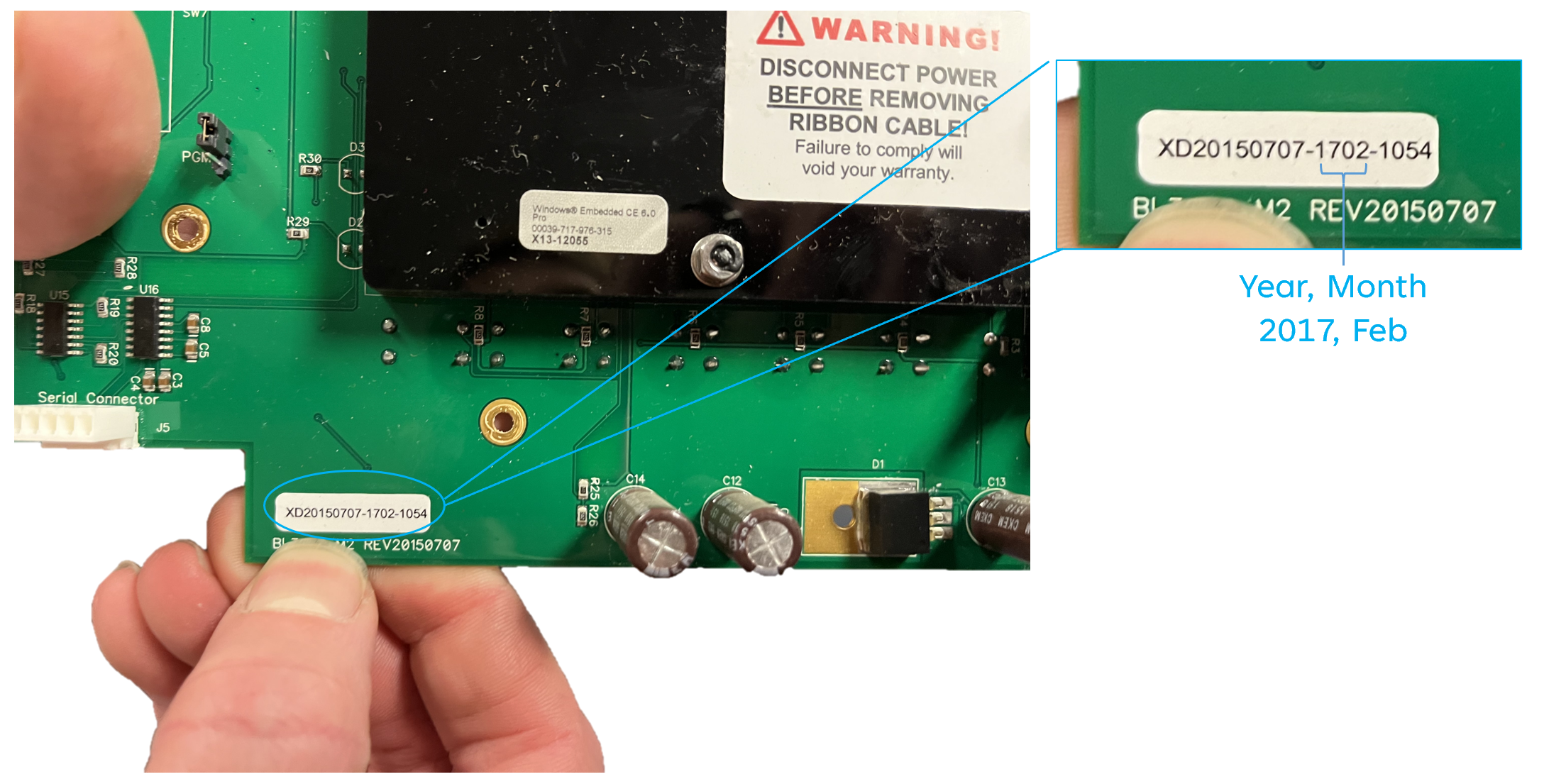
3200 Display
XD20150707-YYMM-XXXX
- XD = X Display
- 20150707 = Revision on PCB, This revision started production in 2015
- YY = two digit year 17 = 2017
- MM = two digit month 02 = February
- XXXX = Unique sequential number
XD100407-YYMM-XXXX
- XD = X Display
- 100407 = Revision on PCB, This revision ceased production in 2015
- YY = two digit year 17 = 2017
- MM = two digit month 02 = February
- XXXX = Unique sequential number
1000 Display
1000D-130303-YYMM-XXXX
- 1000D = 1000 Display
- 130303 = Revision of PCB, This revision started production in 2013
- YY = two digit year 17 = 2017
- MM = two digit month 02 = February
- XXXX = Unique sequential number
1000D-120423-YYMM-XXXX
- 1000D = 1000 Display
- 120423 = Revision of PCB, This revision was only produced in 2012
- YY = two digit year 17 = 2017
- MM = two digit month 02 = February
- XXXX = Unique sequential number
Substation Display
SUBD-130303-YYMM-XXXX
- SUBD = Substation Display
- 130303 = Revision of PCB, Sustations started production in 2017
- YY = two digit year 17 = 2017
- MM = two digit month 02 = February
- XXXX = Unique sequential number
Control Board
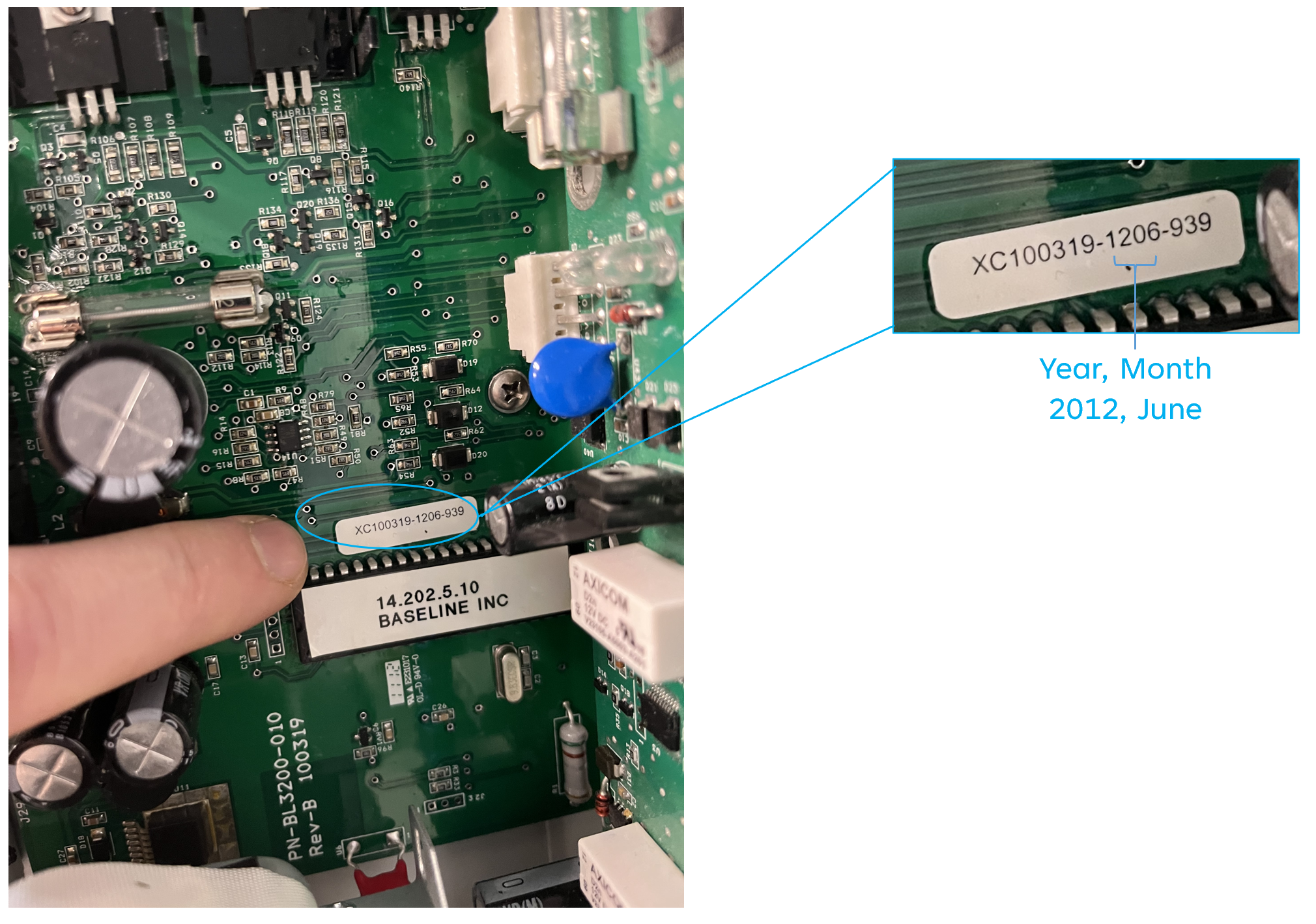
XC20191029-YYMM-XXXX
- XC = X Control Board
- 20191029 = Revision on PCB, This revision started production in 2020
- YY = two digit year 17 = 2017
- MM = two digit month 02 = February
- XXXX = Unique sequential number
XC100319-YYMM-XXXX
- XD = X Control Board
- 20150707 = Revision on PCB, This revision ceased production in 2020
- YY = two digit year 17 = 2017
- MM = two digit month 02 = February
- XXXX = Unique sequential number
R-Board (aka Conventional wiring board / Retro)
RTTYYMM-XXXX (We started adding the R12 or R24 in 2017)
- TT = R Type 12 or 24 depicting R12 or R24
- YY = two digit year 17 = 2017
- MM = two digit month 02 = February
- XXXX = Unique sequential number
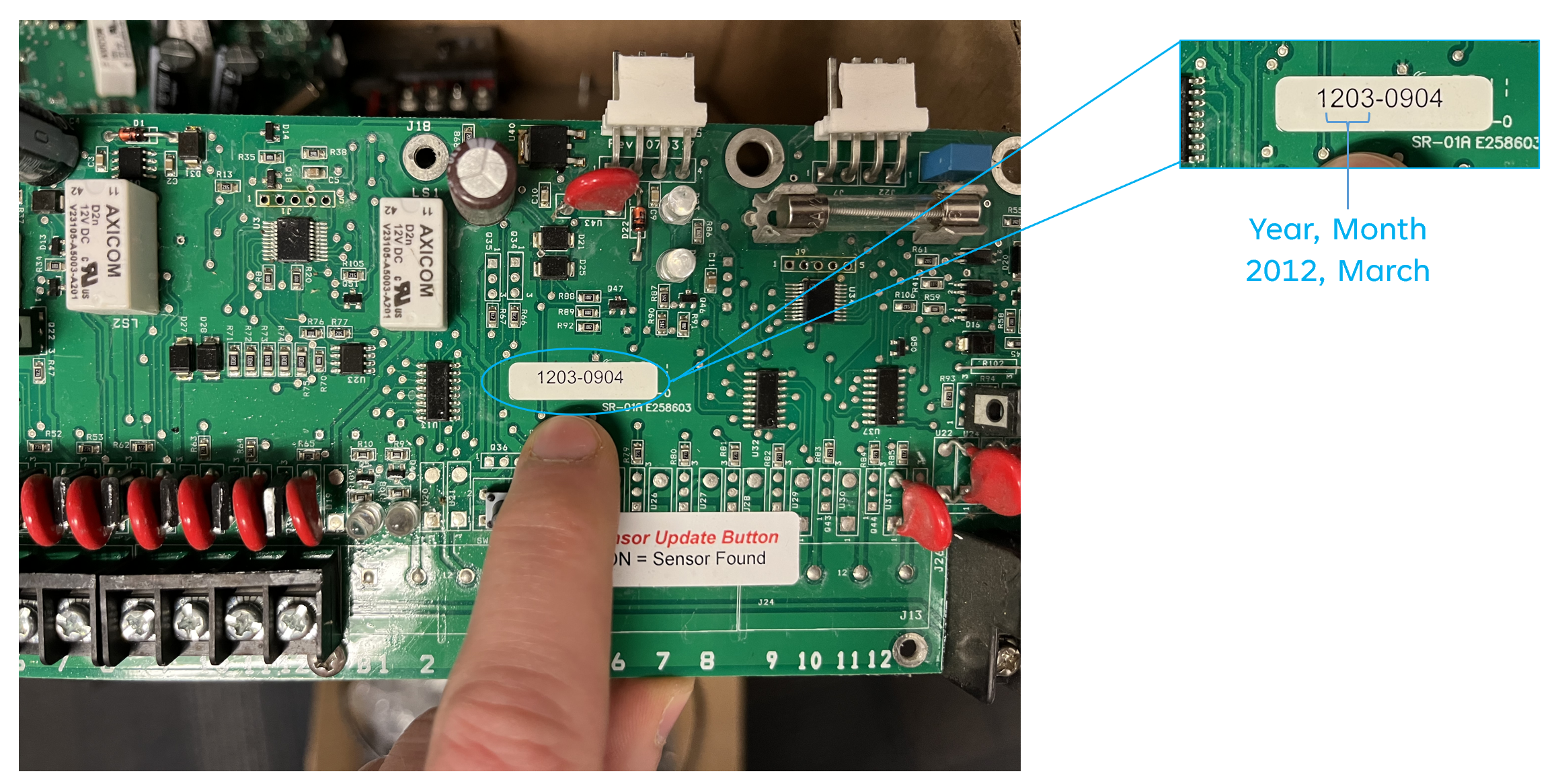
YYMM-XXXX (2017 and before used this format)
- YY = two digit year 17 = 2017
- MM = two digit month 02 = February
- XXXX = Unique sequential number
Soil Moisture Sensor
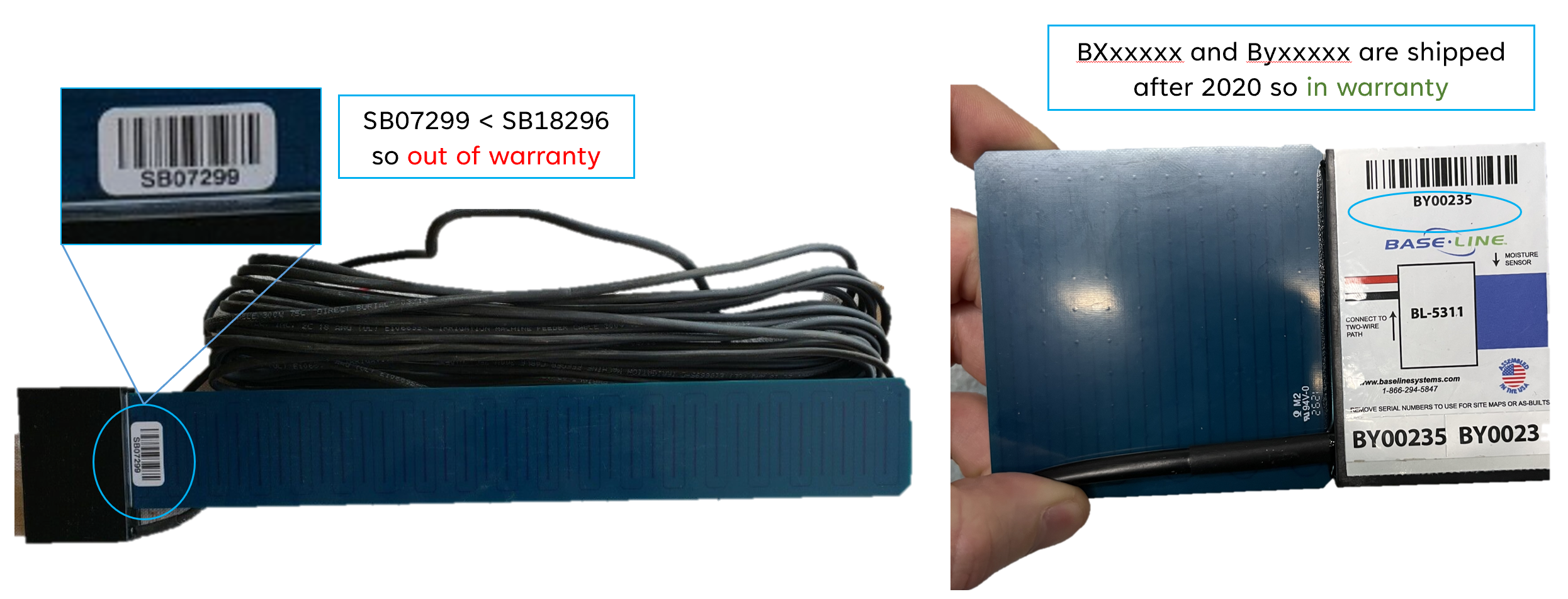
- Anything using the new S/N sequence BXxxxxx and BYxxxxx will be in warranty as those started shipping in 2020
- S/N lower than these examples numbers are more than 5 years old as of now (mid 2023) and out of warranty:
- ST00761-ST00820 were manufactured on 7-12-2018. For STxxxxx, x is less than 761.
- SB18293-SB18352 were manufactured on 7-16-2018. For SBxxxxx, x is less than 18293.
Decoders / BiCoders
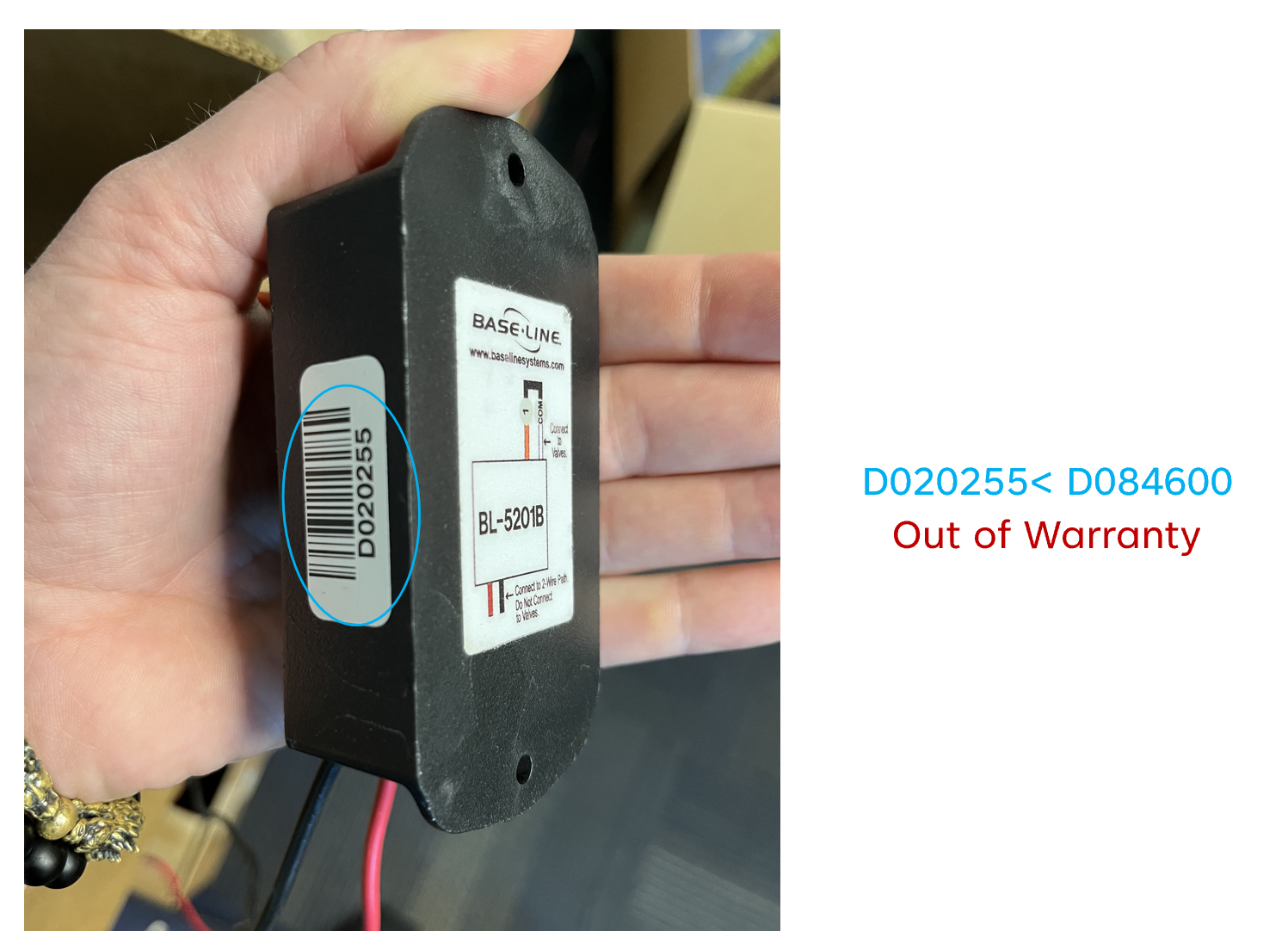
Decoders with serial numbers less than these examples are over 5 years old:
- BL-5201 Singles - D129525
- BL-5202 Doubles - E383021
- BL-5204 Quads - Q231061
- BL-5308 Flow - WF04845
- BL-5309 Flow - BF90055
- BL-5201PR Pump - BP00151
- BL-5201MV Master Valve - BM00956
- BL-Event - BE00101
- BL-5315 - BX01683 (1.5" Compact Direct Burial biSensor)
- BL-5311 - BY00001 (5" Compact Direct Burial biSensor)
- BL-5401 - P000419
- BL-5303 - AT01280
- BL-5406 - BS00256
- BL-5201DC - K101636
EX: E322191 = Out of warranty
INT Board (Two-Wire)
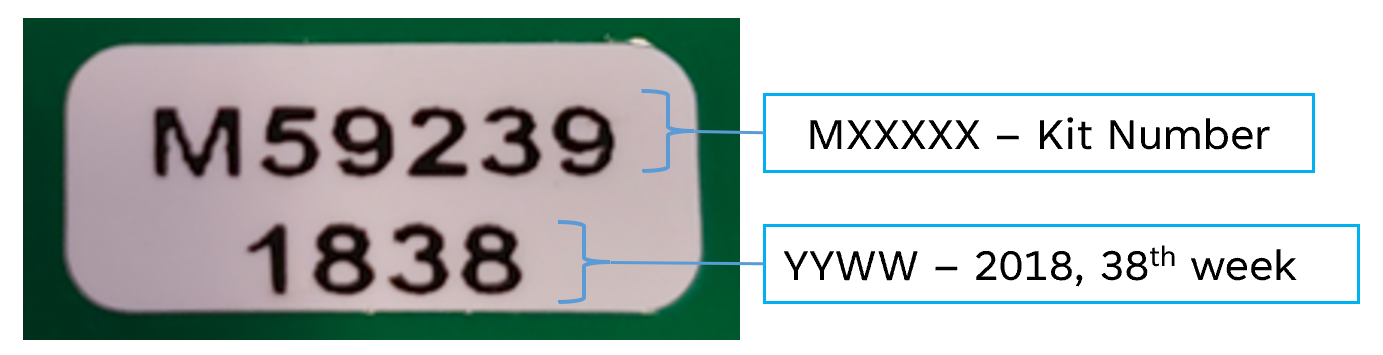
INT Boards have no S/N but it may have a date code from the CM like below
- MXXXXX – Kit number used by CM
- Date = YYWW, where YY = Year, WW = Week
- Example 1838 = 38th week of 2018
- Should have a sticker on the back. If not, it means it is likely made before 2016 which would put it out of warranty.
- Any boards older than [Current Month/Day], 2019 are greater than 5 years old and out of warranty.
Other
- Cloudgate Cell Modem
- Cloud Network Module
- ER Radio
Baseline Warranty link.