Frequently Asked Questions
Where to find warranties? HPDS Legal Page
How do I Initiate RMA? HPDS RMA Processes
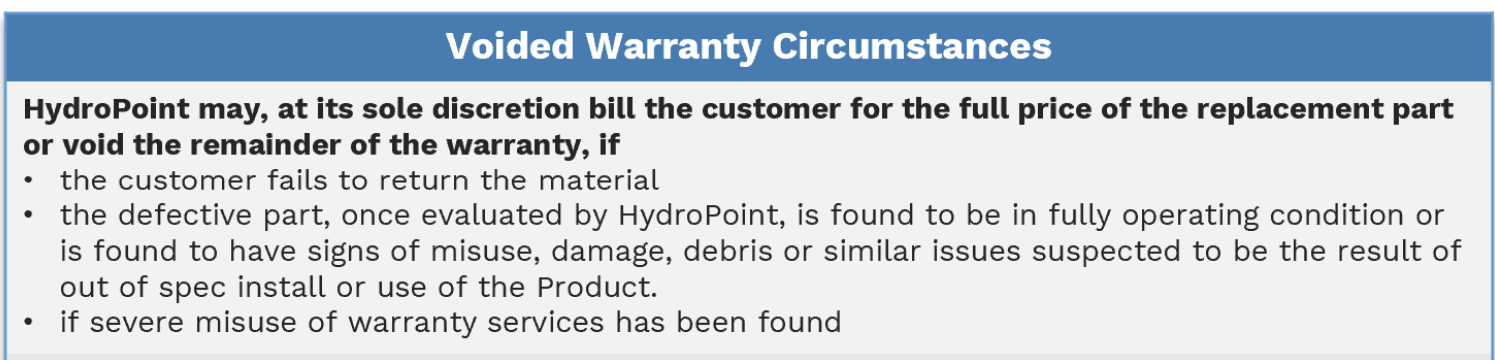
How do I know if decoder installed out of spec? Decoder Replacement Policy
Where are replacement part lists? In the Distributor Portals. Part #s are also located in NetSuite / Salesforce.
Warranty Policies
Coverage
Standard and Ext Warranties cover damage caused by insects and mollusks because our conformal coating - which is a part of our manufacturing workmanship - should prevent potential malfunctions.
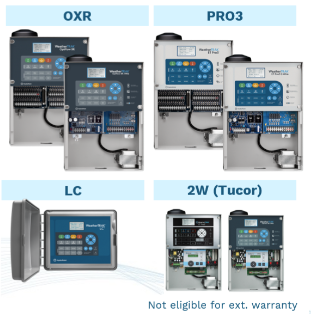
WT Extended Warranty only covers controller-specific parts (chassis, command panel, transformer, pancake antenna). It does not cover connected devices (decoders, outdoor antenna, flow sensors, etc.) or lightening / surge protection. All other devices have separate warranties specific to their useful life (ex: some battery only work 5 to 7 years). Tucor and Legacy controllers (e.g. ET PRO2, SYC, LC (2G product lines), 2W ET PRO3, 2W OXR, etc.) are not eligible for any warranty .
Lengths
Standard Warranty Length depends on:
- Controller type - OXR, PRO3 & LC
- OXR (H2O or Conventional) - 10 Years
- PRO3 (H2O or Conventional) - 5 Years
- LC / LC+ - 3 Years
- Controller upgrades - excluding LTE- are treated as new controller, meaning the standard warranty starts over.
Upgrades incl. new internal parts (chassis and command panel)- OXR From PRO3 - 10 Years
- PRO3 from PRO 2 - 5 Years
- LTE - 0 Years
Extended Warranty length
- If Pre-activation: 2,4,5,7 Years depending on SKU purchased.
- If Post-activation: Custom duration (in months) depending on Extended Warranty SO (start / end date) purchased.
Ext War Purchase Options
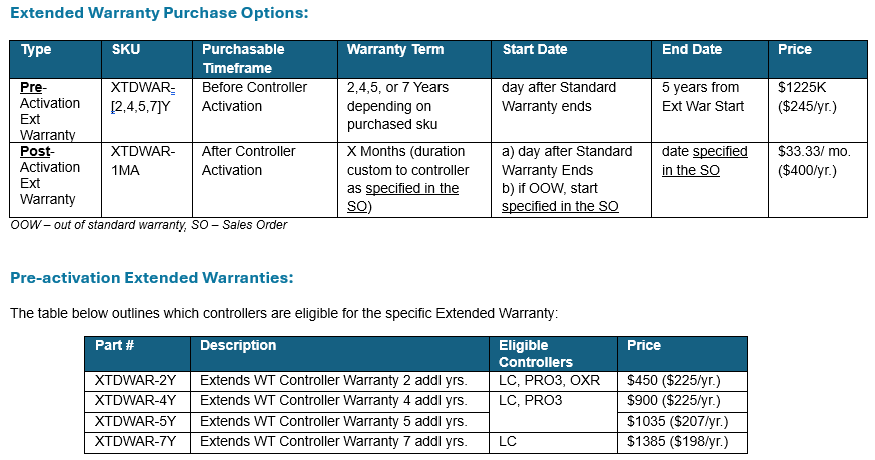

Pre-Activation Ext Warranties: must be purchased before controllers' activation
Post-Activation Extended Warranty, a controller must meet the following criteria:
- Age Maximum: The controller cannot exceed 11 years of age at the expiration of the combined warranty – standard and extended.
- Warranty Duration Minimum: The average Extended Warranty term per Sales Order must be at least 3 years (36 months). This means individual controllers may have shorter extended warranties if they are included in a Sales Order where the combined average warranty term across all controllers are equal to or greater than 3 years.
- to buy post activation extended warranties, customers need to work with their Account Manager who creates a dedicated Ext Warranty Quote (uses only #XTDWAR-1MA) to select the controllers, warranty terms (or co-term their warranties to the same end date) and agree on any exceptions to the eligibility T&Cs
FAQ
Is lightening protection covered? No. Neither Standard or Extended cover damage caused by lightening or surge events. Lightening protection will be sold separately (part # available Q2-3 FY26)
Why are there limits to age (max) and warranty duration (min)?
- Age Max: Eng believes parts to last ~10Y and products have only been on market ~12Y. We don't know when end-of-life stage begins and the ext. warranty is priced to assume either the CHAS OR PAN fail, not both.
- Warranty Term Min: to recover costs of replacements over warrantied time, so customer doesn't go on and off warranty whenever a part fails.
How long can a controller extend its warranty? Assuming the controller is in its standard warranty, the controllers’ allowable extended warranty length would be as follows:
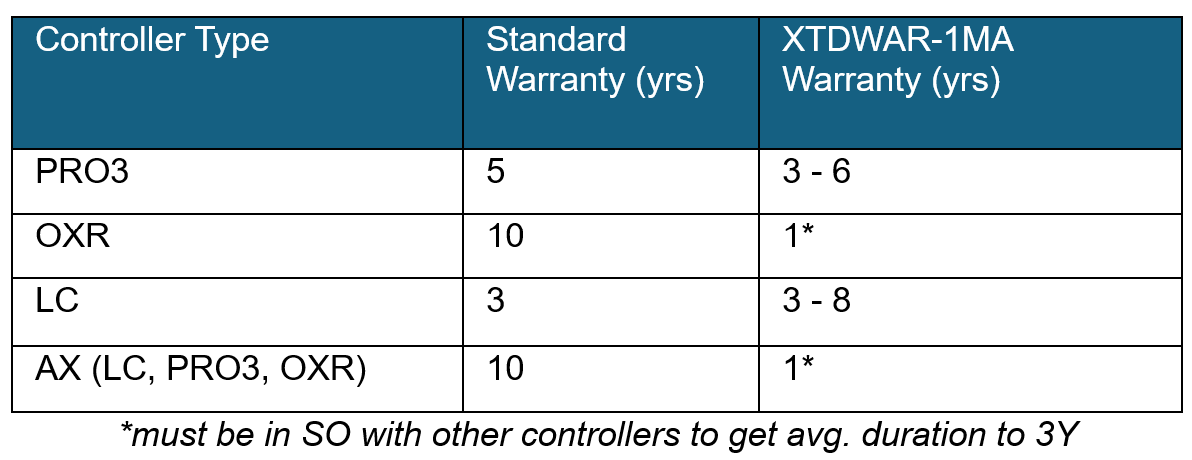
How can an AX or OXR get an extended warranty if the duration minimum is 3Y and the age maximum is 11Y? these controllers would need to be part of a larger sales order with non-AX PRO3s and LCs to get the average warranty duration across the entire SO to be ~36 months. They would only be allowed 1 additional year of warranty. Exceptions would need to be approved by deal desk.
A customer bought a replacement after the Ext Warranty Start Date but the SO was not yet signed. Can we refund them the replacement part because they technically paid for coverage at that time? No, no refunds for anything purchased before our receival of the signed Ext Warranty SO, which was explained in our warranty policy. The part was likely replaced through a distributor, whose price and refund policy are beyond our control.
Why isn’t Tucor covered if its not legacy? We intend to sunset Tucor soon. Each 2W (Tucor), $1400 COGs, Fail ~15-20% YoY. The SO tool automatically excludes Tucor controllers from quotes.
What to do if customer doesn’t agree with activation date? Customer must provide proof of original controller purchase. Acceptable forms of this shall be a photocopy of the dated original invoice bearing the appropriate serial and model number. If proof of purchase is not available, HydroPoint will use the date we have on record.
When does the Stnd. Warranty Start? Externally: "date of end-users purchase". Internally: date controller is activated (for WT)
- Dates are different because we can't track distributor's sales.
- The controller needs to be activated within 1 year of installation or project handoff from Pro Services else the customer forfeits their rights to warranty. This too is unable to be tracked so you do not need to enforce this, it is only communicated externally to customers.
What do I do if Customer has not returned defect material? nothing, we do not yet track returned material
What if I see account consistently a) not returning parts b) FA result is due to out of warranty reason c) part used on another system? escalate to support lead who will notify account manager.
What can a customer do if their controllers aren’t eligible? They can purchase a UPG and get new, free standard warranties. Then those controllers would then qualify for Extended warranties.
How to Verify if X is in Warranty?
Verification Path
Our warranty only covers defects in materials or workmanship, not environmental circumstances. Aside from finding how long a part has been installed look for how it was installed.
Things to look for:
- Customer needs to describe the issue. Do the alerts match the described problem?
- Get a picture.
- Does the wiring diagram match up (color to color match)? Are the connections protected? Does the image show burn marks (indication of incorrect wiring), rust (water damage), exposed wire, etc.
- Important Note: Attach all pictures of receipts, purchase orders, or serial number labels to the support case.
Go/ No Go Criteria If the photo you obtain by the customer has any of the following signs, please do not approve the warranty:
- out of specification use or installation, including improper electrical connections or grounding, abnormal service, or handling (including shipping damage), unusual physical, electrical, electromagnetic stress, or misuse.
- modifications, repairs, attempted repairs, or alterations in design or construction by Customer unless HydroPoint specifically authorized such alterations in writing. This includes the addition of conformal coating.
- Normal wear and tear, rust and/or corrosion, including discoloration due to direct burial or repeated immersion or surface discoloration on enclosure.
- Abuse, theft, unreasonable use, mistreatment, neglect, or defacement.
- Devices or subcomponents whose Manufacturer’s Serial Number and/or Material Number label have been removed, torn, or defaced.
- by ‘acts of god’ such as lightning strikes, electrical line power surges, floods, earthquakes, hurricanes, tornadoes, vandalism, or defects resulting from rodents.
- repairs or attempted repairs performed by anyone other than HydroPoint.
What is the warranty verification path?
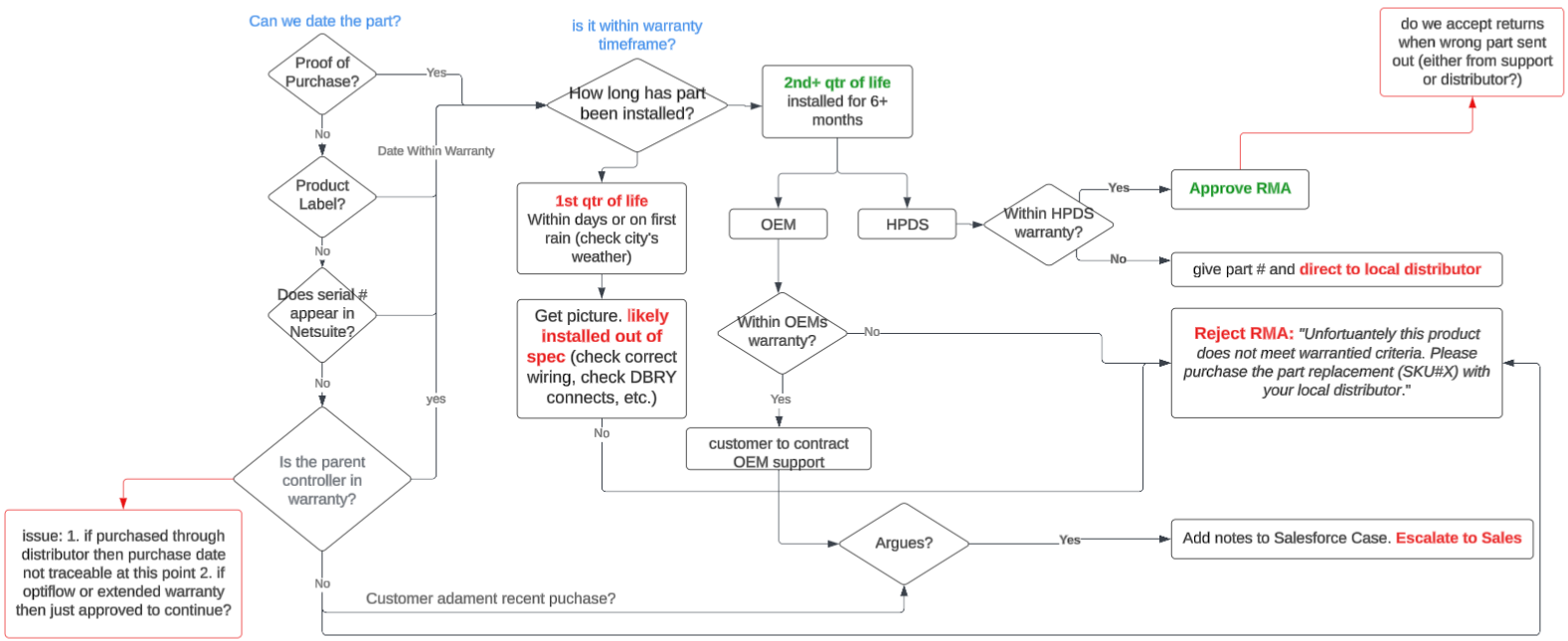
Important Note: Occasionally check Salesforce for how many RMAs this account has had. If this account has had several of the same parts being replaced 3+, it could be that the customer is using an in-warranty controller to replace parts on other systems. Ask the caller why this part has already be re-ordered 2+ occasions. Escalate to manager if suspicious.
If WT Controller
To check if a WT Controller is in warranty, check NetSuite.
- go to NetSuite → type in Serial Number (make sure if begins with 9 there is a preceding 0) → go to Install Base Record IBR) →
- check if controller item sku is New or PAN.
- if Controller is New: find Stnd. / Ext Warranties to see if in Warranty.
- if Controller is PAN: need to go to the original IBR b/c NetSuite does not transfer the Extended Warranty to new IBR when the command panel was replaced.
If the Install Base record (IBR) is missing dates or quick search for original age, then can search the serial number in Warranty Database. Missing dates mean IBR was set up incorrectly.
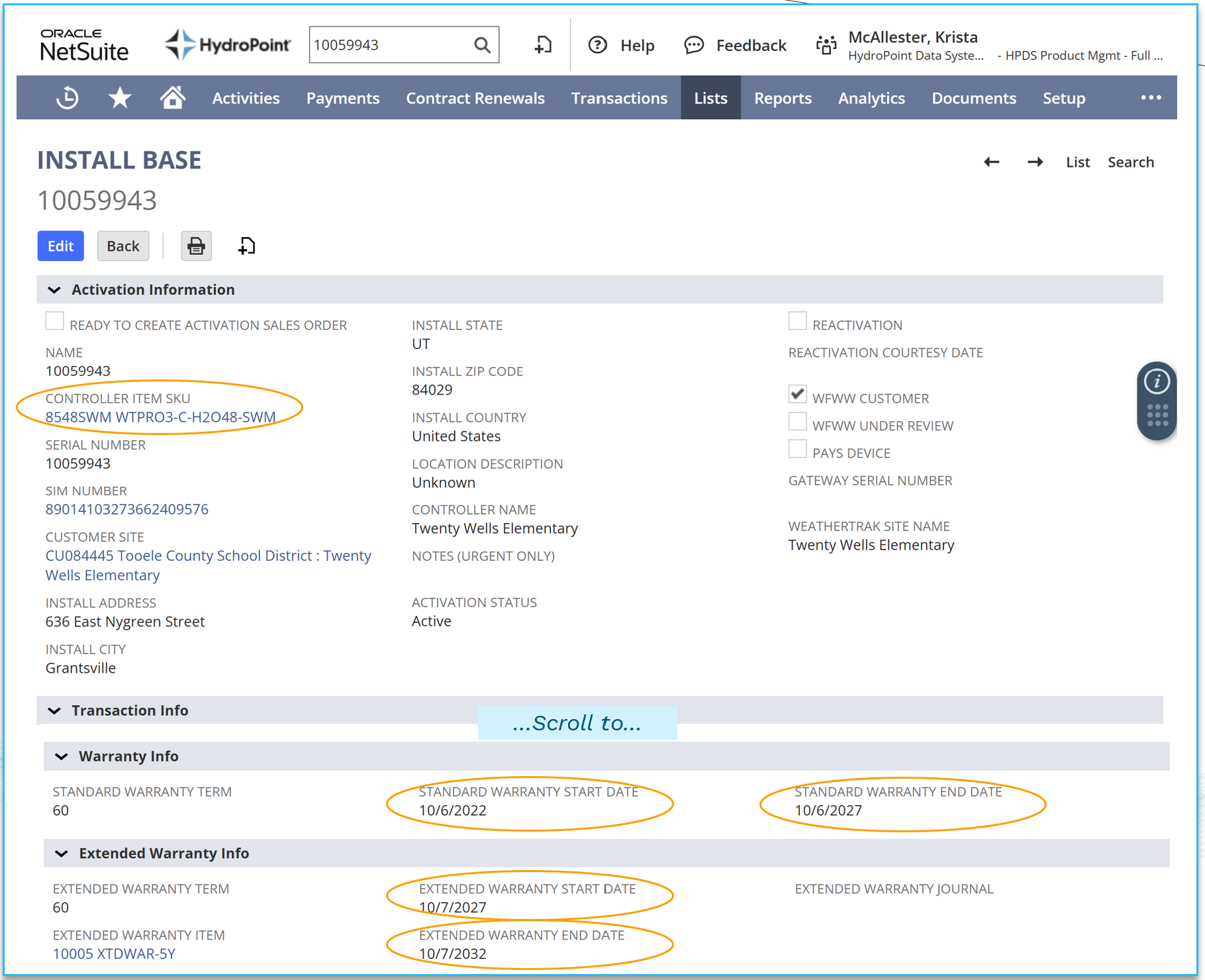
If <controller item sku> = new controller
if <controller item sku> is PAN
- scroll to Deactivation → go to Old Install Base Record → check if controller item sku = New (if not repeat) → scroll to Warranty Info.
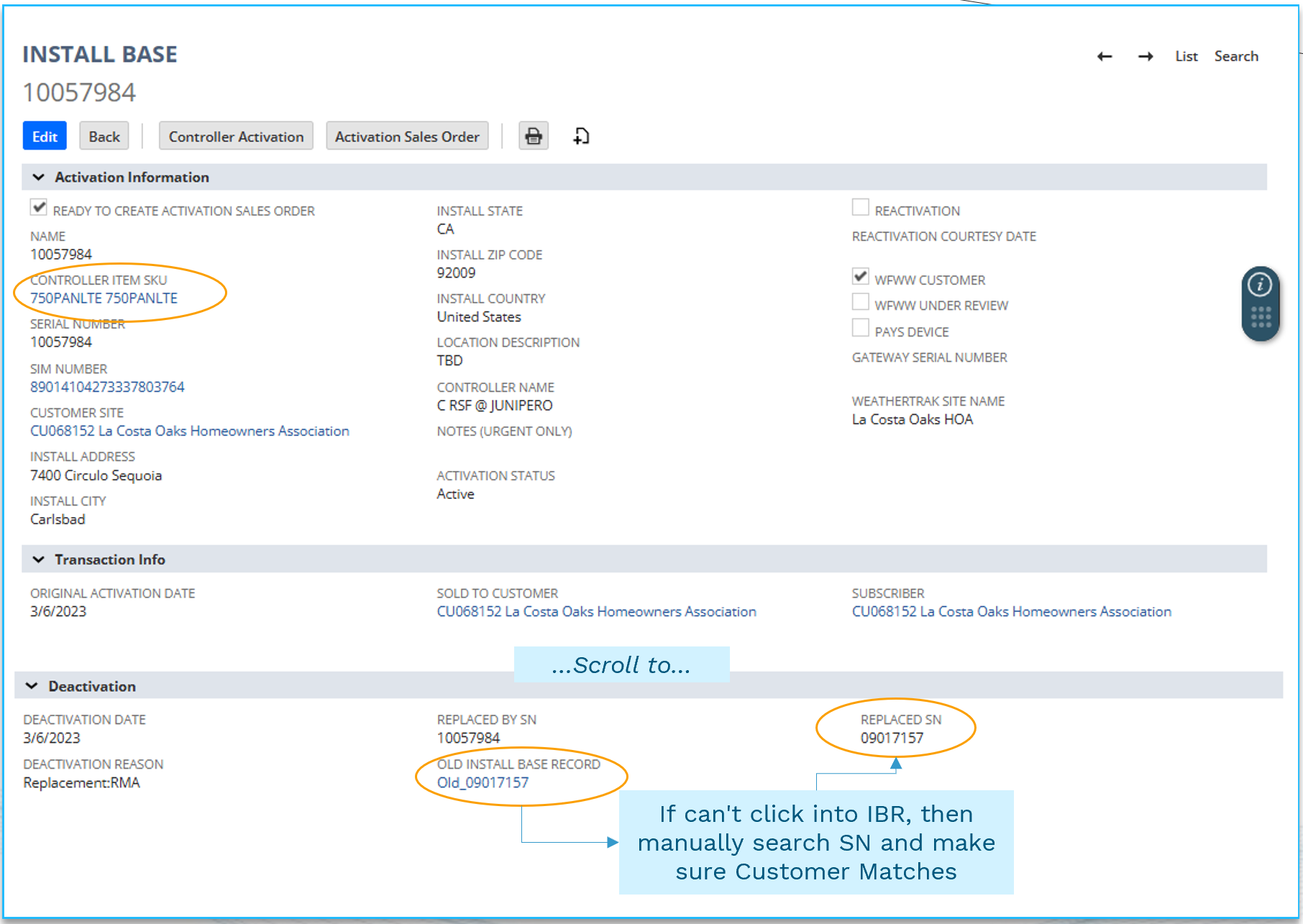
NOTE: As of Nov 2025, Ext Warranty Dates transfer to the new IBR during PAN or UPG replacement.
If it is a PRO2 to PRO3 UPG, the original ext. warranty dates transferred, so these dates may be earlier than the new standard warranty dates. These instances will be extremely rare, but if this happens, calculate the remainder of months between UPG sales order date and original ext. warranty end date. update the IBR so the Ext Warranty Start is day after standard warranty ends, and the Ext Warranty End is the Ext Warranty Start + Ext. Warranty Remainder.
If the controller purchased a PRO3 to OXR UPG, the ext. warranty dates do not transfer because the OXR comes with 10Y of ext. warranty. If the customer says it should have Ext. Warranty, you can either add some Ext. Warranty. It will either be the remainder of the Ext warranty (OXR UPG activation to original Ext War End) if the remainder is <2Y. If >2Y only give 2Y of ext. warranty as this is the maximum age for warranty coverage.
If HPDS Accessory
- Compare age of device with the warranty length.
- To find the age, use Identifying Serial Numbers to check if part has mfg. date label, else
- Customer to provide proof of purchase, else
- Customer to provide part serial no. (SN) or Sales Order (SO) or RMA number:
- Instructions: go to Salesforce (SF) or NetSuite (NS) → enter the SN, SO or RMA in search → should populate it and when it was ordered
- SO or SN will only be in SF or NS if a) the part is serialized b) it was ordered through HPDS (as an RMA via Support/ HPM or was initially installed by Pro Services). Anything ordered through distribution won't show in NS (which includes all OOW replacements).
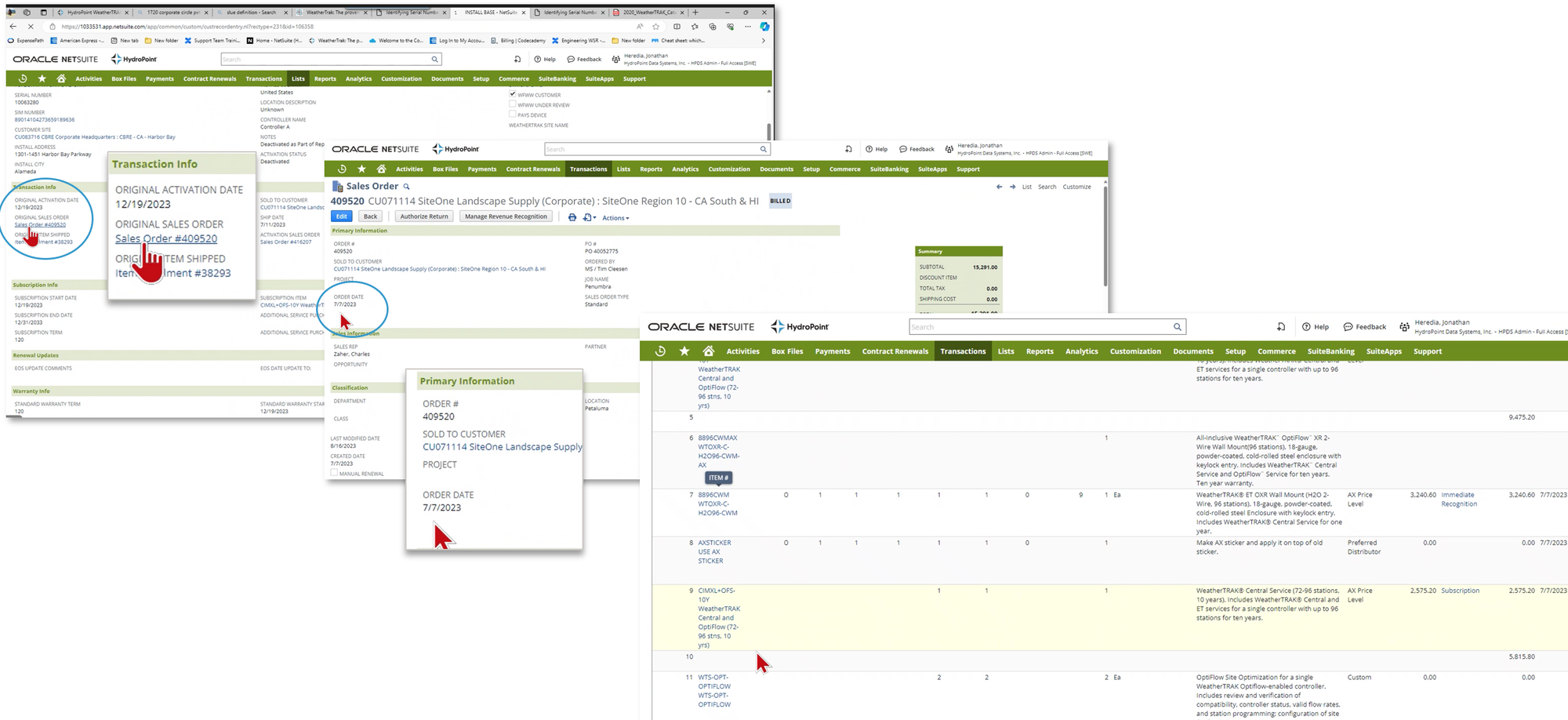
Use parent controller's original activation date as age of device, unless the device is manufactured by OEM (see next tab).
- Remember to find the ORIGINAL controller age. This means if controller item sku = PAN, look at deactivated IBR because the activation date in the new IBR will be the date when the replacement display was activated, not the true age of the controller. can also refer to Warranty Database for controller age.
- HPDS Accessory: devices manufactured by us (ex: decoders/biCoders and flow sensors with bicoder attached to it)
- OEM Accessory: 'original equipment manufacturer' are devices we resell from another manufacturer. (outdoor antennas, flow sensors, pressure sensors, moisture sensors)
If OEM Accessory
An OEM part is a part not manufactured by HPDS, only sold through us (flow sensors, outdoor antennas, etc.). These warranties carry the OEM warranty. Most of these devices are not serialized, meaning if we can't find the SO, we will not know the date of purchase / if it is in warranty.
check if device in warranty by:
- Find the SO in SF/NS (this would be if part was ordered via a RMA or Pro Services)
- else, check if device has mfg label via Identifying Serial Numbers
- else, ask the customer to provide the PO.
- no SO then tell the customer "Unfortunately, we can only accept returns for products manufactured by another OEM if we can verify this accessory was purchased through HPDS, which we cannot at this time. This item is subject to manufacturer’s warranty and must be authorized by a manufacturer customer service representative for disposition."
- Direct Customer to OEM (see bottom of article for contacts)
How to replace?
In Warranty
In Warranty
For returns related to warranty review and/or replacement due to defective or damaged product, an RMA is initiated and created in Salesforce by the Customer Support Team. see Hydropoint RMA Processes
Out Of Warranty
Out of Warranty (OOW)
A non-warranty is any controller or part that's warranty has expired. If HPM, go to process further below for "Replacing Non-Warranty Unit Parts for HPM Enterprise Customers". If not HPM, then do the following:
- Provide the Landscape Maintenance Contractor (LMC) the part number.
- Instruct the LMC to purchase the needed replacement part through their local HydroPoint distributor. Can use HydroPoint Distributor Information to help find their local distributor.
Do not confuse the Hardware Warranty with the Worry-Free Wireless Warranty (WFWW). These are two different types of warranties. Learn more at: Worry Free Wireless Warranty FAQ
Ditsi/Enterprise
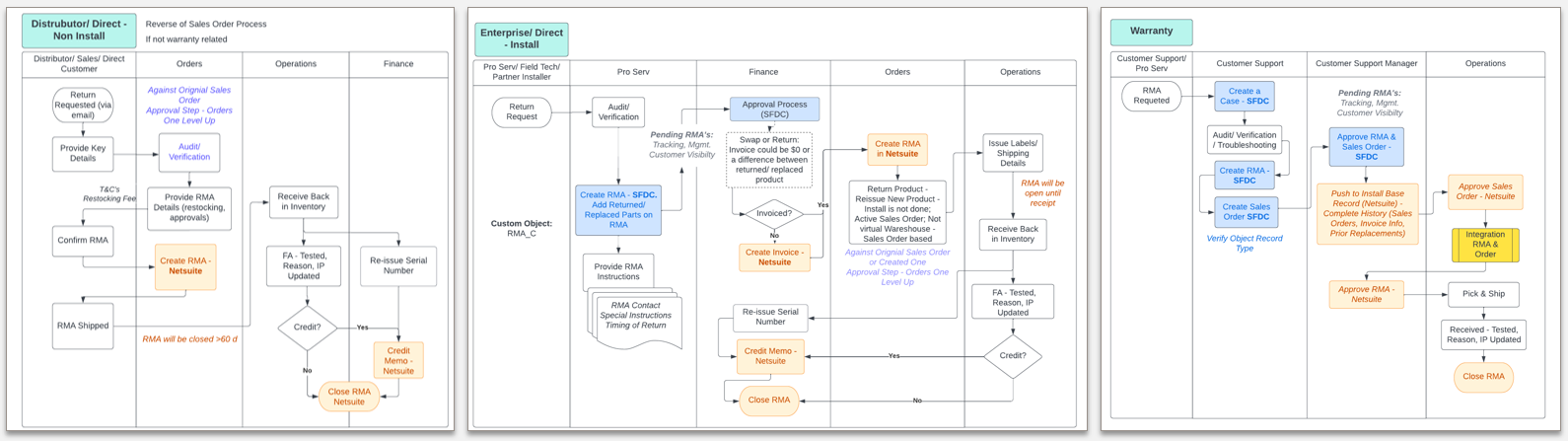
Distributor / Direct (Non-install) or Enterprise / Direct (install)
Non-install are RMA requests initiated by channel partners, distributors stock replenishments from customer returns, etc. Install are RMA requested by Pro Services, Field, Techs, Partner Installers. Where the RMA originates affects which departments it flows through. Instructions here: RMA Policy and Process.
HPM
Walmart Responsibilities
Replacing Non-Warranty Unit Parts for HPM Enterprise Customers
- Validate warranty end date: NetSuite> Install Base Record.
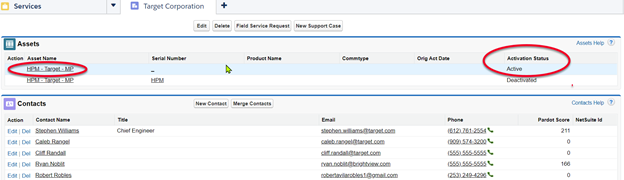
- Validate customer is using HydroPoint Management Services (HPM): Salesforce > Parent Account > Account Assets. An HPM account will show the following:
- HPM-MP is listed Under the Parent Account. HPM is the account name and MP stands for Master Projects.
- The Activation Status is Active. An example is shown below:
- Another option to validate an HPM account is to go to the HPM Master Projects page in Salesforce. This page lists all accounts using HPM services.
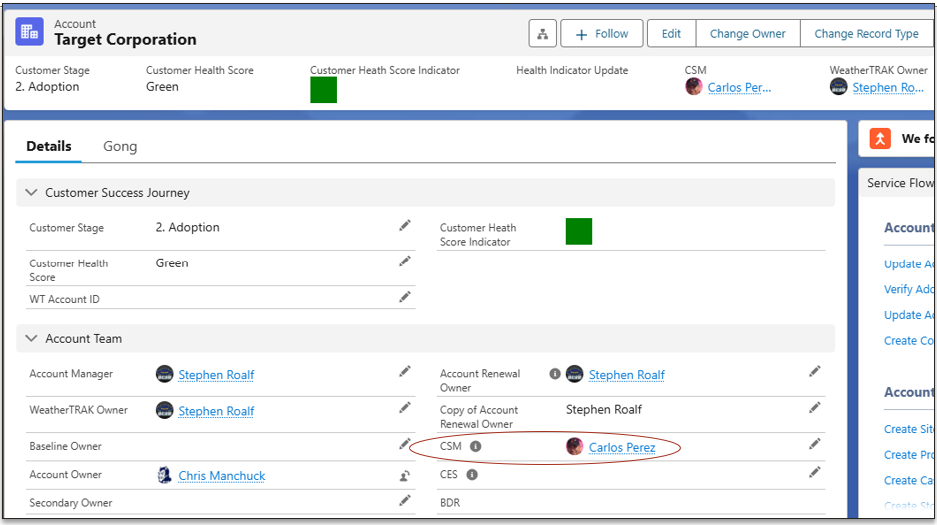
- If the account is an HPM customer, send the replacement part number(s) and diagnostic details by email through the Salesforce case to performance@hydropoint.com to alert the Customer Service Manager owner (CSM). The CSM information is located within the Parent Customer Account (see below).
- The CSM will coordinate the appropriate next steps and communicate back with updates. The Support case should remain open for monitoring with the original owner until the CSM confirms the resolution and closure details.
Controller Parts
⚠️All parts are given their respective COGs (Q1FY24) to understand the associated cost when approving free replacement.⚠️
Controller-Specific Parts
Covered by controller warranty. If controller out of warranty, then replacement parts will have a 1 Year warranty, must find Sales order or RMA.
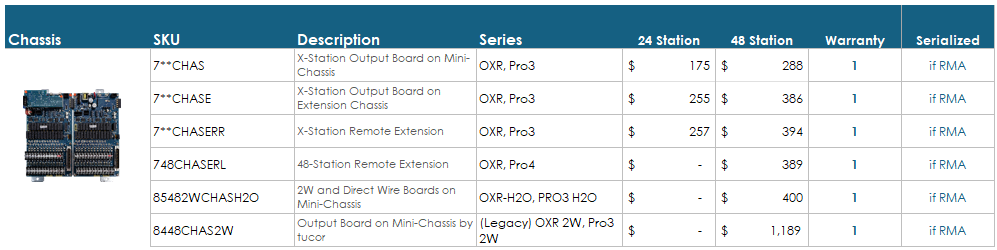
Chassis (CHAS)
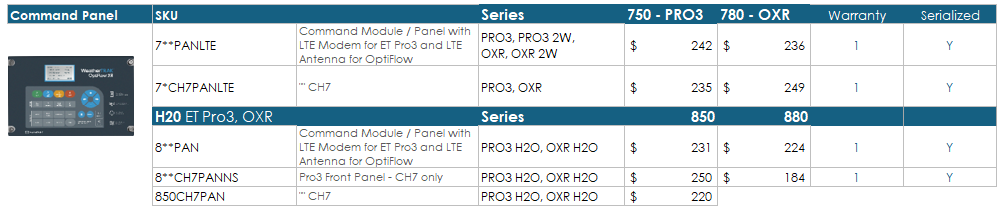
Command Panels (PAN)
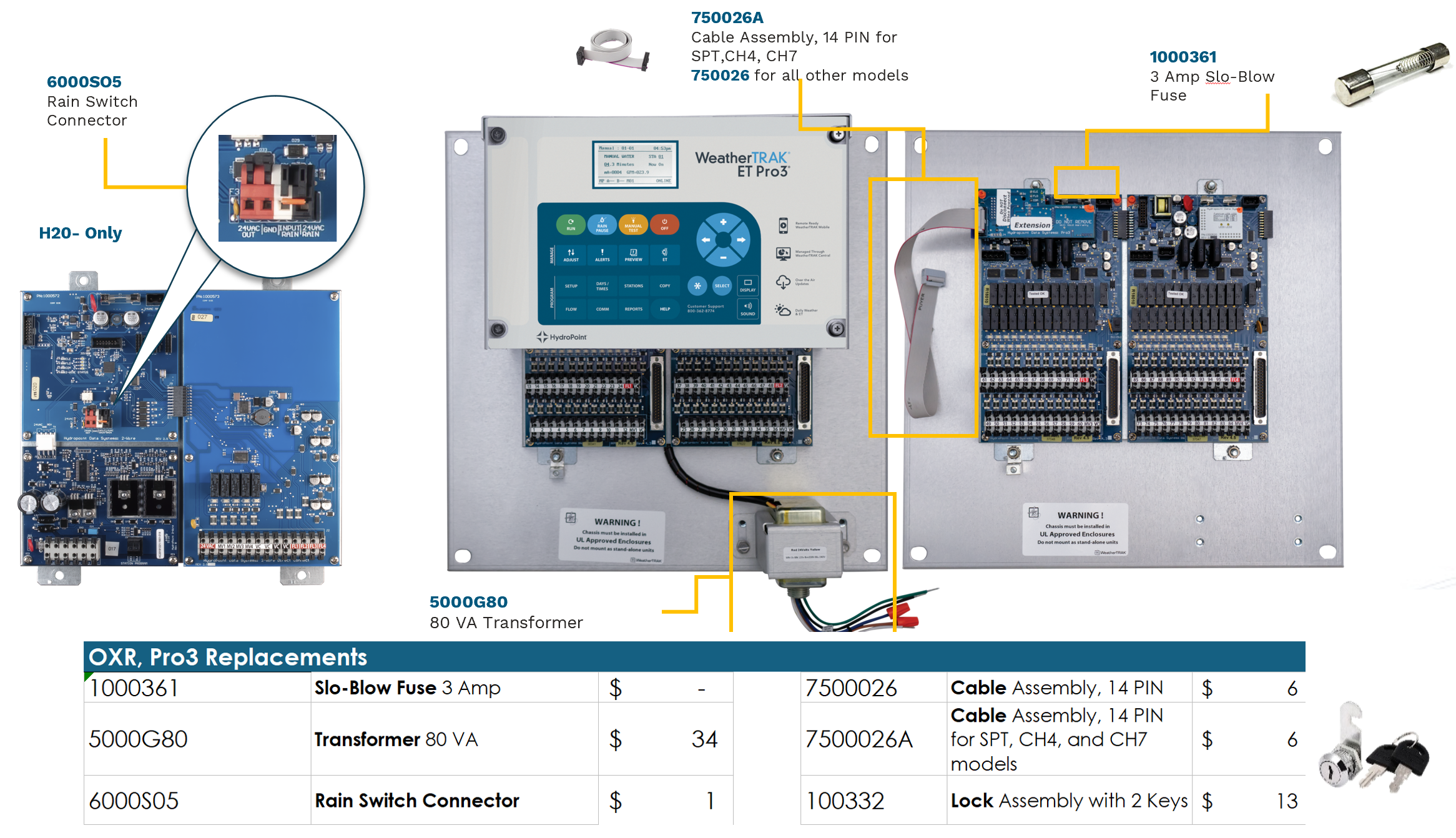
General Replacement Parts
*Parts are not serialized
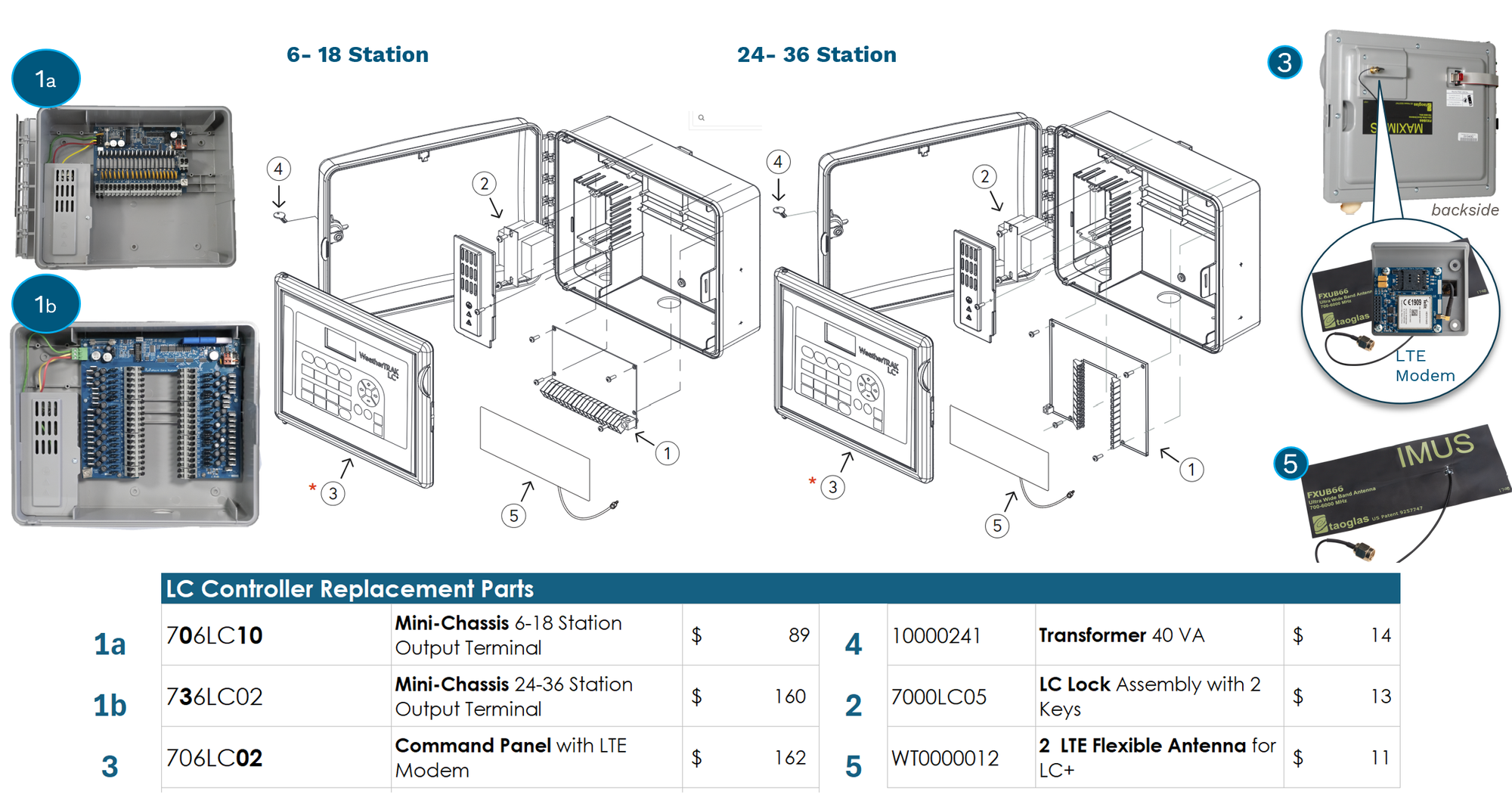
LC Replacements
CHAS Types
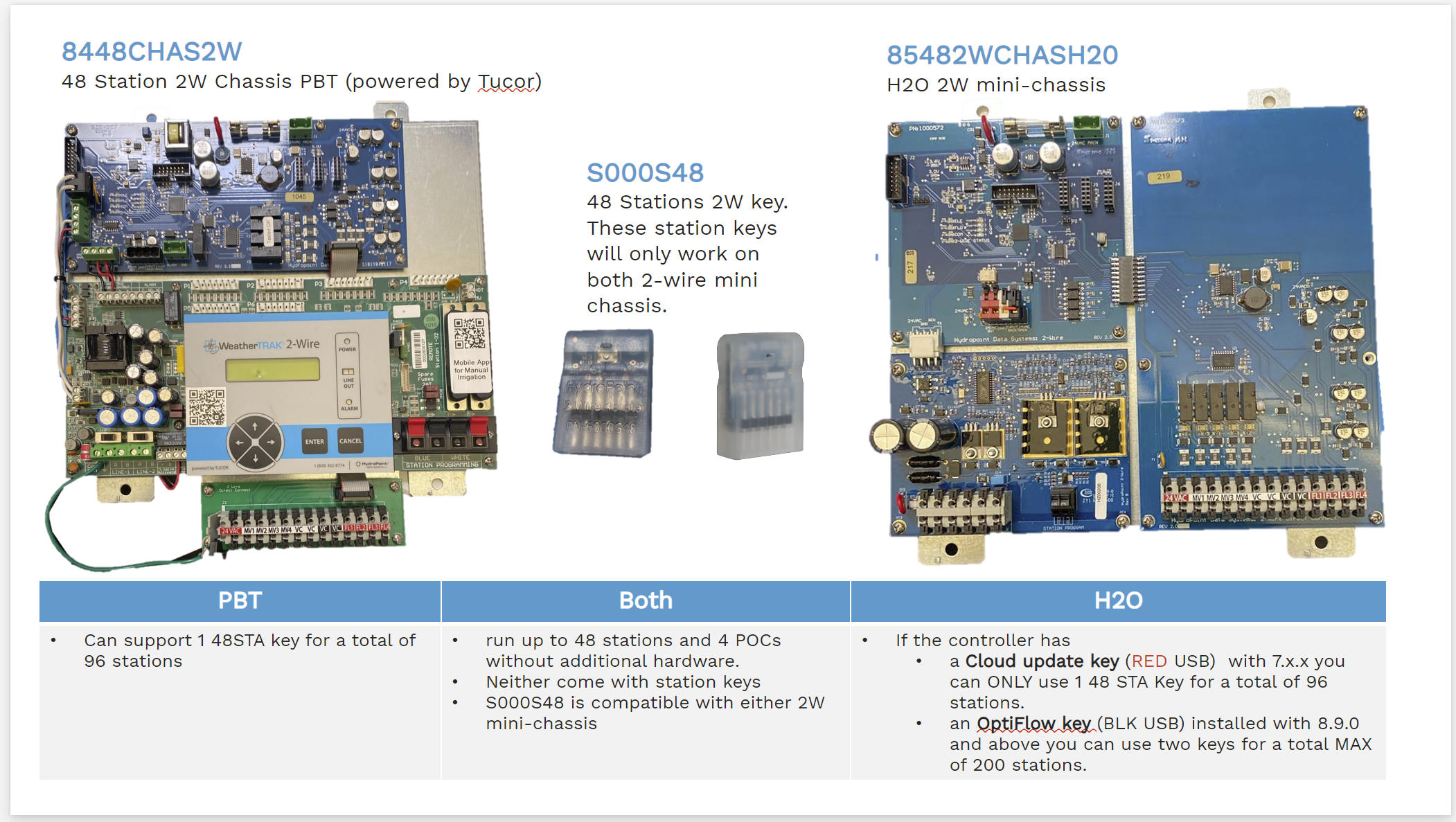
- Mini chassis are replacement components
- Many mini-chassis look alike but there are several special components that make different mini-chassis incompatible with each other. CHASE is not a direct replacement to 724CHAS for example. CHASP has a red/yellow power connector which runs the CWM bridge and a different ribbon cable.
- chassis are entire sale units (complete to allow a user to keep the existing enclosure- this will avoid the need to install a new enclosure) and have a face plate.
- Customers should reuse the station keys as they hardly ever fail, and all these mini chassis listed here DO NOT come with Conventional Station keys (6000S04).
- All the high station count controllers - whether it is the primary or a 96-station secondary - WILL come with the second flow key (WTPRO3-2FLO-KEY) included.
- What if I don't know what chassis or PAN belongs to a specific controller? for WT: NetSuite → search SN or controller item SKU → Purchasing / Inventory → Components
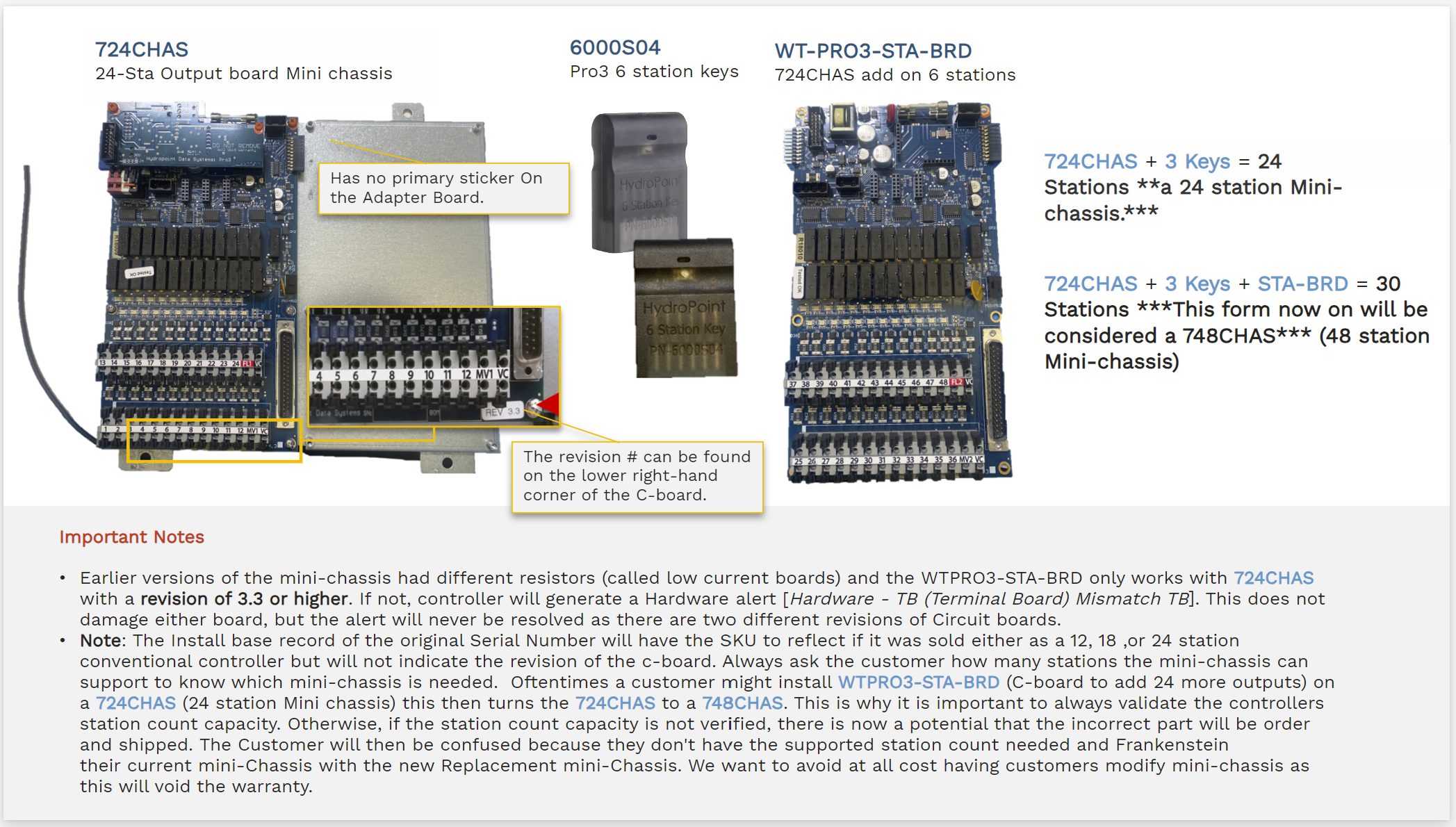
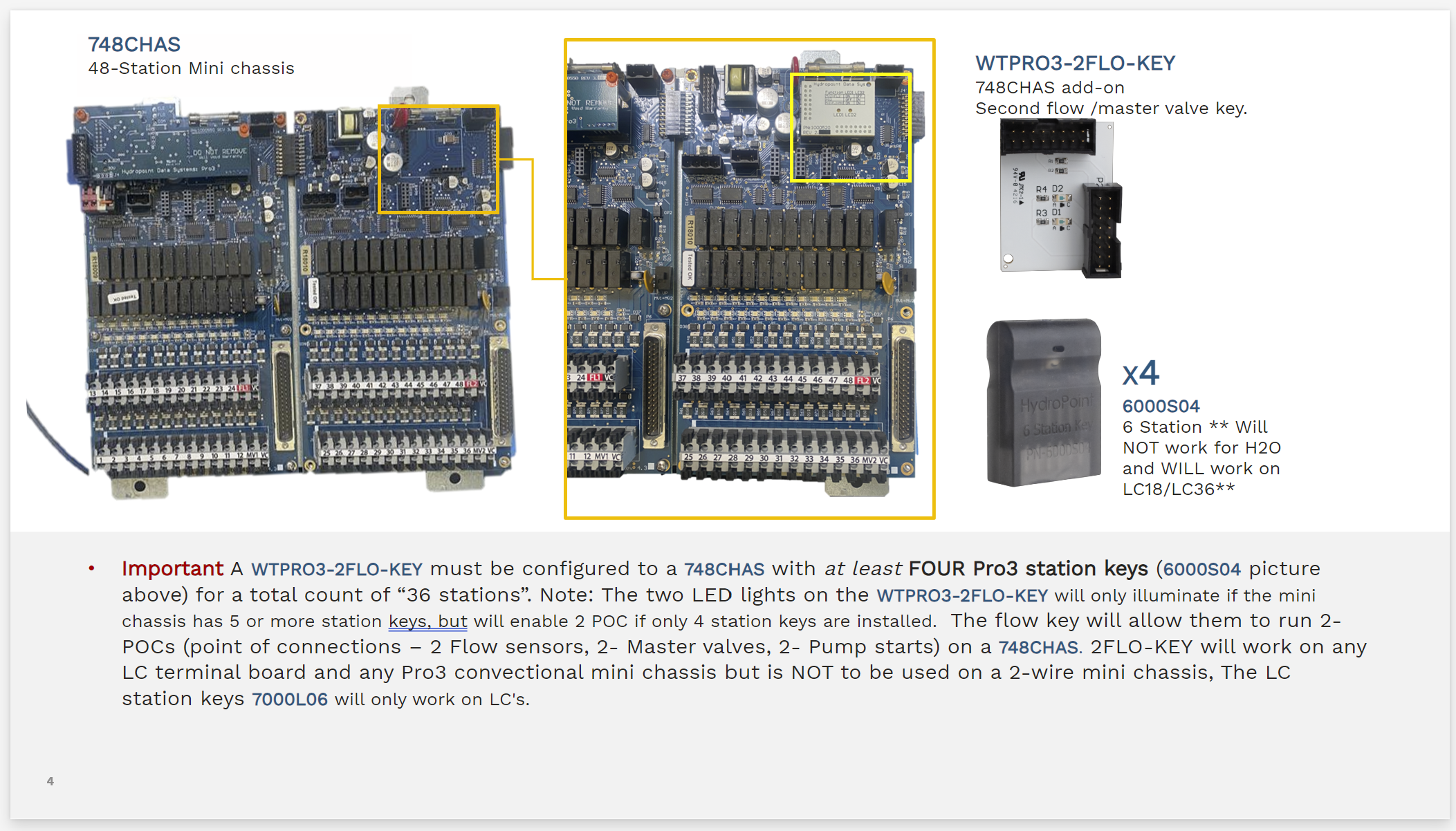
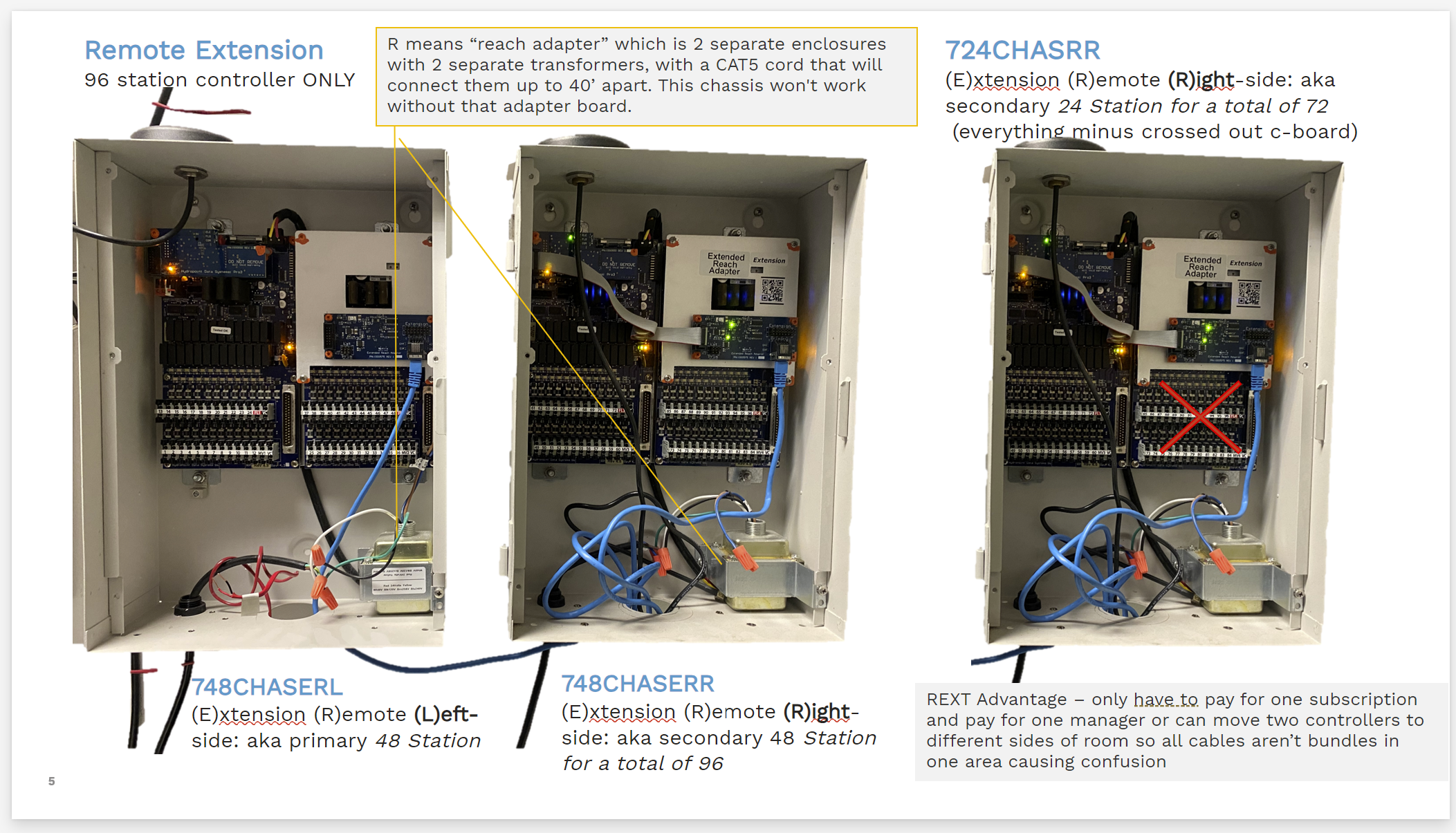
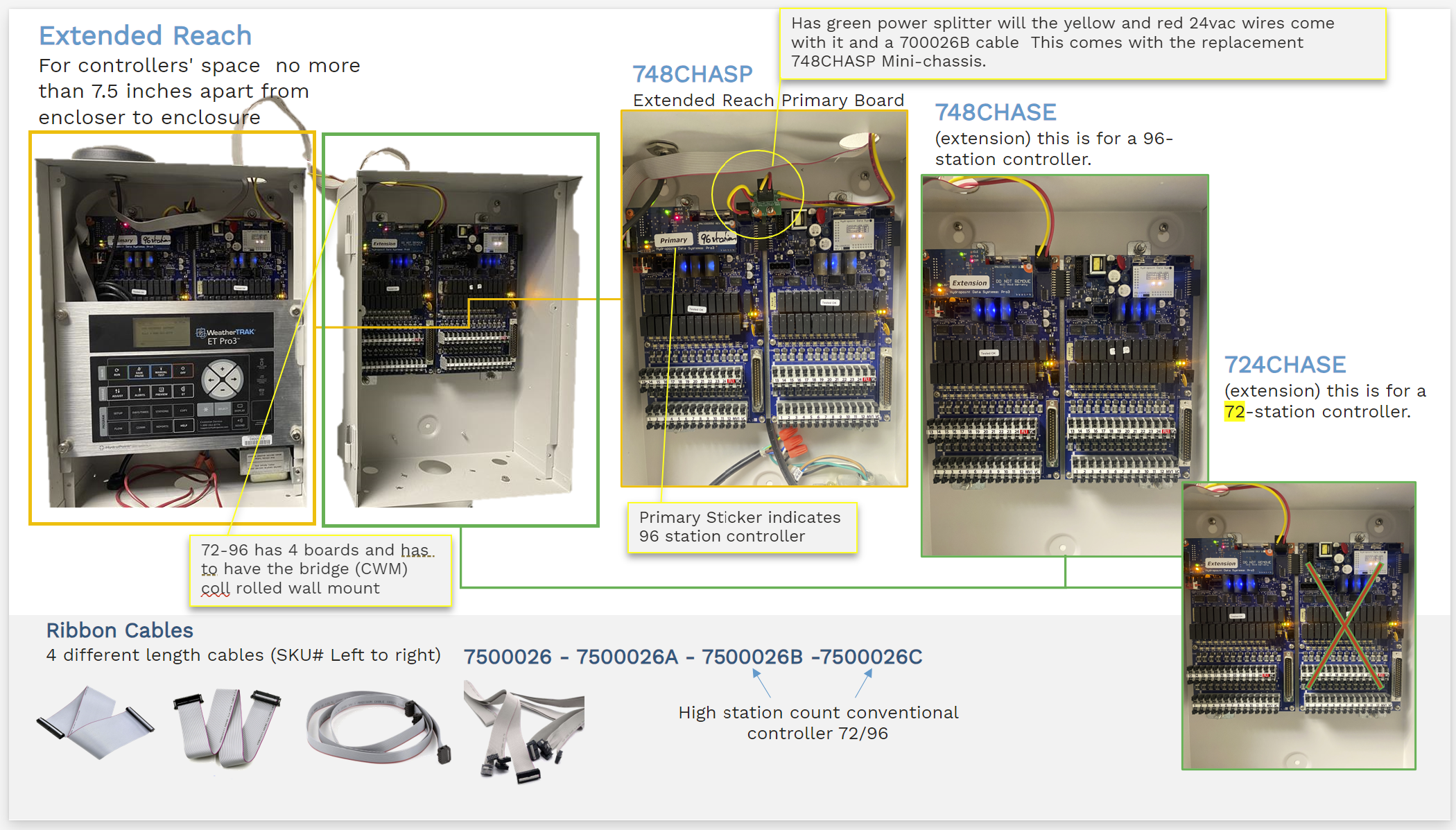
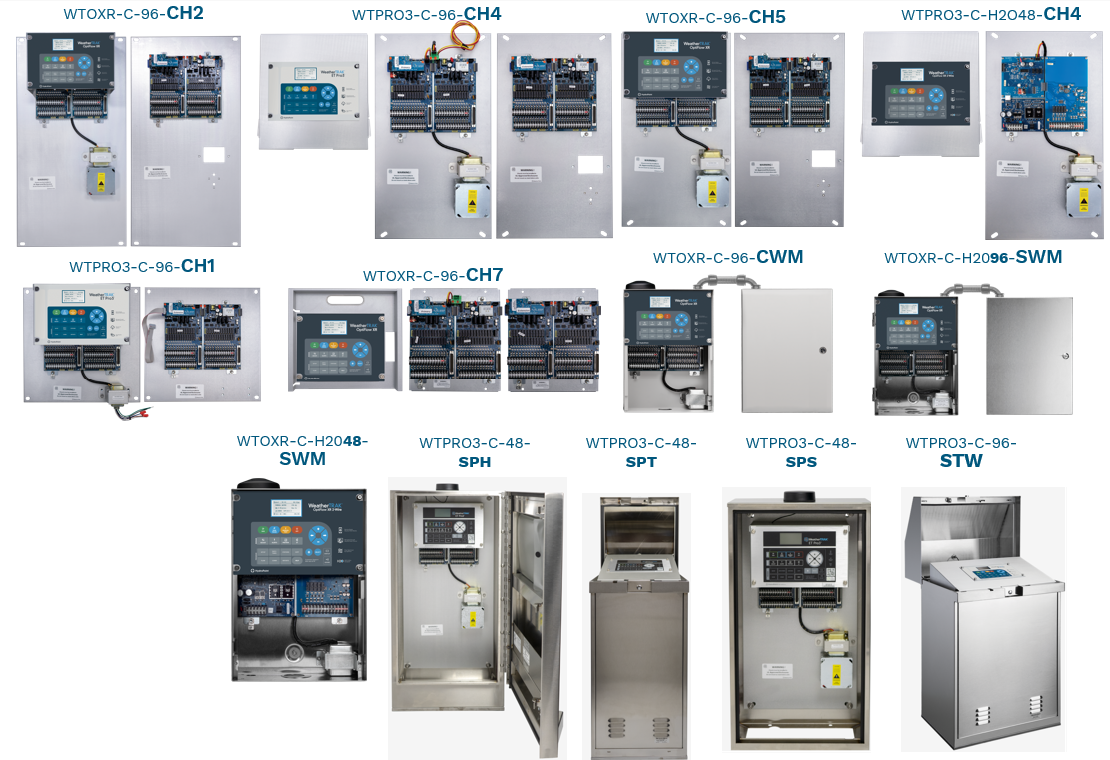
Controllers / Upgrades
Controller item skus broken out by enclosure types and/or upgrade kits
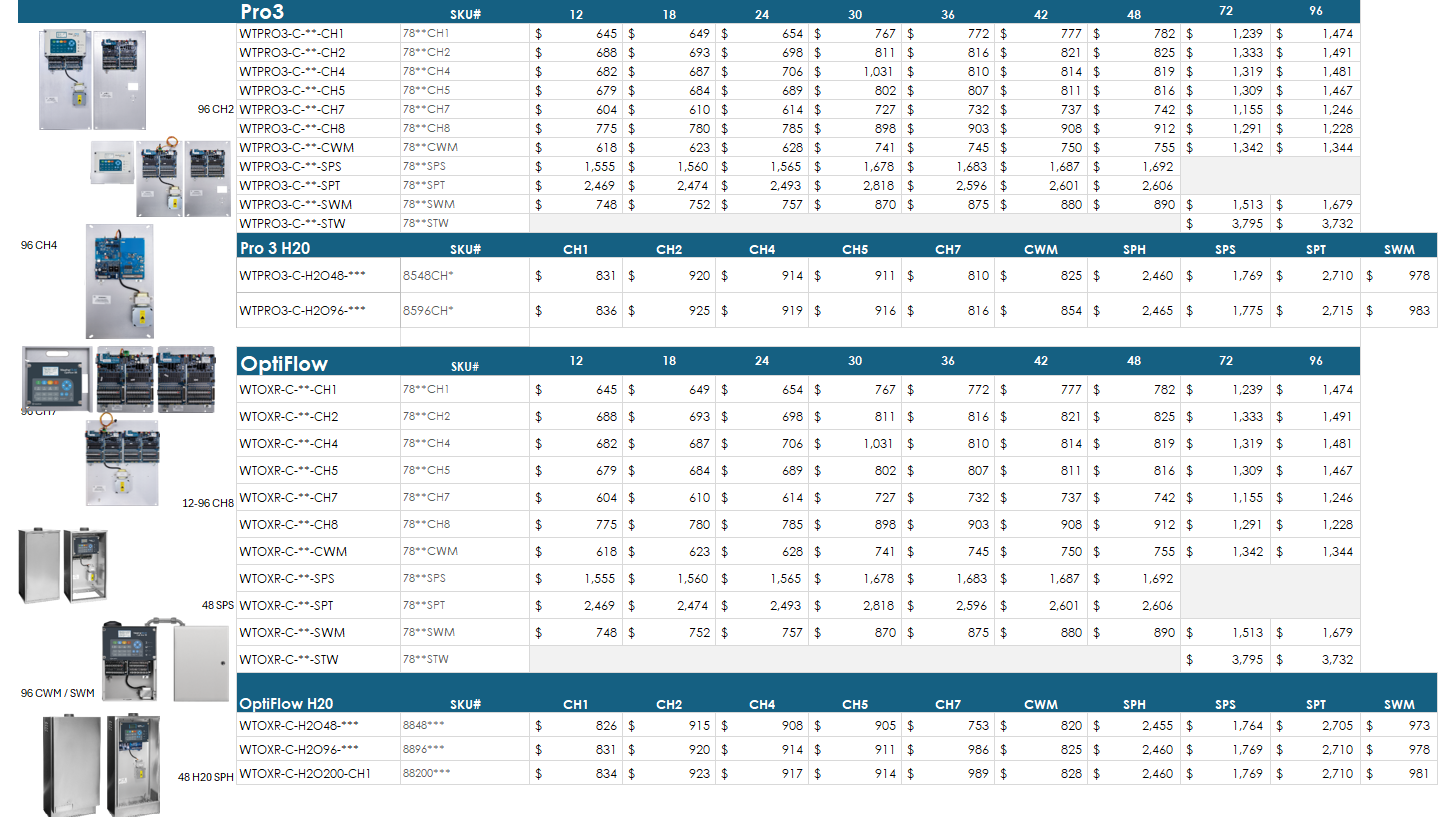
New Controller Extensions

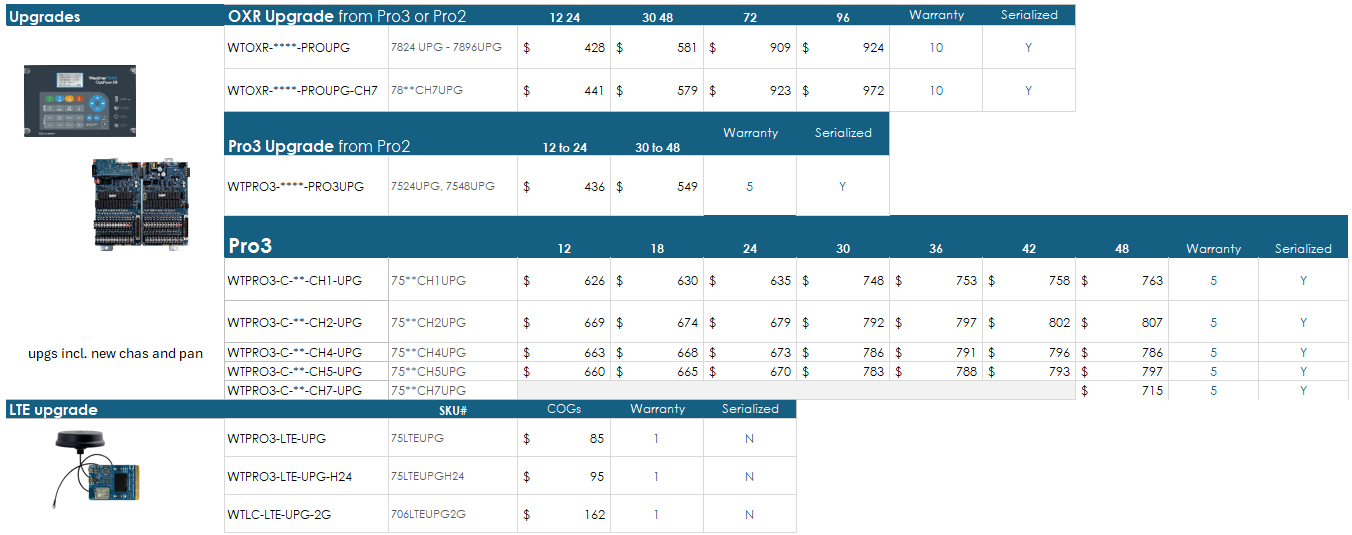
Upgrades (UPGs)
WT Accessories
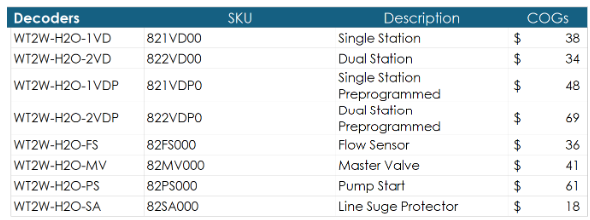
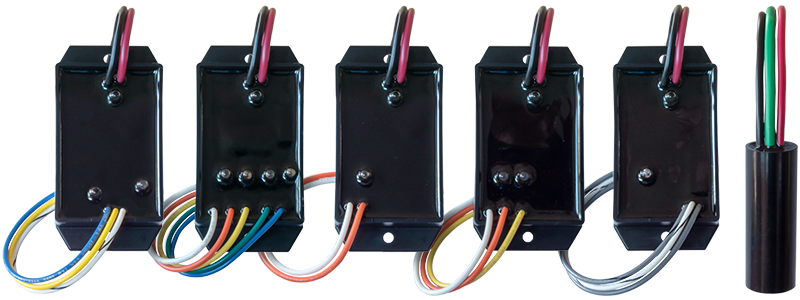
Decoders - warranty = 5 years, have manufactured label
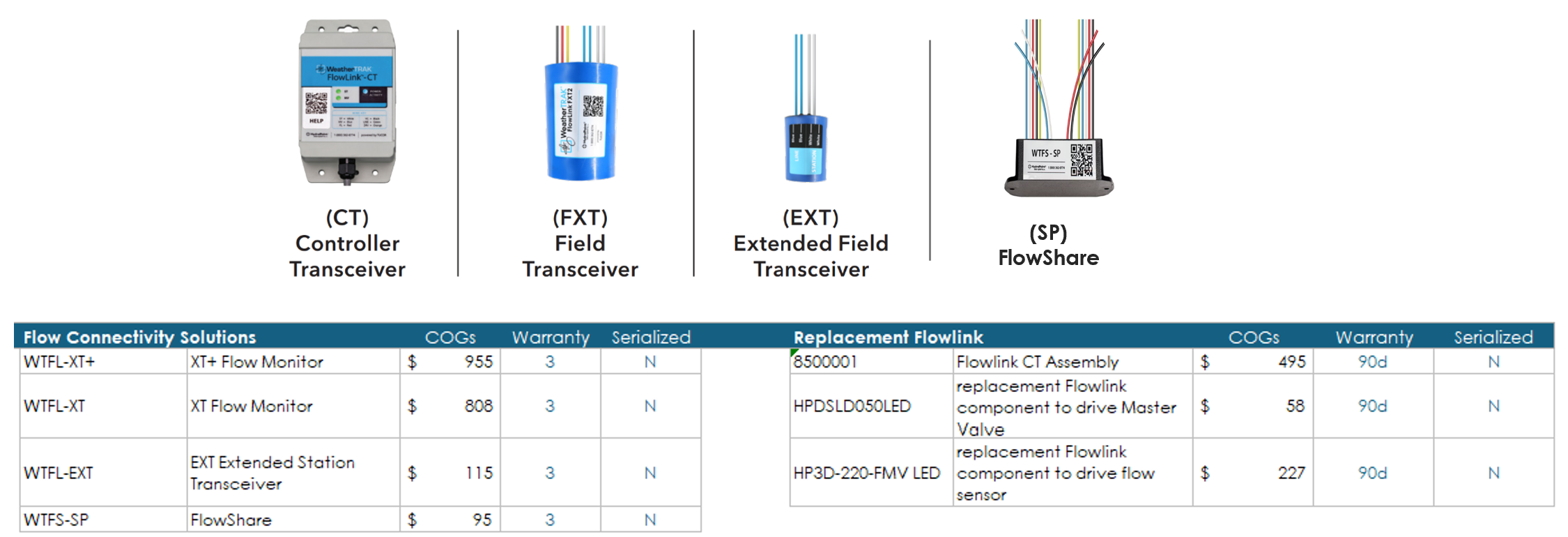
FlowLink
OEM Flow Sensors
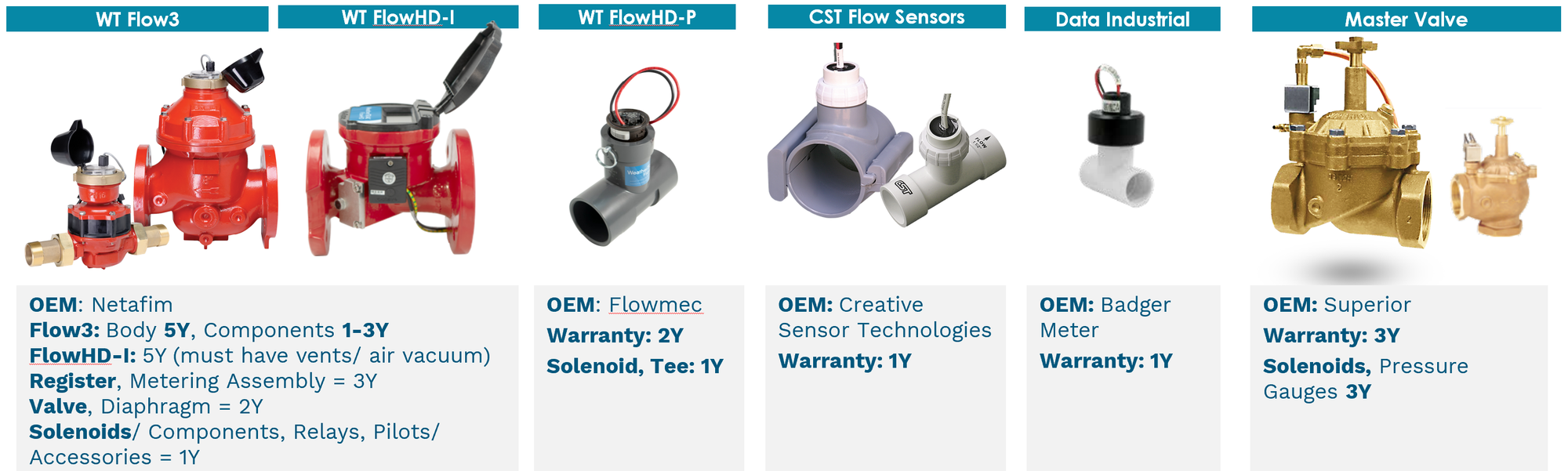
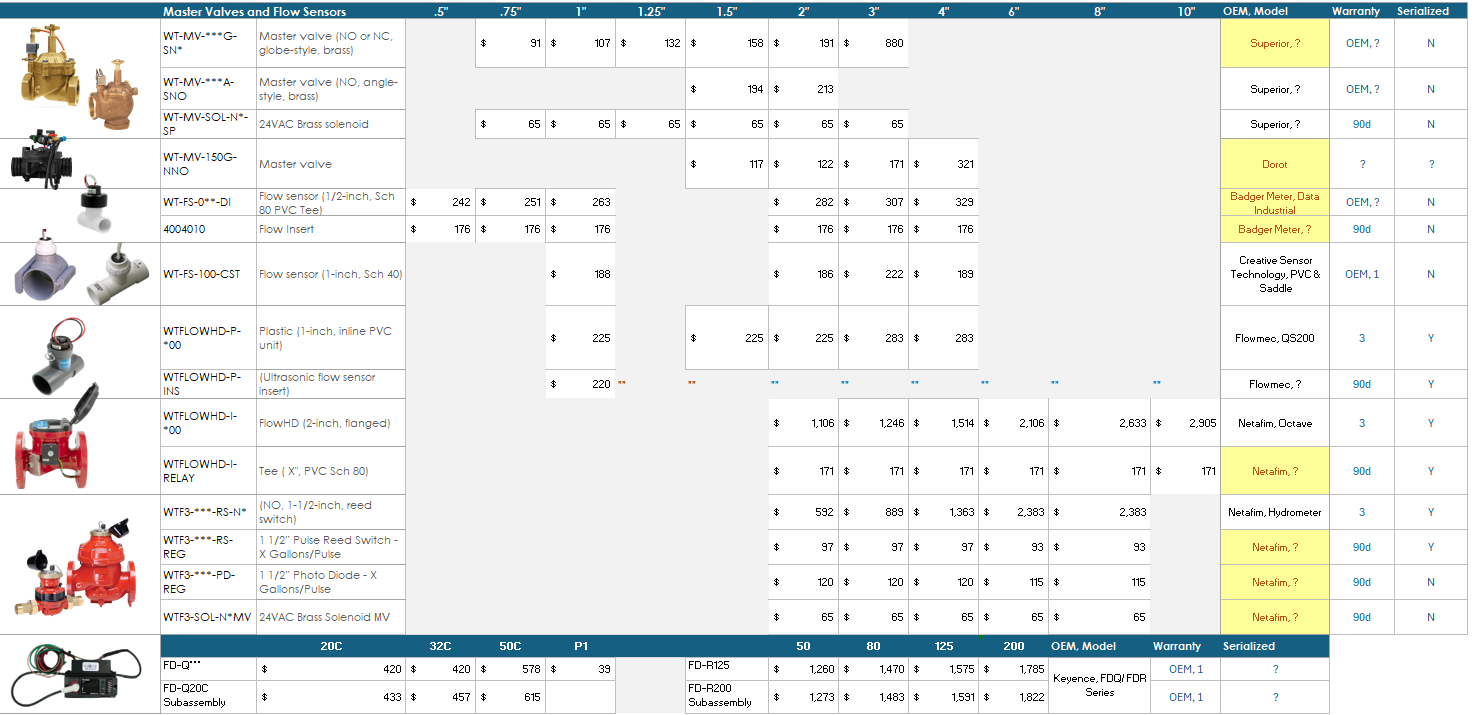
Flow3 and Flow HD-P warranties are greater than the OEM manufacturers to incentivize customers to purchase devices through us although our price is higher. CST = Creative Sensor Technology.
- Netafim Water Meter & Hydrometer:
- Netafim Octave: WT FlowHD-I - 3 years, Ultrasonic.
- Flowmec Source: WT FlowHD-P
- CST PVC, Brass & Saddle, WT Product Catalog p 54, BL PFS, BFS - Impeller.
- Badger Meter, WT Product Catalog "Data Industrial" p 54 - Impeller.
- Keyence FD-Q/ FD-R, BL IDFS - 1 Year terms Here. Clamp-on, Ultrasonic.
- Superior Source, Superior Catalog (angle), (WT Product Catalog p 55)
OEM Antennas
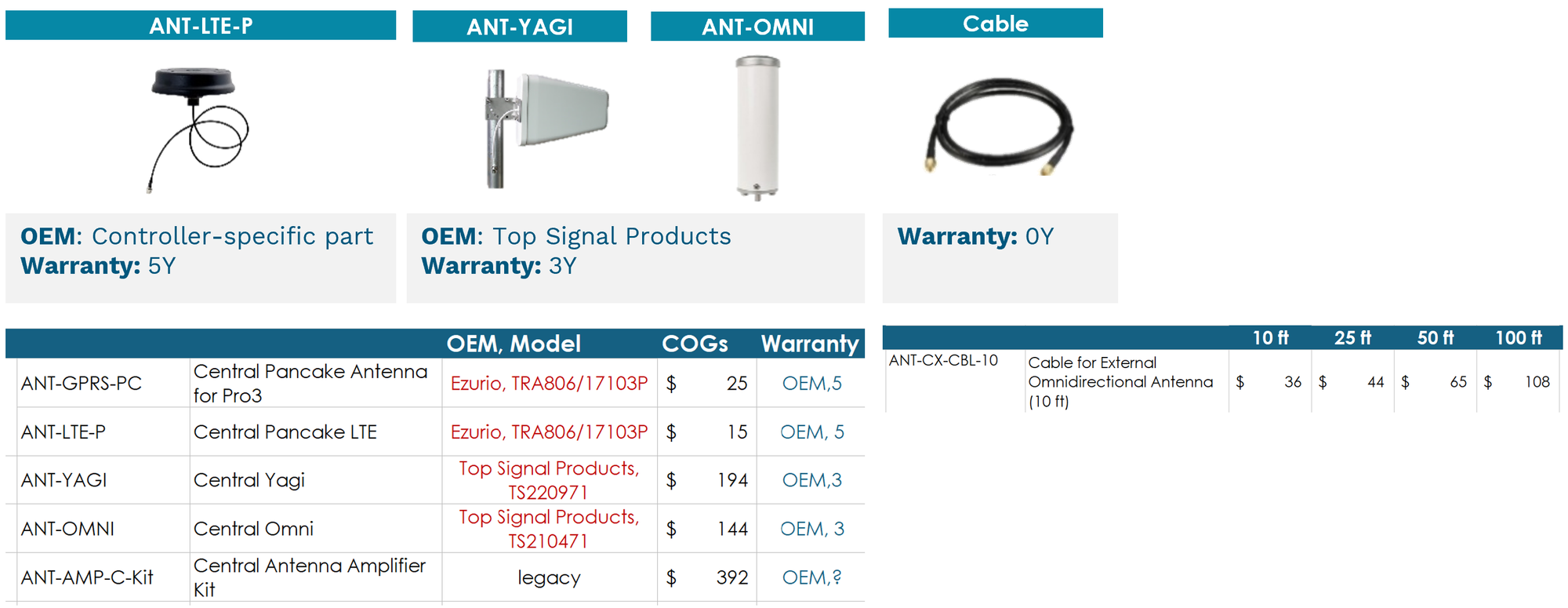
- Laird Connectivity: 5 years on all outdoor antenna. Please direct all customer claims of warranty to laird.NA-techsupport@dupont.com.
- Top Signal: 3 years on all signal boosters. Please direct all customer claims of warranty to sales@powerfulsignal.com.
- HPDS Cell Antennas
OEM Other
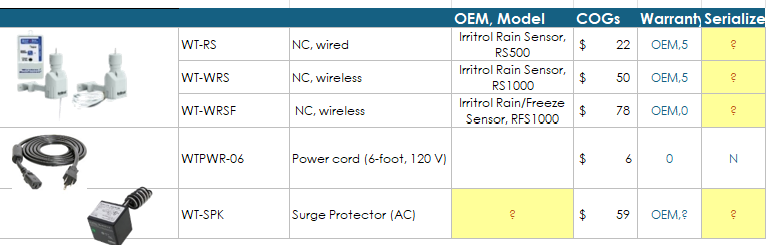
Irritrol Rain Sensors Warranty. Direct warranty claims to their Support line: 1(800) 634-8873.
💢Customer Threatens a Lawsuit?
Upon purchase of the product customer agreed to the terms and conditions set forth in our warranty which does and has always included:
"HydroPoint is not responsible for special, incidental, indirect, or consequential economic or property damages resulting from the use or inability to use this product, or breach of warranty, or under any other legal theory, including, but not limited to loss of data, lost profits, downtime, goodwill, specific carrier, damage, or replacement of equipment and property.
Some states do not allow the exclusion or limitation of incidental or consequential damages or exclusions of implied warranties, so the above limitations or exclusions may not apply to you."
For Controllers on Quarantine List under Hardware Category:
- If the controller's display is visible and fully operational, replace the appropriate mini chassis if it is a PRO3, OXR, H2O, Powered by Tucor (PBT).
- If the controller's display is visible and fully operational, replace the appropriate LC+ terminal board.
- Make sure that all station keys are fully operational. Have the LMC test those station keys at a different unit to validate that station keys will not be needed. If the station key(s) fail, make sure you provide the correct type of station key part number and quantity of bad key(s) that need to be replaced.
- For overview of WeatherTRAK Quarantined Controllers, read: WeatherTRAK Quarantined Controller Overview
What if an LMC pushes back regarding non-warranty units?
Contact the sales representative for that customer via email within the Salesforce case. Explain why the customer is pushing back and what parts/ number/ quantity for what serial numbers/ account/ site will be needed. A sample email is below.
|
Greetings <Sales rep>, I am reaching out to you because <LMC- Full contact information> needs a replacement <Pro3 Mini chassis Part number: 748CHAS for serial number: 12345678> for Site: <the site for Account: The Account.>. I have explained to the LMC that the Product Warranty for quarantine unit he is working has expired since: <date 04/09/2017> and he stated he's unwilling to pay for a replacement part. Please let us know how you would like to manage this issue. |
To find the Sales Rep, go to Salesforce > Customer Account: