
Frequently Asked Questions
Where to find warranties? HPDS Legal Page
How do I Initiate RMA? HPDS RMA Processes
How do I know if decoder installed out of spec? Decoder Replacement Policy
Where are replacement part lists? In the Distributor Portals. Part #s are also located Salesforce or Quickbooks.
Warranty Policy
Coverage
All Warranties cover damage caused by insects and mollusks because our conformal coating - which is a part of our manufacturing workmanship - should prevent potential malfunctions.
Standard Warranty: Controllers and devices have unique warranties. Lightening protection is NOT covered.
Legacy Extended Warranty: controller-specific parts and lightening/ surge protection for the warranty term. It does not cover connected devices.
Current Extended Warranty: controller-specific parts and connected devices. It does not cover lightening/ surge protection (sold separately).
Extended Warranty Coverage
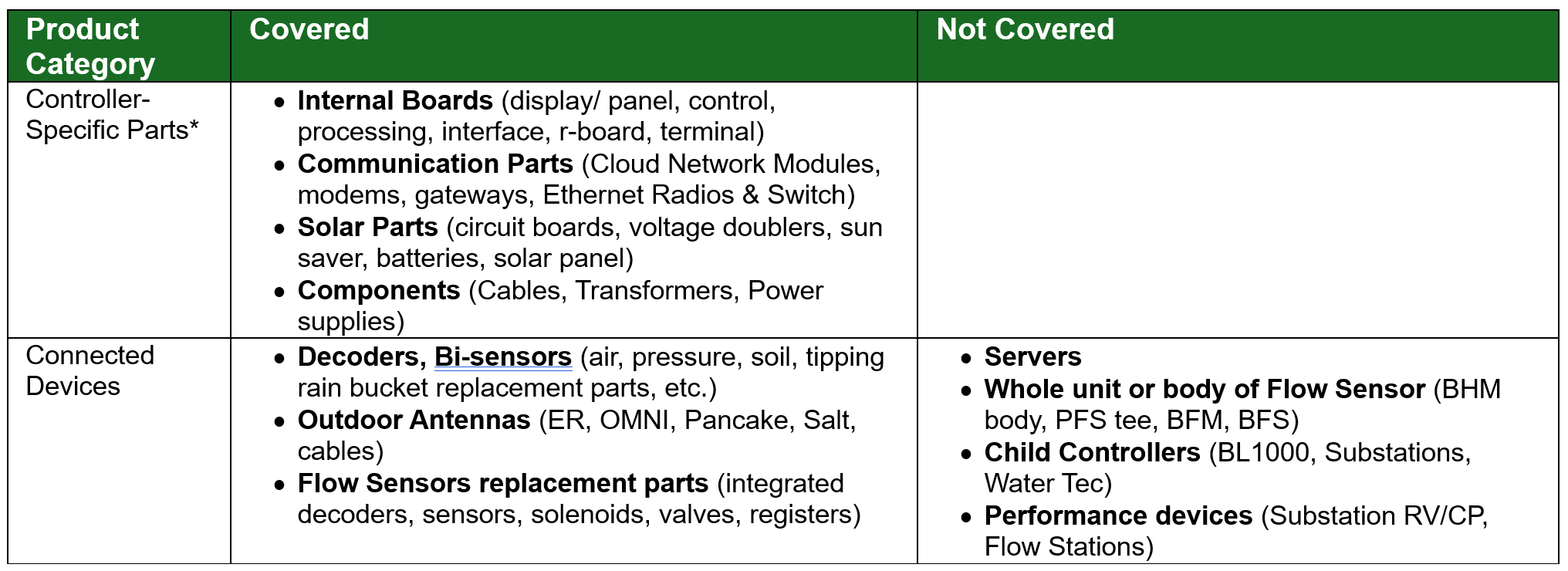
Connected devices are devices directly attached to the controller’s wire path, excluding any child controller(s), performance device(s) and/or their connected devices. Only the internal parts of flow sensors are covered. If a flow sensor does not have internal replacement parts, it is not within warranty.
IMPORTANT NOTE: Because Ext. Warranty Covers connected devices, it is pivotal to check that the decoder, antenna, flow meter, etc. under review is in fact connected to a controller with ext warranty coverage by checking controller alerts (valve no connect, etc.)
Lengths
Standard Warranty Length for all BL Controllers is 5 Years.
Legacy Extended Warranty is 5 Years
New Pre-Activation Extended Warranty is 5 Years.
New Post-Activation Extended Warranty is custom duration (in months) depending on Ext War SO (start / end date) purchased.
Ext War Purchase Options
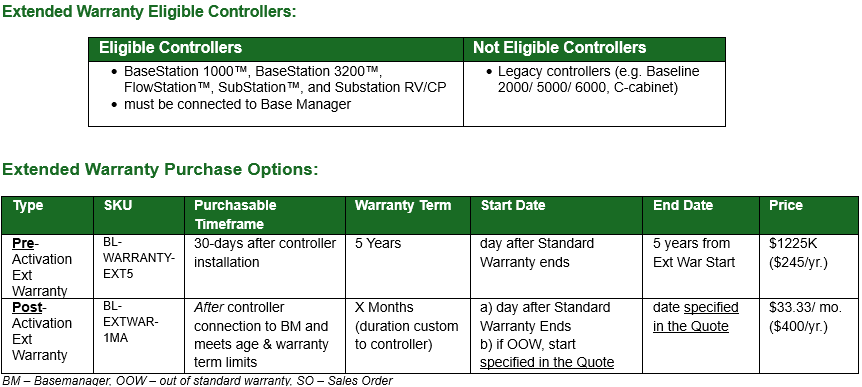
Post-Activation Extended Warranty Terms & Conditions:
A controller must meet the following to be eligible for this Ext warranty:
- Age Maximum: The controller cannot exceed 11 years of age at the expiration of the combined warranty – standard and extended.
- Warranty Duration Minimum: The average Extended Warranty term per Sales Order must be at least 3 years (36 months). This means individual controllers may have shorter extended warranties if they are included in a Sales Order where the combined average warranty term across all controllers are equal to or greater than 3 years.
- to buy post activation extended warranties, customers need to work with their Account Manager who creates a dedicated Ext Warranty Quote (uses only #BL-EXTWAR-1MA) to select the controllers, warranty terms (or co-term their warranties to the same end date) and agree on any exceptions to the eligibility T&Cs
FAQ
When will lightening protection coverage come available? In backlog, project scheduled to begin in 1Q26, so likely 2Q26
What to do if customer has legacy Ext Warranty and there is a lightening Event? Read the two wire / surge arrestor and grounding tech spec sheets. Was it installed to spec. We only warranty BL equipment, not non-BL equipment which includes OEM parts. If there are several installed SA (1 per 5-10 decoders) and controller is grounded correctly/ in-warranty, then RMA parts and note “lightening damage” in ticket.
A customer bought a replacement after the Ext Warranty Start Date but the SO was not yet signed. Can we refund them the replacement part because they technically paid for coverage at that time? No, no refunds for anything purchased before our receival of the signed Ext Warranty SO, which was explained in our warranty policy. The part was likely replaced through a distributor, whose price and refund policy are beyond our control.
Why are there limits to age (max) and warranty duration (min)?
- Age Max: Eng believes parts to last ~10Y and products have only been on market ~12Y. We don't know when end-of-life stage begins and the ext. warranty is priced to assume either the CHAS OR PAN fail, not both.
- Warranty Term Min: to recover costs of replacements over warrantied time, so customer doesn't go on and off warranty whenever a part fails.
When does a BL controller's warranty begin? Externally: "date of end-users purchase". Internally: connected to Basemanager (for BL). Dates are different because we can't track distributor's sales.
What do I do if Customer has not returned defect material? nothing, we do not yet track returned material
What if I see account consistently a) not returning parts b) FA result is due to out of warranty reason c) part used on another system? escalate to support lead who will notify account manager.
How to Verify if X is in Warranty?
Verification Path
Our warranty only covers defects in materials or workmanship, not environmental circumstances. Aside from finding how long a part has been installed look for how it was installed.
Things to look for:
- Customer needs to describe the issue. Do the alerts match the described problem?
- Get a picture.
- Does the wiring diagram match up (color to color match)? Are the connections protected? Does the image show burn marks (indication of incorrect wiring), rust (water damage), exposed wire, etc.
- Important Note: Attach all pictures of receipts, purchase orders, or serial number labels to the support case.
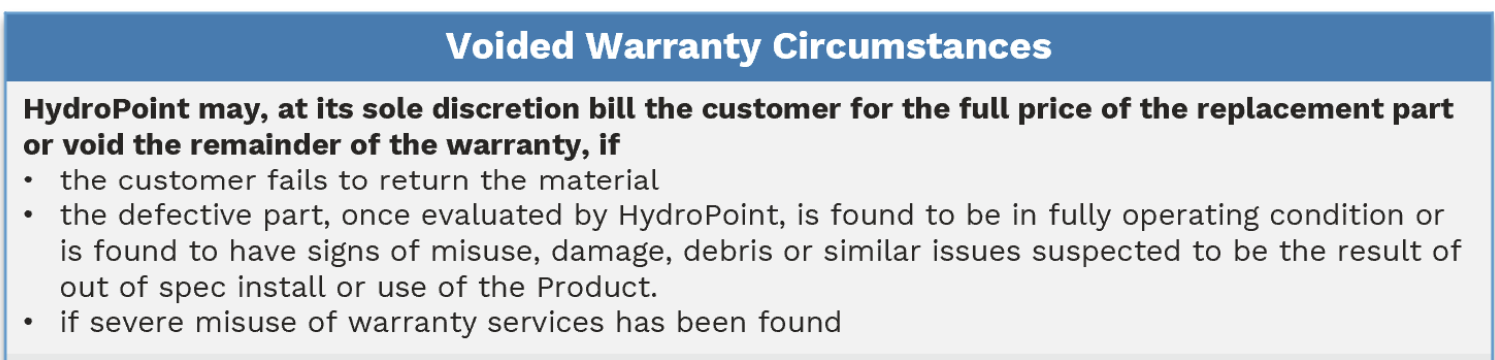
Go/ No Go Criteria If the photo you obtain by the customer has any of the following signs, please do not approve the warranty:
- out of specification use or installation, including improper electrical connections or grounding, abnormal service, or handling (including shipping damage), unusual physical, electrical, electromagnetic stress, or misuse.
- modifications, repairs, attempted repairs, or alterations in design or construction by Customer unless HydroPoint specifically authorized such alterations in writing. This includes the addition of conformal coating.
- Normal wear and tear, rust and/or corrosion, including discoloration due to direct burial or repeated immersion or surface discoloration on enclosure.
- Abuse, theft, unreasonable use, mistreatment, neglect, or defacement.
- Devices or subcomponents whose Manufacturer’s Serial Number and/or Material Number label have been removed, torn, or defaced.
- by ‘acts of god’ such as lightning strikes, electrical line power surges, floods, earthquakes, hurricanes, tornadoes, vandalism, or defects resulting from rodents.
- repairs or attempted repairs performed by anyone other than HydroPoint.
What is the warranty verification path?
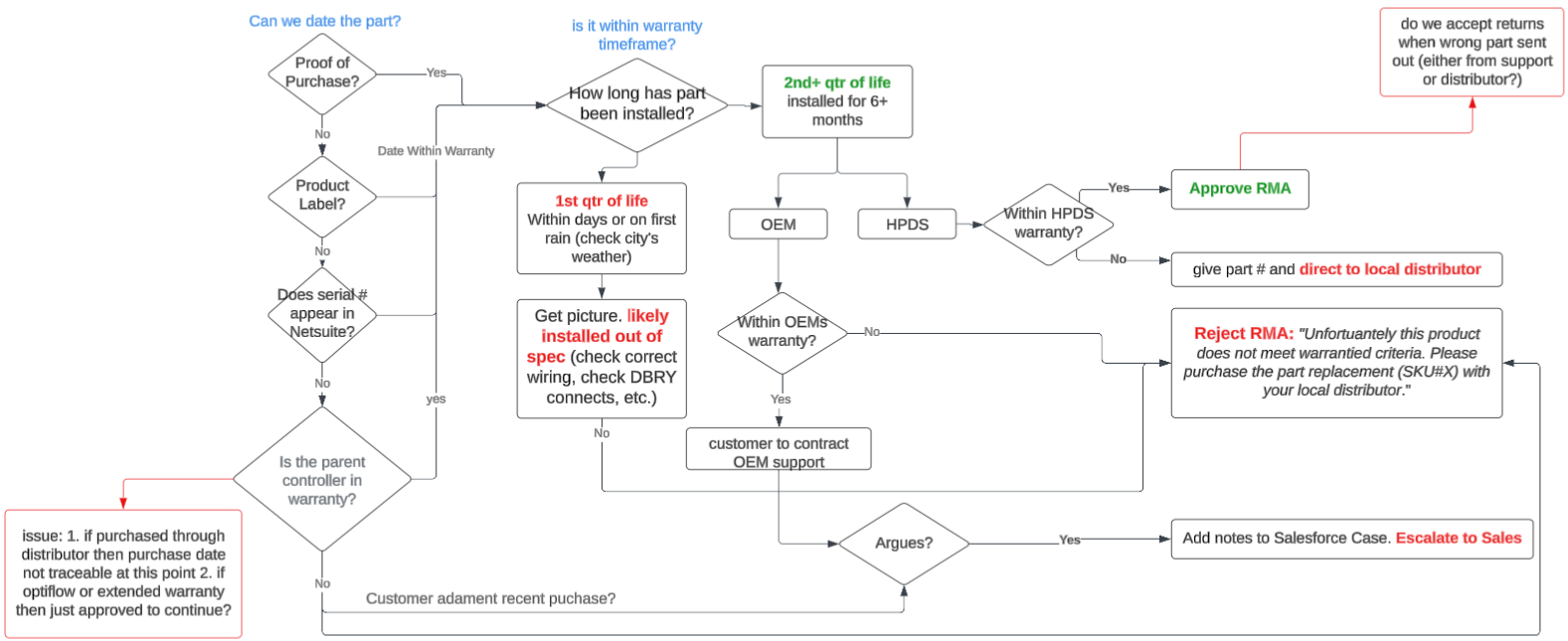
Important Note: occasionally check Salesforce for how many RMAs this account has had. If this account has had several of the same parts being replaced 3+, it could be that the customer is using an in-warranty controller to replace parts on other systems. Ask the caller why this part has already be re-ordered 2+ occasions. Escalate to manager if suspicious.
if BL Controller
For a Baseline Controller
- Salesforce Asset field→ enter the Mac Address.
- the mac address is a unique and permanent serial number assigned to a device when it registers with BaseManager. BPM uploads mac addresses into SalesForce so Support can track warranty & relevant tickets.
- the controller ID is a permanent ID assigned to a device when it registers with BM.
- Else BaseManager → go to Admin Subscription Page→ Warranty End Date
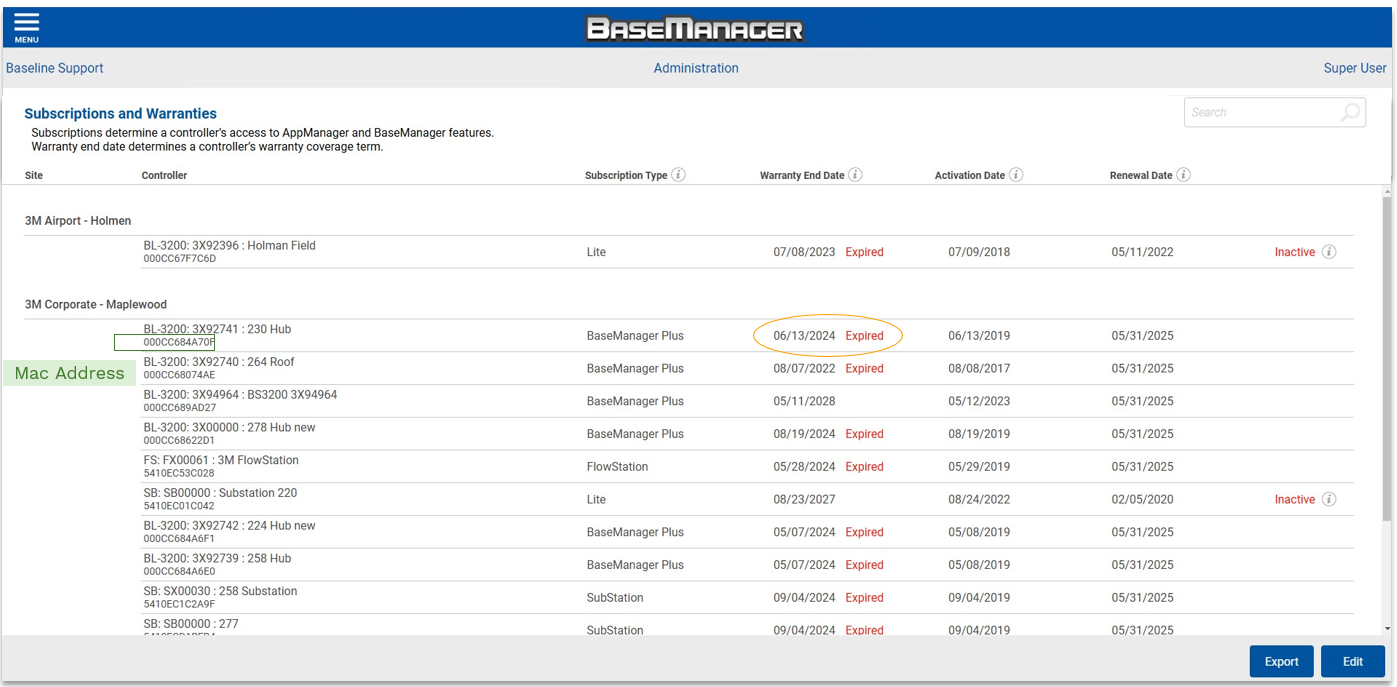
- Else, customer provide proof of purchase. Get a picture of the purchase order/ receipt and attach it to support case.
- Else, use Kool Grid software to see if the purchase order record is in there. If you aren't already familiar with Kool Grid, ask Tier 2 or a supervisor for help.

if BL Accessory
- Compare age of device with the warranty length.
- To find the age, use Identifying Serial Numbers to check if part has mfg. date label, else
- customer to provide proof of purchase, else
- customer to provide part serial no. (SN), Sales Order(SO) or return (RMA) number:
- Instructions: Salesforce → enter the SN or SO in search →populate related SO or RMA # with the date and parts included on SO.
- SO or SN will only be in SF if a) the part is serialized b) it was ordered through HPDS (as an RMA via Support/ HPM or was initially installed by Pro Services). Anything ordered through distribution won't show in SF (which includes all OOW replacements).
- Instructions: Salesforce → enter the SN or SO in search →populate related SO or RMA # with the date and parts included on SO.
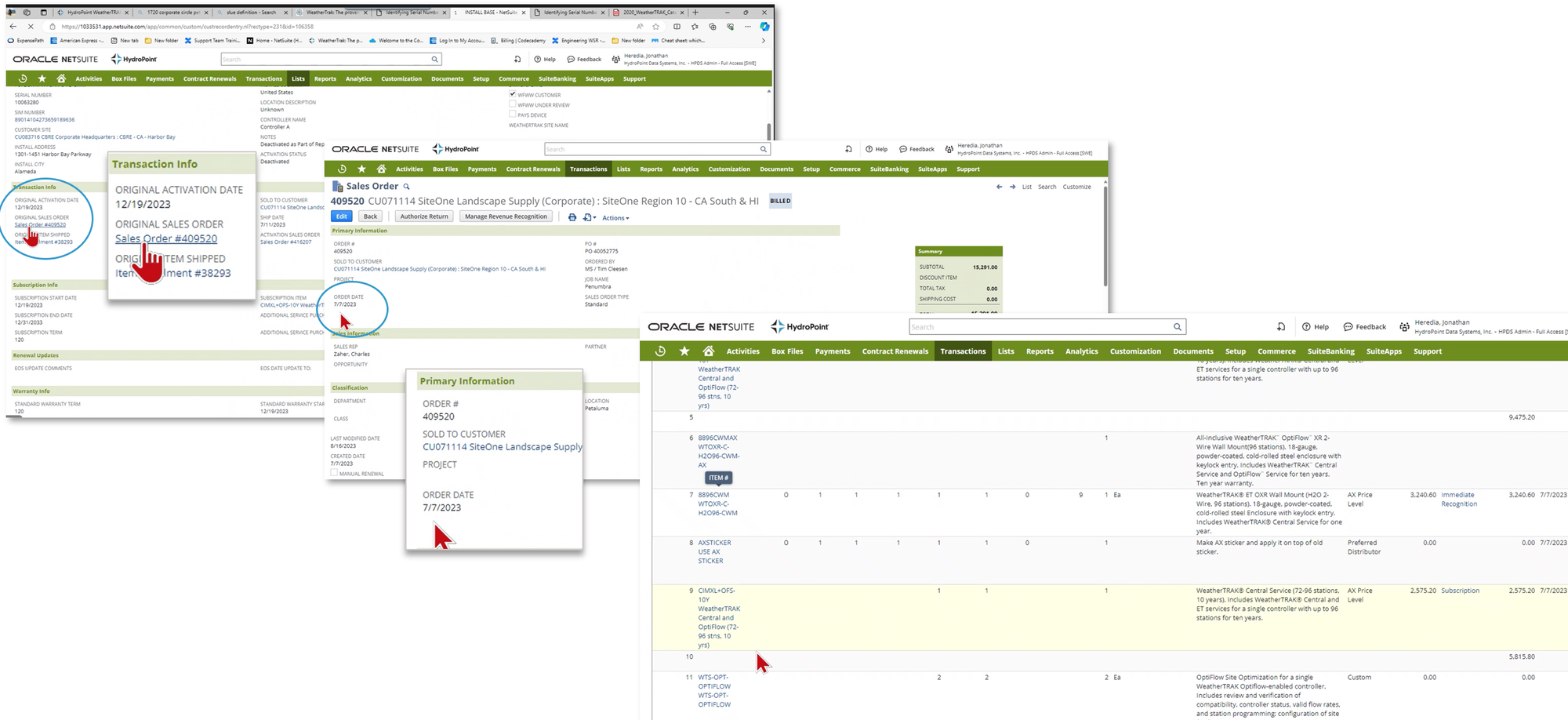
- else use KoolGrid Software (BL products) to see if PO record is there.
- else use parent controller's warranty coverage unless the peripheral is manufactured by OEM (see next tab).
- HPDS Accessory: devices manufactured by us (ex: decoders/biCoders and flow sensors with bicoder attached to it)
- OEM Accessory: 'original equipment manufacturer' are devices we resell from another manufacturer. (outdoor antennas, flow sensors, pressure sensors, moisture sensors)
if OEM Accessory
An OEM part is a part not manufactured by HPDS, only sold through us (flow sensors, outdoor antennas, etc.). These warranties carry the OEM warranty. Most of these devices are not serialized, meaning if we can't find the SO, we will not know the date of purchase / if it is in warranty.
check if device in warranty by:
- Find the SO in SF/NS (this would be if part was ordered via a RMA or Pro Services)
- else, check if device has mfg label via Identifying Serial Numbers
- else, ask the customer to provide the PO.
- no SO tell the customer "Unfortunately, we can only accept returns for products manufactured by another OEM if we can verify this accessory was purchased through HPDS, which we cannot at this time. This item is subject to manufacturer’s warranty and must be authorized by a manufacturer customer service representative for disposition."
- Direct Customer to OEM (see bottom of article for contacts)
How to replace?
If in Warranty
In Warranty
For returns related to warranty review and/or replacement due to defective or damaged product, an RMA is initiated and created in Salesforce by the Customer Support Team. see Hydropoint RMA Processes
Out of Warranty
Out of Warranty (OOW)
A non-warranty is any controller or part that's warranty has expired.
- Provide the Landscape Maintenance Contractor (LMC) the part number.
- Instruct the LMC to purchase the needed replacement part through their local HydroPoint distributor. Can use HydroPoint Distributor Information to help find their local distributor.
Ditsi/Enterprise
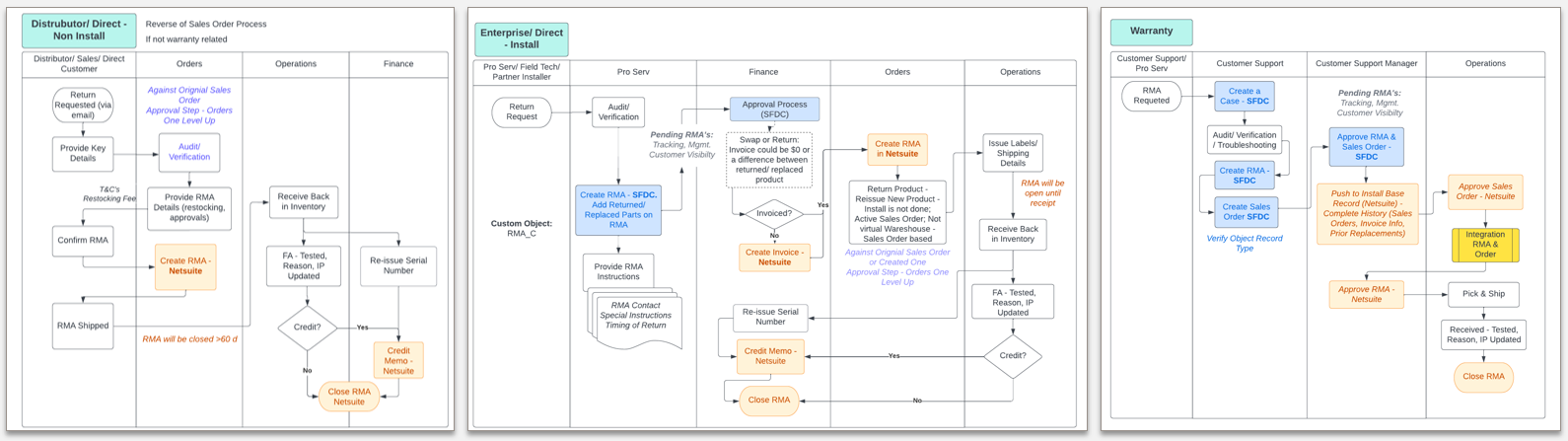
Distributor / Direct (Non-install) or Enterprise / Direct (install)
Non-install are RMA requests initiated by channel partners, distributors stock replenishments from customer returns, etc. Install are RMA requested by Pro Services, Field, Techs, Partner Installers. Where the RMA originates affects which departments it flows through. Instructions here: RMA Policy and Process.
Controller Parts
All parts are given their respective COGs (Q1FY24) to understand the associated cost when approving free replacement.
Controllers/UPGs
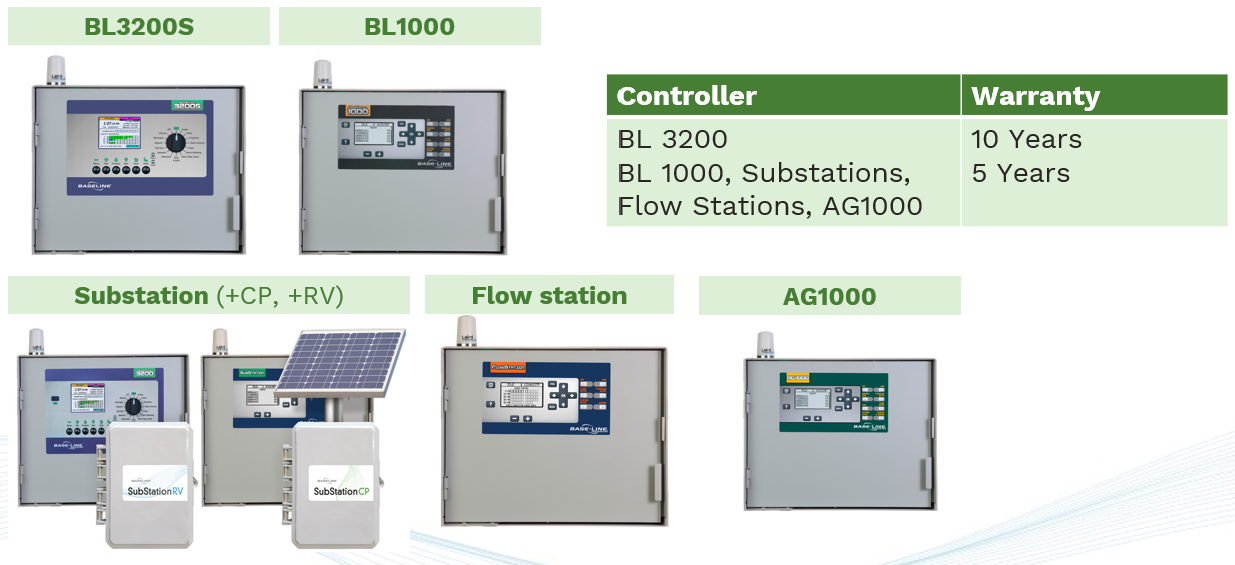
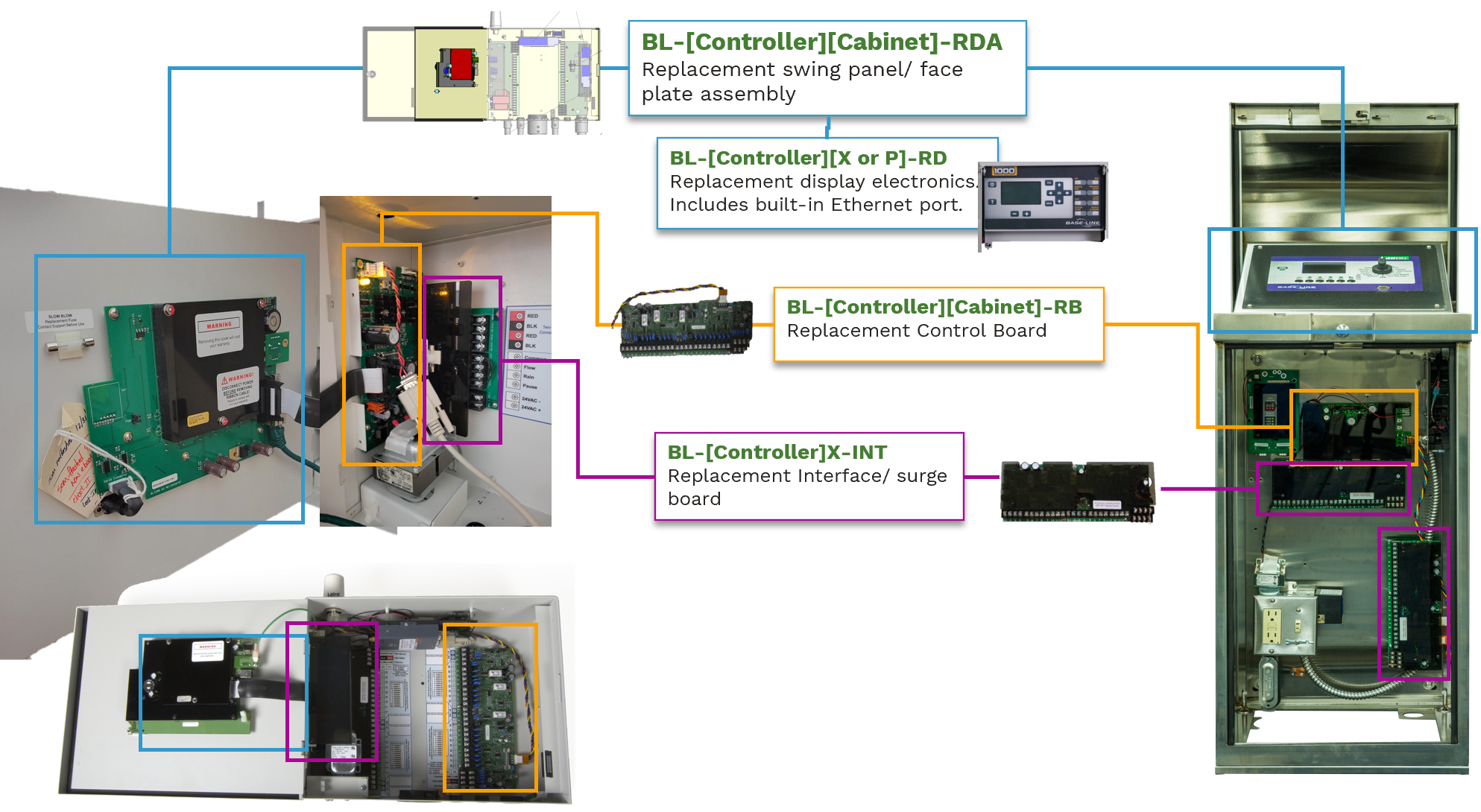
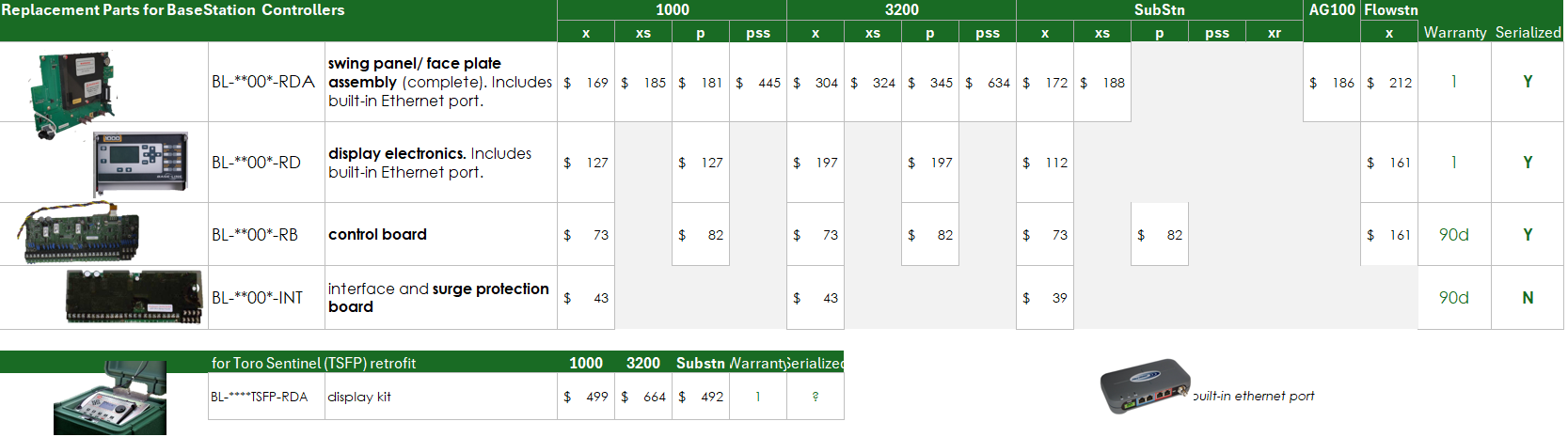
Baseline's design is modular. The Back panel assemblies (BPA) are configured to customer specs; specifying the communication type (cloud network module, gateway, ethernet, etc) and if system is 2W or conventional. If conventional, an r-board is added (-R12, -R24, -R36, -R48) depending on station count. Comm modules are factory installed into the controller enclosure. BPAs includes control board, interface board, comm module, transformers, and r-board (if conventional). You would not replace entire BPA, only the defect component(s).

Controller-Specific Parts
Replacement parts will have a warranty of 1 year or remainder of current warranty, whichever is longer.
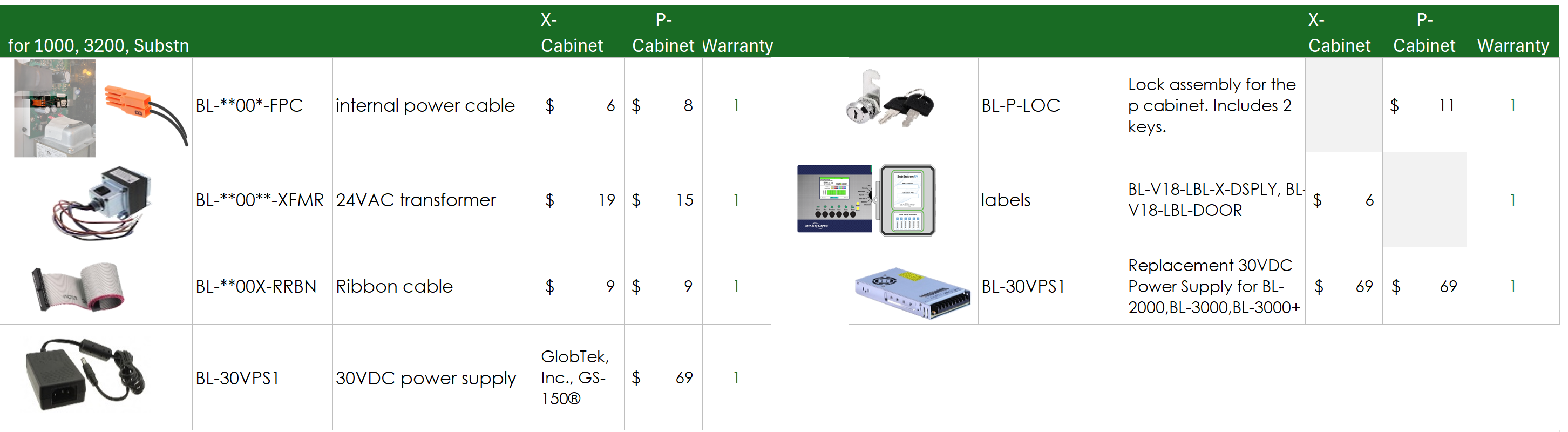
General Parts
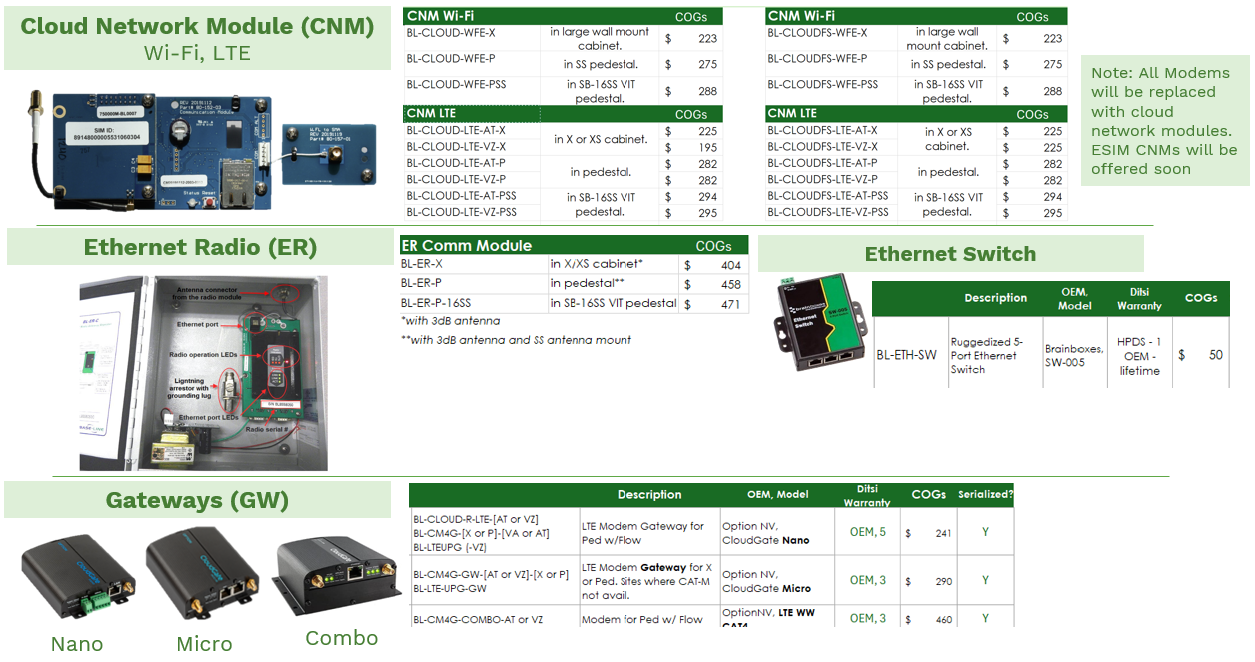
Communication Modules - If controller is in warranty, comms is covered. if its OOW then comms device is one year.
- communication cables (BL-CLOUD-[LTE/WFE]-ANTPTAIL) $28 and controller specific part. Power Cables $8 and controller specific part
- Internally for failures needing a return Mfg. contacts contact support@getwirelessllc.com and provide them with the ESN or IMEI number to see if under warranty.
- if the controller is OOW, a customer may still be able to claim their warranty through the OEM. direct them to:
- for Modems: OptionNV CloudGate Warranty; specifically, their support page.
- for Ethernet Switch: Brain Boxes offers lifetime warranty. Direct customers to sales@brainboxes.com.
BL Conventional Wire Replacements
R-boards are interfaces for non-two-wire (conventional) systems.

Substation RV/CP Replacement Parts
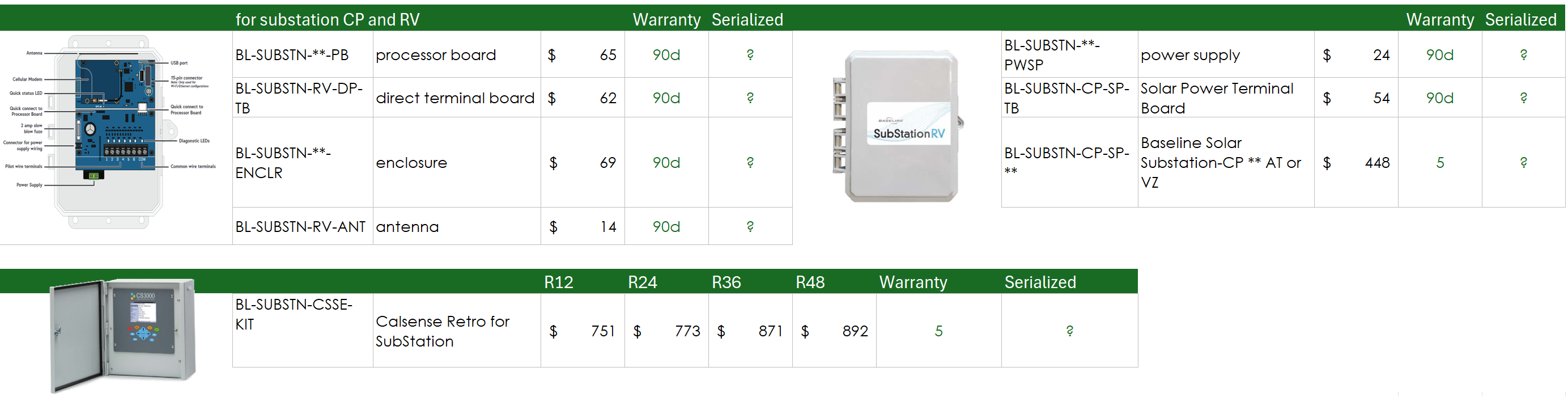
BL Accessories
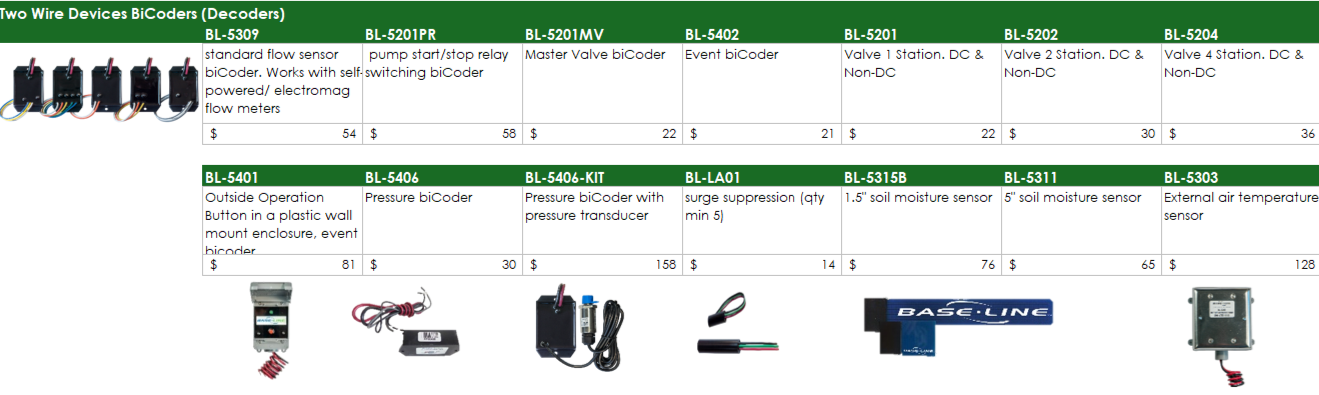
Decoders - 5 Year Warranty. Have mfg. date label.

Flow Sensors - these have been modified - integrated with a decoder- by Baseline, therefor we warranty the flow sensor for 3 Years, not OEM (this excl IDFS which is stays OEM warranty).
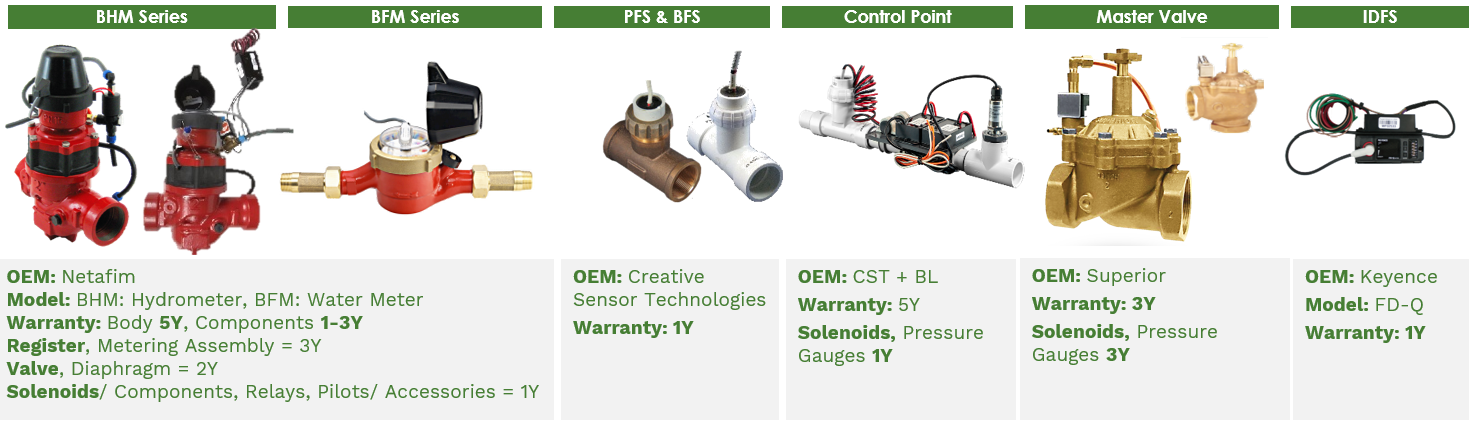
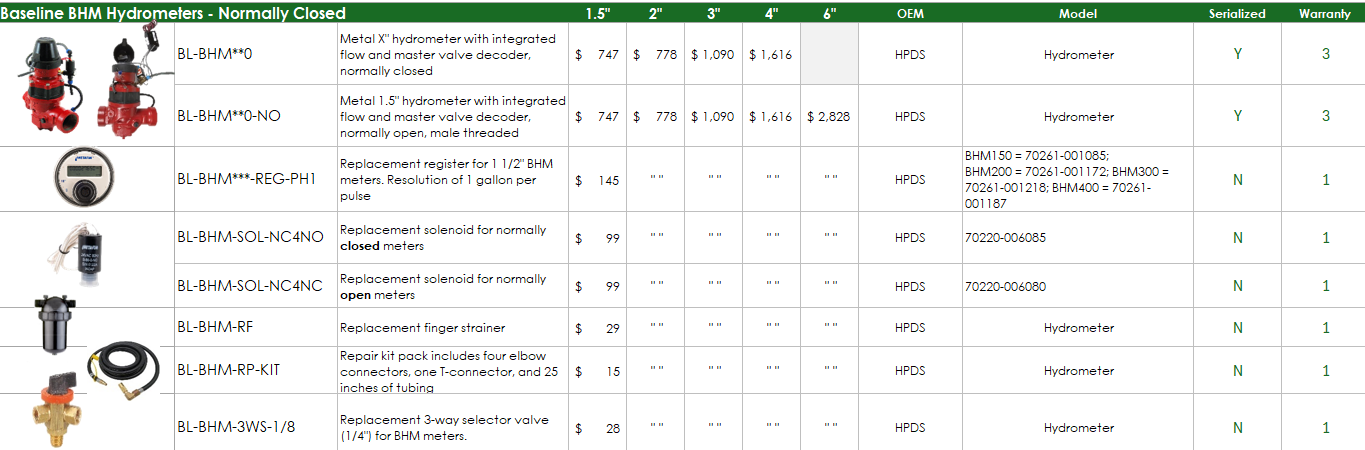
- BHM: integrated with a pressure sensor and MV decoder
- BFM, PFS, BFS: integrated with a flow decoder


OEM Accessories
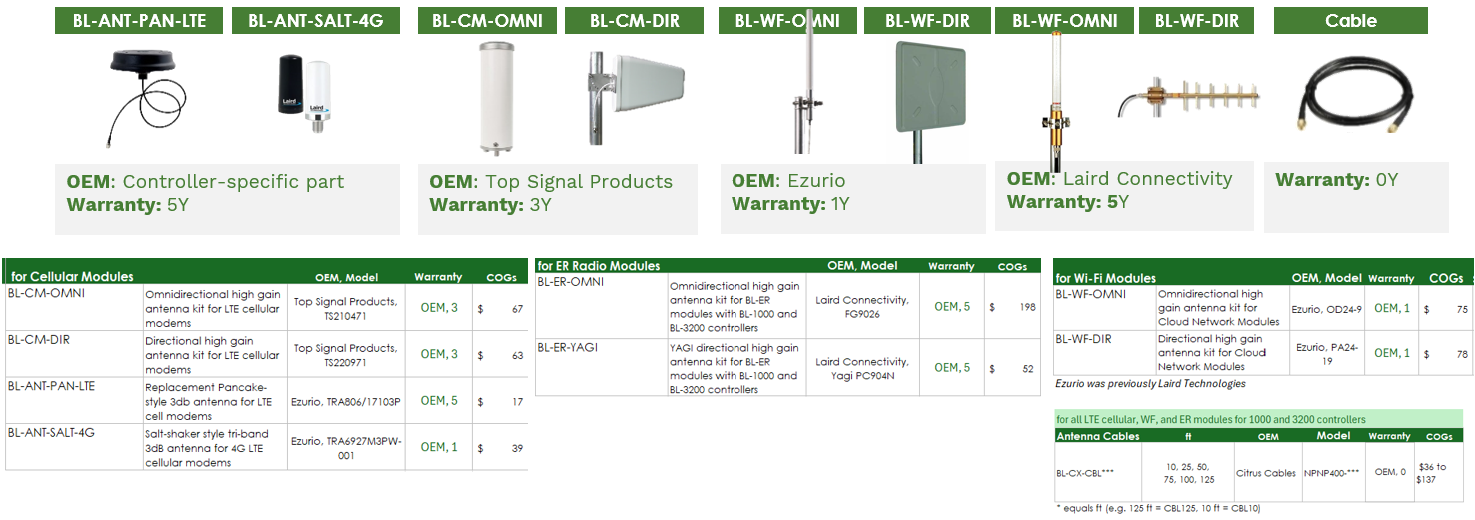
Antennas

Other
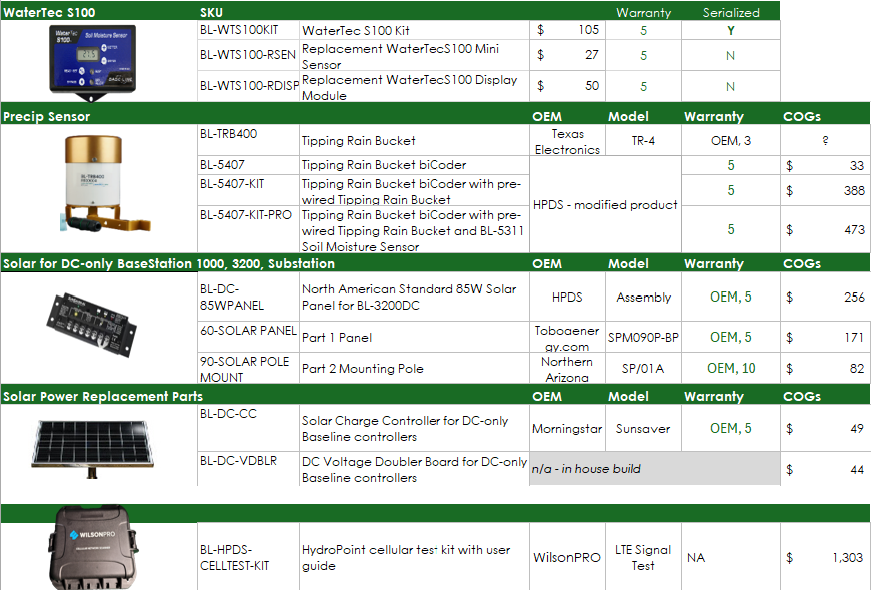

- Toboa Energy Resources LLC. Direct warranty claims to their Support email: sales@solartechpower.com.
- Batteries/ Chargers: Morningstar Sunsaver Warranty, GlobTek Warranty
- Power supplies (batteries, solar panels, cords, chargers) are not eligible for warranty.