
Running a hardware report from WeatherTRAK Central provides information about the hardware on WeatherTRAK Controllers. On the hardware report, you can find the modem type, (located on line 3) as well as other information pertaining to the terminal board. Log into WeatherTRAK Central to get started.
Running a Hardware Report
1. Click the Reports tab.
2. In the Generate Reports section use the drop-down list to select Controller Hardware Report.
3. In the Customize Report Options section, use the drop-down list to select the desired controller. You have the option of selecting more than one controller and can select all the controllers on a site if needed.
4. Click Get PDF to run the report.
Hardware Report Contents
Items on the hardware report can help troubleshoot hardware issues that may occur. If you need to call support or order replacement parts, the report shows specifics of the hardware components associated with your controller. Below is an example of what you will see on a hardware report.
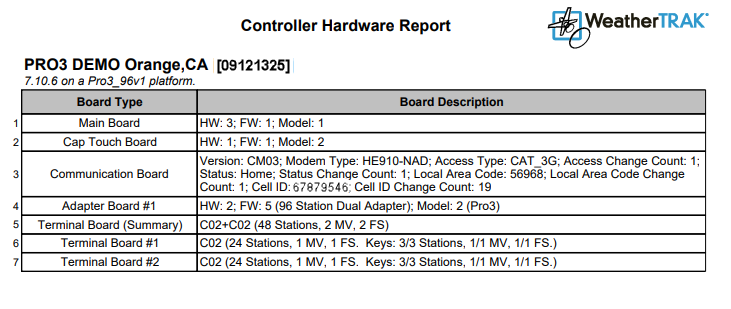
Just above the table, you will see the site name with the serial number of the controller. Below the site name is the firmware version and controller type.
The report lists the hardware on each board associated with the controller. Information found on the communication board (line 3) and terminal boards (lines 5-7) can be helpful.
Listed below are the lines that may help you troubleshoot hardware issues:
Line 3: Communication Board (Modem Type)
This is the section where you will find the type of modem that your controller has.

The information next to Modem Type is the mapping communication technology capability. Below is a table that helps determine what type of modem you have.
| Modem Type | Mapping Communication Technology Capability |
|---|---|
| 2G | SEGR64; GR64, G24 |
| 3G | H24, HE910-NAD; HE910-GA |
| 4G | LE910-NA1 |
| 5G | ME910C1-NA |
Line 5: Terminal Board (Summary)
A summary of the controller’s stations, master valves, and flow sensors. If the controller has two chassis or terminal boards, the summary combines both boards to let you know what the controller as a whole contains.
Line 6: Terminal Board #1 (Station and MV/FS count)
The number of stations and station keys, and configured master valves and flow sensors on the primary chassis board.
Line 7: Terminal Board #2 (If applicable)
The number of stations and station keys, and configured master valves and flow sensors on the secondary chassis board.