Skip to content
HydroPoint Knowledge Base
  • All products
  • HydroPoint
/

Controllers

  • Factory Reset - WeatherTRAK Controller
  • LED Chassis / Terminal guide
  • LEGACY- AT&T Certification of HydroPoint LTE CAT-M devices
  • Lightning Troubleshooting Steps
  • Offline (OFL) or No ET (CM) Controller Procedure
  • Quarantined Controller Procedure
  • Transformer Buzzing
  • Troubleshooting a Blank Display
  • Verify Power to the Controller
HydroPoint / Controllers

LEGACY- AT&T Certification of HydroPoint LTE CAT-M devices

Updated May 13, 2026 1 min read

Purpose: Overview of how to set up access to the C2M ProjectOne AT&T Internal Coverage Map and use the tool to verify area coverage

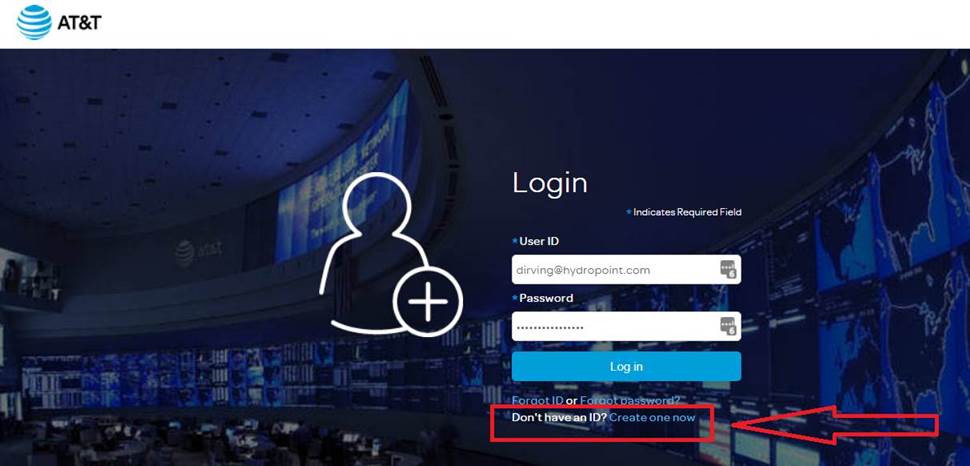
Go here: projectone.att.com

Then select: Don’t have ID Create One now and follow the steps to set up a new account
Was this article helpful?

Related in Controllers.

  1. Offline (OFL) or No ET (CM) Controller Procedure This document provides a general protocol to troubleshoot an Offline or No ET alert. It details the alerts the customer
  2. Quarantined Controller Procedure This document outlines what it means when a controller is quarantined, why it happens, and the steps Support and Extended
  3. Verify Power to the Controller These steps require someone to physically go to the controller panel to perform electrical tests. If the controller does not
  4. Lightning Troubleshooting Steps Diagnostic Steps Alerts: Overcurrent (OC), Valve Short/No Connect, Station Not Found, Hardware Errors Lightning/ Surge Path: Field & Valve
HydroPoint

Water management intelligence.

  • Sign up

© 2026 HydroPoint Data Systems. Built on HydroPoint.