
These steps require someone to physically go to the controller panel to perform electrical tests. If the controller does not appear to be powering on, complete the following items:
1. Confirm Power is running to the Controller.
- Check if the display panel light up and the controller beeps when you push the set up button? go to step 2
- Does the chassis light up?
- no, check the power supply/transformer first (step 3) and then the fuse (step 4)
- yes, use WT Controller Chassis/Terminal guide to see what the light pattern indicates. Different lights help users' diagnosis specific issues (adapter vs ribbon cable vs station keys, etc):
- Is it connected to a working power source?
- is it plugged in or is attached to a switch that has been turned off
- Check the circuit breaker.
2. Check if Display Screen Issue
Troubleshooting a Blank Display
3. Fix any power Issue
- Pull out the voltmeter to see where power is being lost.
- Check the volts going into the transformer to verify power source is on.
- Check the transformer cord that connects the transformer to the top of the chassis. Put 1 lead on the yellow wire and 1 on the orange wire going into each adapter.
- It should be between 24v - 31v (electrical troubleshooting at the transformer is necessary).
- if there is power going into the transformer, but none going through the adapter, it is likely the transformer has failed.
- if there is power along the adapter, it is likely the Mini chassis has failed.
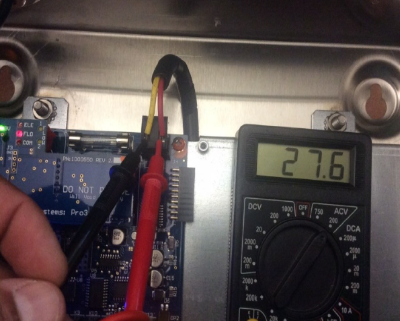
If the customer is not qualified/ comfortable testing for power, always recommend they seek help from profession electrician.
4. If its a blown or popping Fuse Troubleshooting Blown or Popping Fuses
If the fuse has been blown, it needs to be replaced with a slow blow (or delay) fuse. Do not replace with a regular fuse.
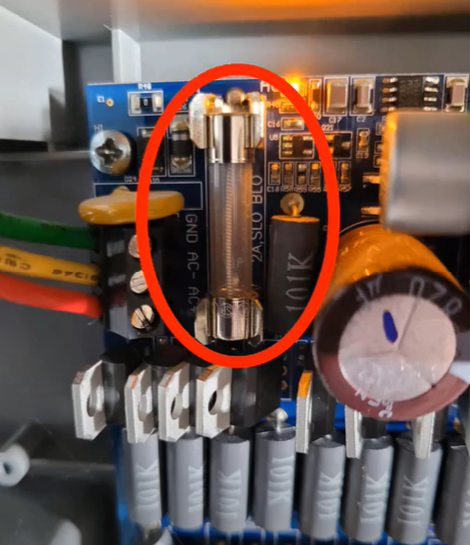
5. Replace hardware components with loss of integrity
- Check for corrosion or similar damage on all relevant parts. It is possible that expansion and contraction from temperature changes, moisture intrusion and bugs/slugs are all cause for potential damage.
6. The "Known Good Method."
- If the customer has other working controllers on-site or on-hand and they are willing and capable, we can guide them on swapping displays.