
This document outlines what it means when a controller is quarantined, why it happens, and the steps Support and Extended teams should follow to resolve it.
What is the Quarantine Program? The Quarantine Program is designed to protect system performance. Controllers with poor cellular signal may repeatedly disconnect and reconnect to the WTC / BL servers. This can cause excessive communication, slow data refresh cycles, and impact overall network stability. To prevent this, software was developed to identify controllers that exceed normal communication limits and temporarily block them from connecting to the central servers.
What is a Quarantined Controller? A controller is placed in quarantine when it exceeds a communication threshold within a 24-hour period, as defined by Engineering (see table below). Once quarantined, the controller is blocked from communicating with the server, appears offline to the user, and cannot be remotely managed. WT.net reports can be used to identify which controllers are exceeding communication limits or are currently quarantined.
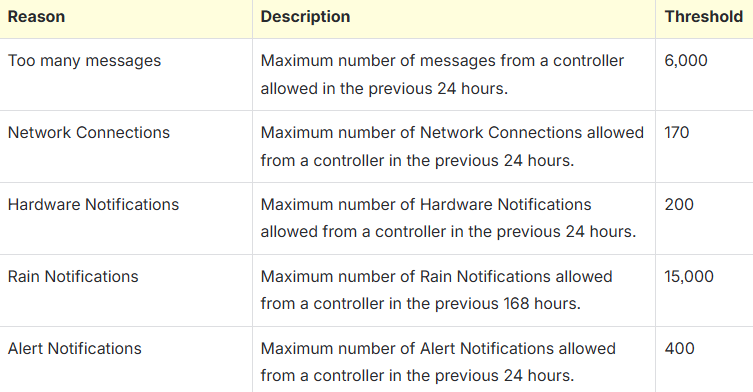
What causes a Controller to be Quarantined? There are four root causes for why a controller may overcommunicate:
- HPDS-side : Hardware Issue - replace chassis, rain switch jumper wire and/or station keys if needed (alert reason: Hardware Notifications and Rain Notifications)
- HPDS-side : Hardware Issue - replace modem or upgrade SIM to VZ (alert reason: Network Connections or Too Many Messages)
- Customer-side : Network Issue - poor signal at site or controller location (alert reason: Network Connections)
- Customer-side : Field or Hardware Issue - resolve alert or replace chassis and/or station keys if needed (alert reason: Alert Notification)
To see if hardware vs network issue, view the Smart Alert Case Details.
Distributor to Customer Email
If a distributor calls in requesting messaging for a controller that appears to be offline, please send them the following messaging:
‘In WeatherTRAK Central, you may have been receiving offline (OFL) or No ET (CM) alerts or finding that you are unable to remotely view or manage the controller’s programming. This may be due to either a hardware issue on the controller or a network issue specific to the controller’s site location. Access to the Licensed Software will be provided over various facilities and communications lines. Information will be transmitted over local exchange and Internet backbone carrier lines, through routers, switches, and other devices owned, maintained, and serviced by third-party providers, all of which are beyond HydroPoint’s control. HydroPoint understands the inability of Subscriber to properly access and use the Licensed Software’s operation due to internet connection issues as extremely frustrating. We will use our best efforts to diagnose issues and recommend viable solutions. Please Contact Support for available actions to resolve the network or communication issue.
HydroPoint Customer Support, (800)362-8774, support@hydropoint.com’
Attach 3G/LTE ppt link here.
Quarantined Controller Support Procedure
Customers with offline or quarantine controllers will receive priority for case resolution. A user will continue receiving ‘Offline Alerts’ (if subscribed) until the controller is cleared from the quarantine list.
Our policy of Quarantine is CONFIDENTIAL. DO NOT DISCLOSE TO THE CUSTOMER quarantine as the reason for the interruption of the controller’s service. These alerts do not mention 'chatty’ or ‘quarantine.’ When explaining the issue, use messaging such as:
- “We see that your controller is experiencing communication or Hardware issues that cause it to be offline. We want to help you resolve these issues so you can resume utilizing the WeatherTRAK service.”
Note: Walmart Controllers? Walmart Responsibilities - HydroPoint (helpjuice.com)
1. Confirm Controller in Quarantine
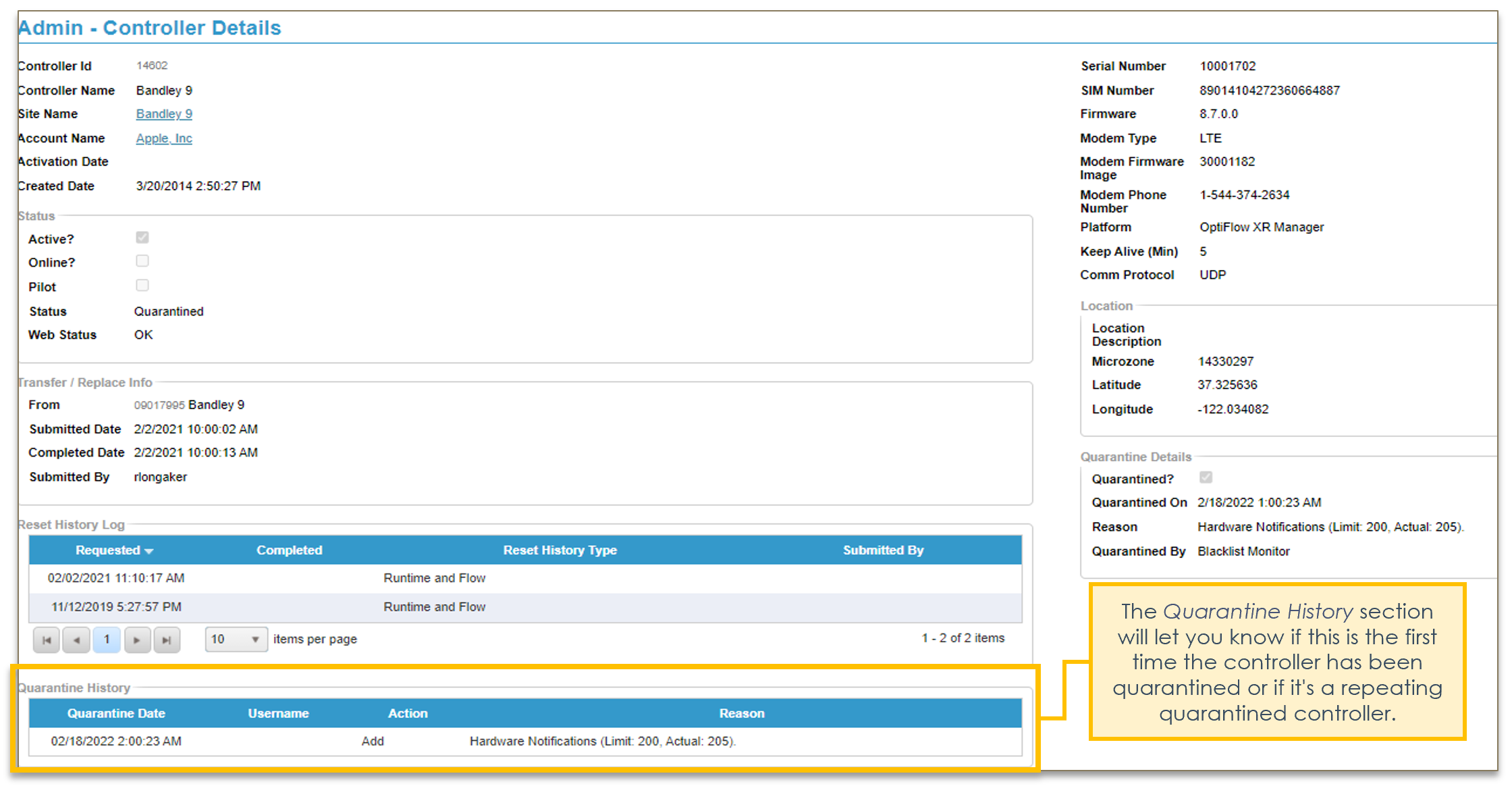
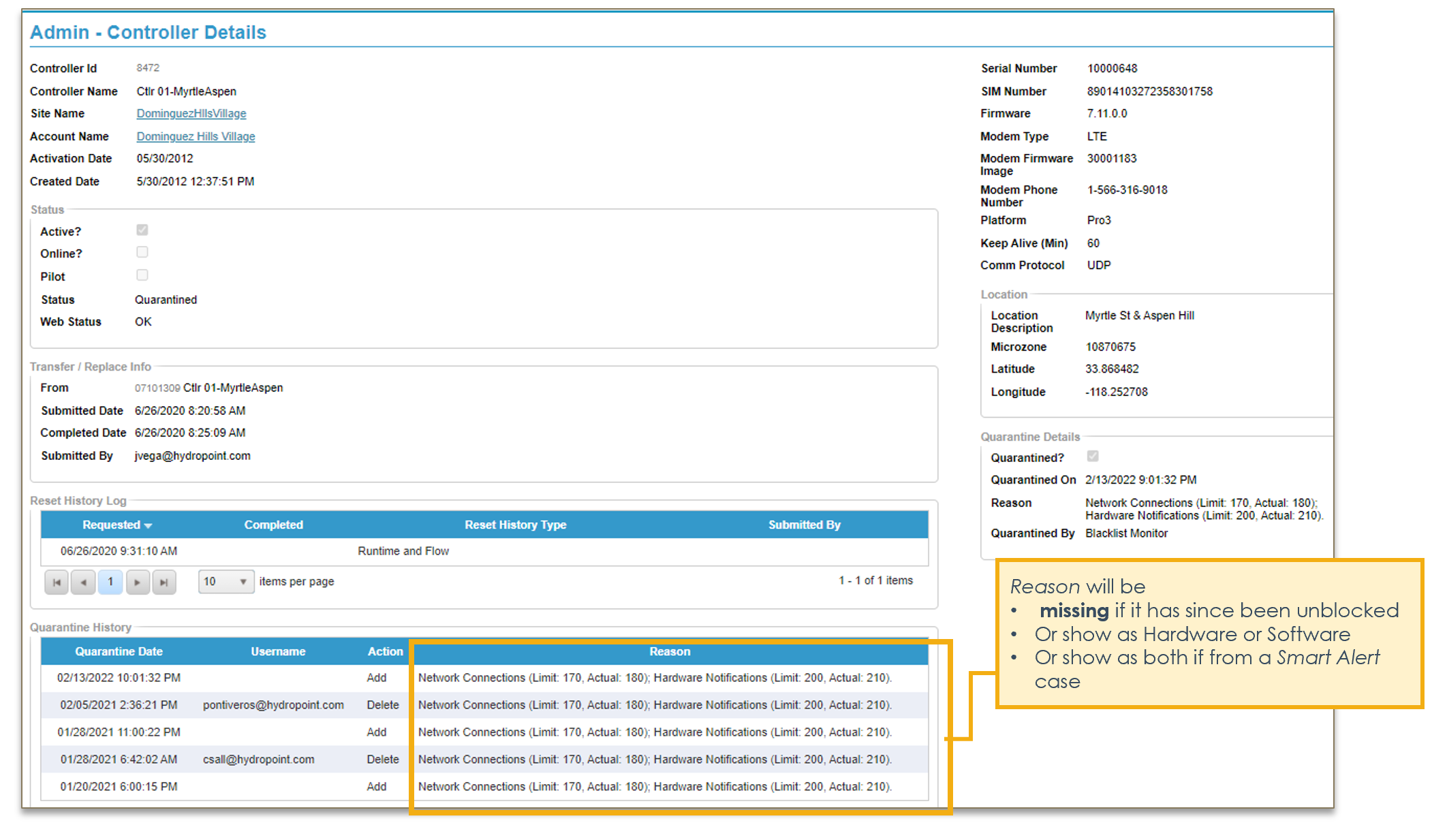
Checking the Controllers Quarantine History
In WeatherTRAK.netgo to the Controller Details, then scroll to Quarantine History and related Reasons.
- go to controller's Smart Alerts and review Case Details to understand if its Network or HW issue (these alerts may show it as both)
- can also run a Controller Quarantine History Report to understand HW vs Network Issue
First Offense Example
Repeat Offense Example
Smart Alert Case Details
2. Decide where controller is in decision tree
How many times has the Controller been Quarantined? What has been the trouble shooting history?
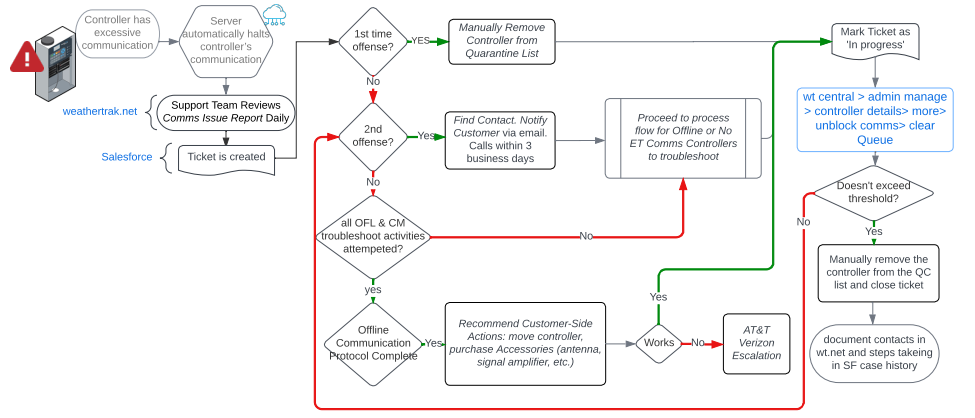
How many times has controller been quarantined?
1st Offense
2nd Offense
If this is the 1st time a controller has been quarantined, a Salesforce case will need to be made for this instance. Be sure todocument quarantine details (reason, quarantined by, etc.).
Then the controller should be manually removed from the list to help reduce quarantine queue.
- In Weathertrak Central, enter controller serial number and go to its Admin Manage
- Select Controller Details and identify/notate the type of quarantine in the case. (If it's a smart alert case - those details will already be there.)
Once Unblocked Notate first offense and resolve in Salesforce Case History
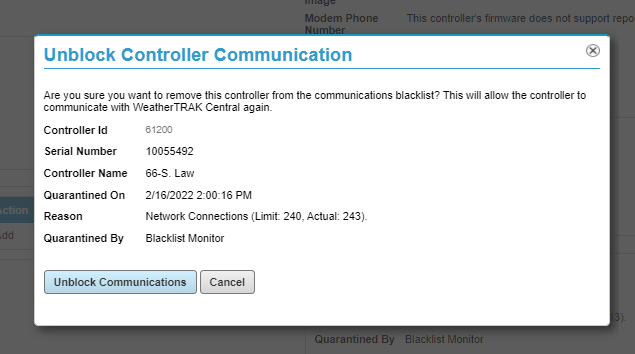
Once Unblocked, you will receive a confirmation above the controller details.

First select "More" to view menu dropdown. First click “Clear Queue”, then "Unblock Communications."
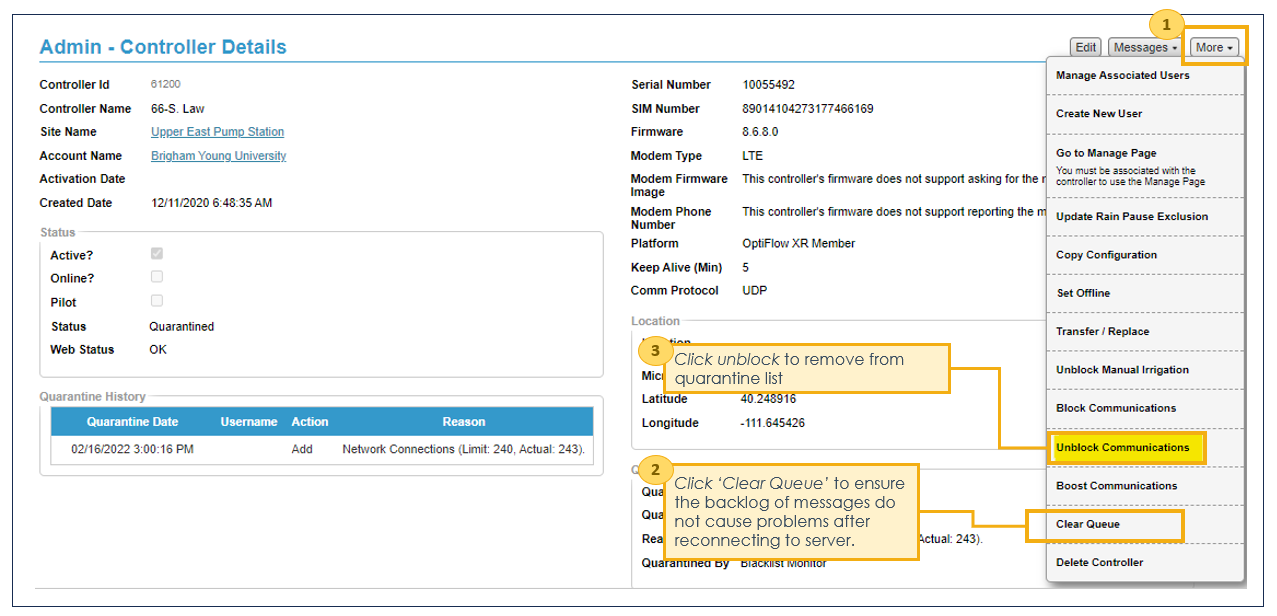
For controllers reappearing a second time contact the Customer. We need to proactively communicate with Customers who have controller(s) on quarantine. Please send the email below as early as the first day, or at least by 3 business days. After 3 business days attempt to call the customer. To find a Contact, scroll to next section.
- Notification Cadence: Please email the customer every 3 business days. If a customer does not respond, email more senior personnel with previous contact 'bcc'd'. There is a general 3-strike rule to attempt customer contact. If no reply, no need to continue. The controller will remain on quarantine until we coordinate with someone onsite.
- Update Site Details in WT.net with appropriate contacts and Case History in Salesforce with all outreach efforts (how many times we've sent email, to who, ignored response, etc.)
Customer Notification Email
Subject Line: WeatherTrak notified of an Offline Controller. Please Contact Support Immediately.
Hello ___,
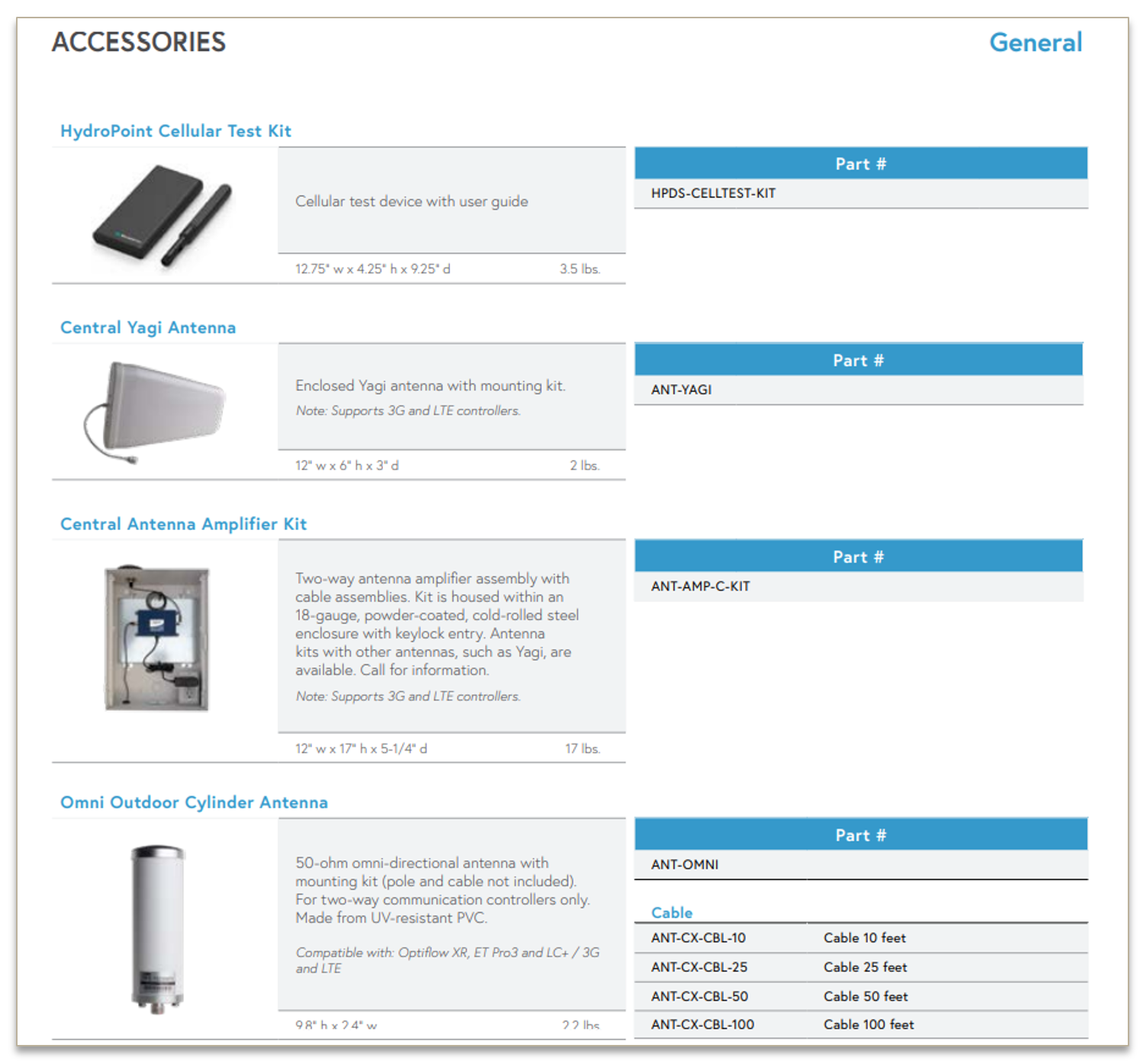
I am reaching out to you regarding Controller <xxxx> at Site <yyyy> that appears offline. As you may know, there are unique instances based on geography, cellular tower locations, and site topography that can make it difficult for a cellular signal to reliably reach a cellular-based irrigation controller. HydroPoint has extensive troubleshooting toolsets including controller communication alerts, controller signal strength diagnostics, and cellular signal strength testing to establish what might be the cause of unreliable cellular signals at a controller. HydroPoint also carries an array of different antennas and cellular booster kits to enhance coverage where needed.
Our Support Member will first need to someone from your team to help us inspect/ troubleshoot the controller at the site to see if it is a hardware issue. Required replacement parts will depend on diagnostics. It would be extremely helpful and expedite the process if you gather the following information prior to contacting Support:
- Controller Serial #
Best shipping address for this site- Best contact for onsite person performing testing and repairs
GPRS Status, Controller Signal Strength and Quality: on COMM 02 Menu Screen (WeatherTRAK link or Baseline link)- Description of where controller is (ex: in metal enclosure, long/lat coordinates, etc)
We apologize for this inconvenience and greatly appreciate your cooperation in resolving this issue. If you have any questions or concerns, please feel free to reach out.
Kind Regards,
Customer Support
(800) 362 -8774
HydroPoint Data Systems
Note: No charge upgrades will only be available for customers under warranty. Our Warranty does not include Preferred Shipping for replacement parts.
Finding a Contact
- If Large Number of Contacts: Try to use Talkdesk activity to identify recent site maintainer contacts
Warning
Special Handling Instructions - FM300 Data Collectors
For All HPM Customers
If it’s an HPM customer AND a contact is already populated in the case, proceed with outreach. Email performance@hydropoint.com to engage CSM if no response.
If it’s an HPM customer AND no contact is populated in the case, email performance@hydropoint.com to get a contact from the CSM before proceeding with outreach.
To engage the CSM Team, send an email to performance@hydropoint.com requesting assistance and provide the following details:
- Support Case ID
- Controller SN
- Account/Site
- Quarantine details
Once they respond, coordinate with the appropriate CSM for any required follow up or additional troubleshooting actions, and keep them copied on all customer communications so they have visibility to current status.
Special Handling Instructions - FM300 Data Collectors
Customers with FM300 Data Collectors require different resolution steps and Customer Support does not need to initiate customer outreach for those. To handle a quarantine data collection controller, follow the steps below:
- First confirm if the quarantined controller is a Data Collector by going to the "Admin - Controller Details" screen in WTC and verify the "Is FM300?" field (see example below)
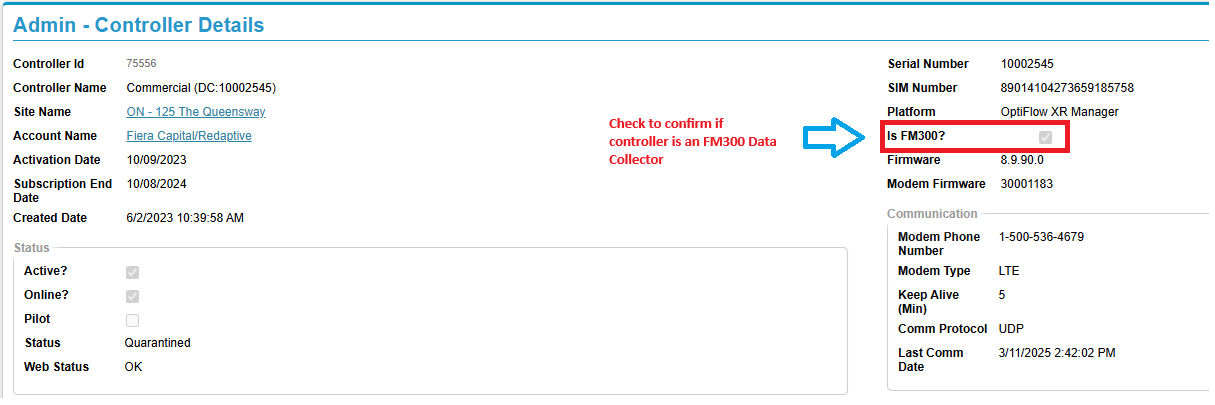
2. If the controller's FM300 designation IS NOT marked, proceed with the standard HPM outreach process.
3. If the controller's FM300 designation IS marked, DO NOT PROCEED WITH CUSTOMER OUTREACH.
- Put the following notation in your quarantine Smart Alert case notes:
- "This controller is an FM300 Data Collector. Reassigning to CSM to coordinate the necessary follow up."
- Reassign the quarantine Smart Alert case to the designated CSM and they will manage all next steps.
For all Non HPM Customers
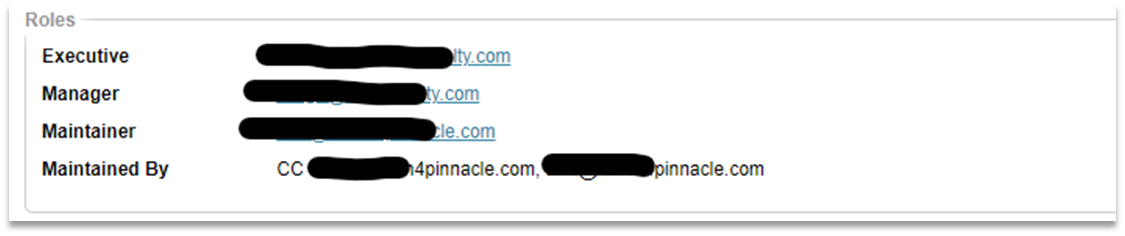
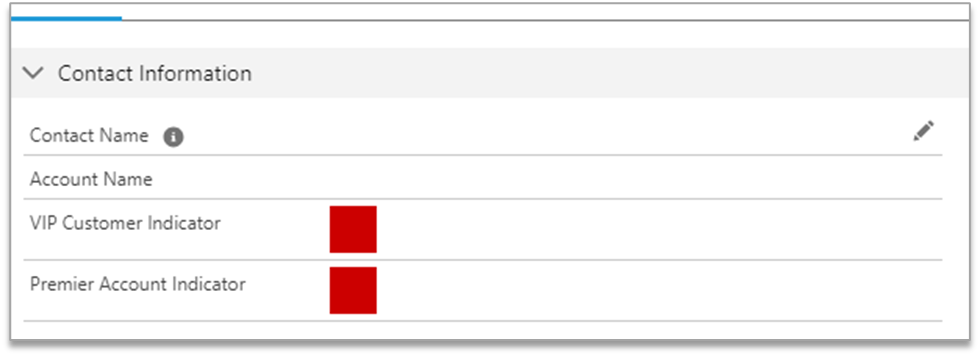
2. First check WeatherTRAK Central. From the Controller Admin page and click on the site. On the pop-up Site Admin page look in the Roles Window.
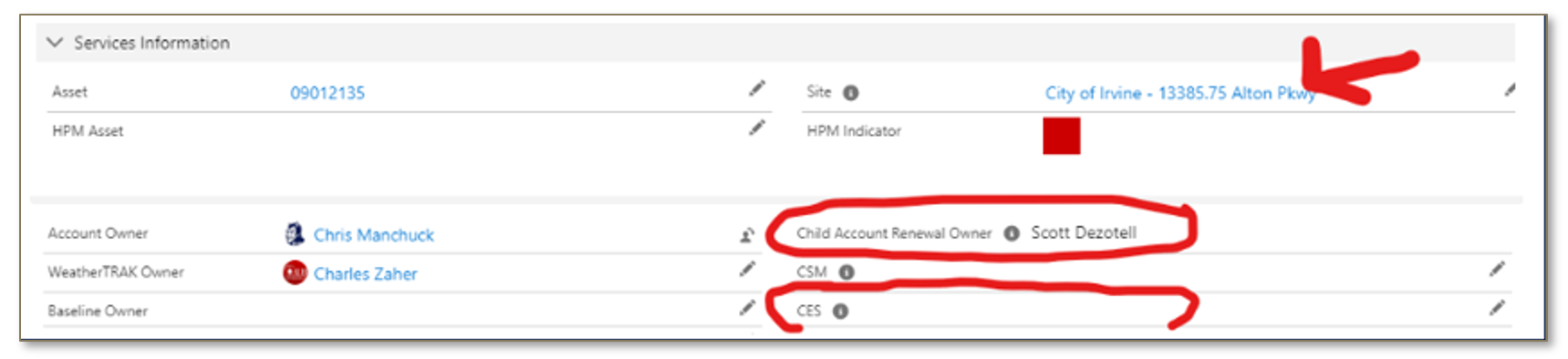
3. Else, in Salesforce, click on the case and use the Account Team information to identify Hydropoint Acct. Manager &/or Customer Engagement Specialist to ask them for a potential contact. Email both of them from Salesforce Case for tracking purposes.
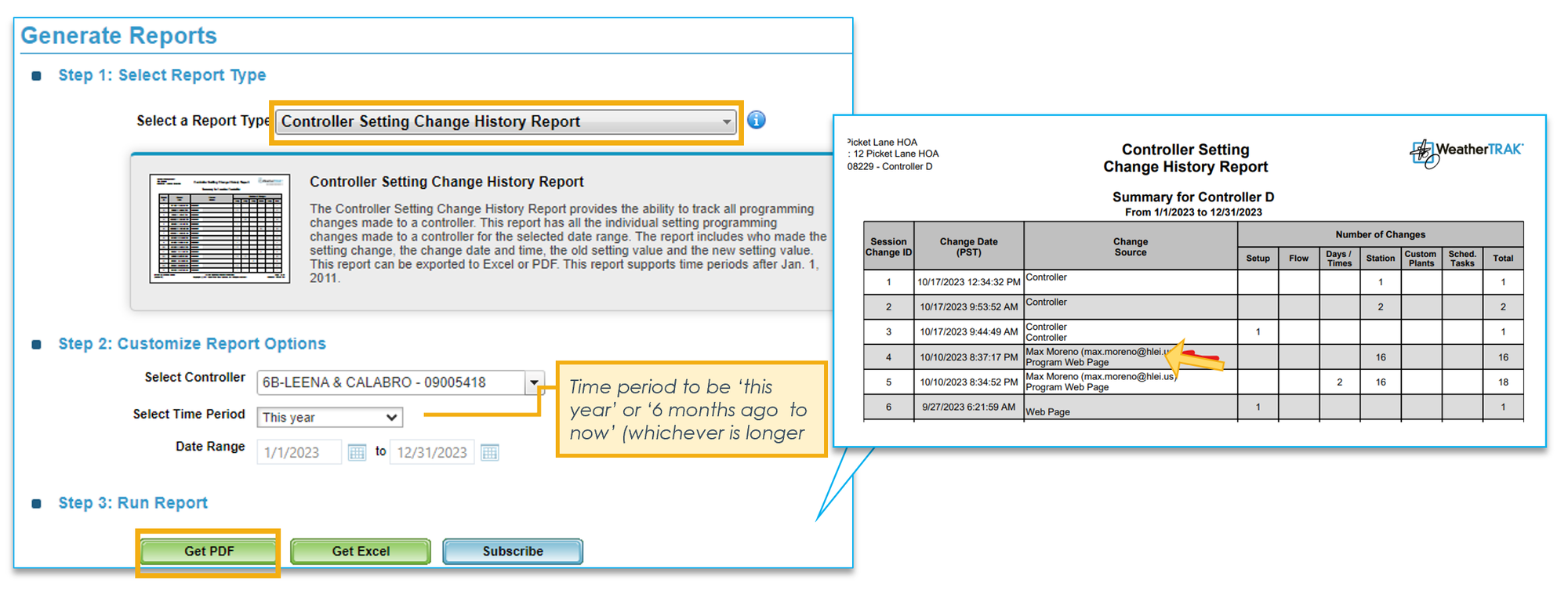
3. Else, in WeatherTRAK Central go to Reports tab, run a Controller Settings Change History Report. Select the serial and site in question. Select the time period to be “this year” or “6 months ago to now,” whichever is longer. Review the report to see if there is a user acct (contact) that has made changes and reach out to them in addition to gathering the email addresses of users associated with that site. Note: We understand that there likely will be users no longer affiliated with the site/controller.
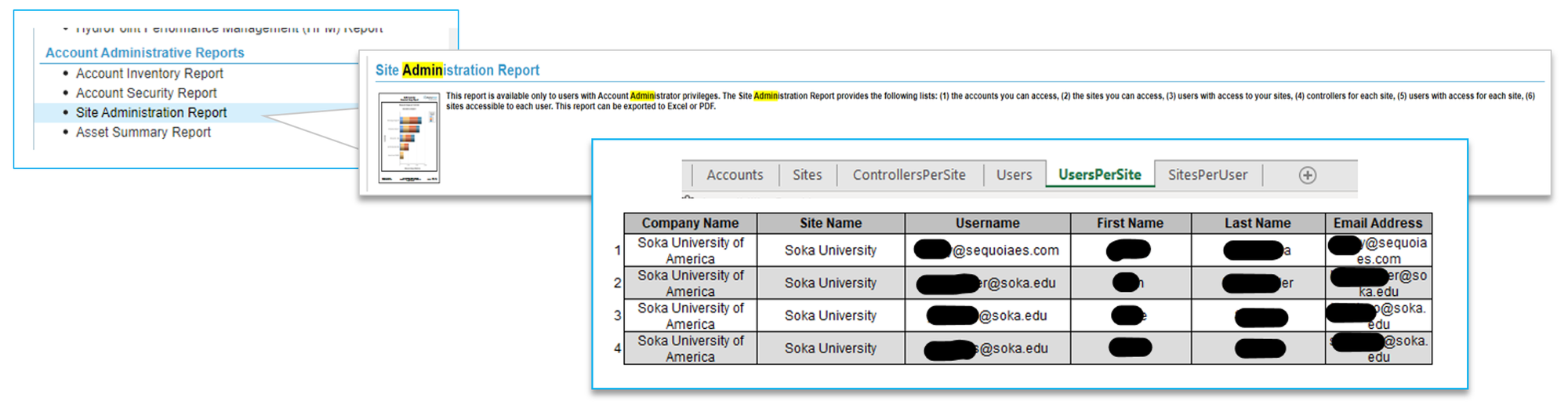
4. Else, try running a Site Administration Report to gather a list of potential contacts to send an email to. Use the BCC (blind carbon copy) field when adding numerous email addresses to keep any intended privacy of email addresses intact.
5. If you still cannot identify a contact(s), go to Salesforce > user profile > asset record and search the controller's serial #. In the Case History see if there is user contact associated with the controller.

5. If you cannot find a contact or the account is nonresponsive
Engage Sales Rep, Customer Engagement Specialist (CES), Customer Success Manager (CSM) or Account Manager to help manage customer's expectations of services. Alert them through SF Support Case. They should be made aware of what next steps are to resolve the issue with details of our outreach history (ex: contact denies outreach, etc.). Mark the support case status to "On Hold." Once you have marked the case status to “On Hold," choose the resolution method “Quarantine On Hold.”
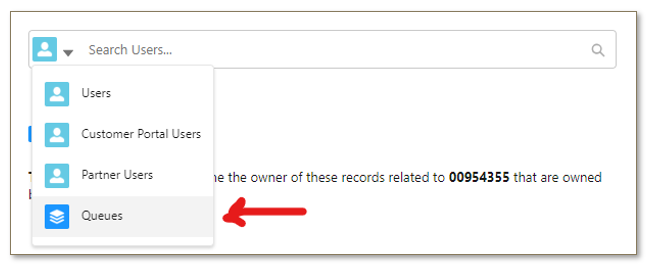
Require T2 Support Approval before adding to hold queue. Assign the Case Owner to be Queue "Quarantine Dead End." These cases will be reviewed to validate that all methods of attempting to find a contact have been exhausted. If not the case will be reassigned to you. Please ensure you take the time to exhaust all methods to prevent extra work for yourself.
Maintain Accurate Information in Our Systems
- Because a controller may become re-quarantined it is crucial to record any supplementary information in our systems as this may be the only point of evidence troubleshoot actions were taken, as well as prevent duplicative actions Support has to carry out. In addition, the maintainer who previously performed the remedial action may have critical information (ex: customer decided not to replace hardware, customer not replying)
- Record/ Update
- new contact information in WeatherTRAK central.
- any outreach/troubleshoot actions taken in Salesforce Case History
3. Have you completed Offline or No ET Controller Protocol
Warning
For All HPM Customers
If it’s an HPM customer AND a contact is already populated, proceed with outreach. Email performance@hydropoint.com to engage CSM if no response.
If it’s an HPM customer AND no contact is populated, email performance@hydropoint.com to get a contact from the CSM before proceeding with outreach.
Consult the CSM to review required troubleshooting steps before communicating to the customer.
Do not recommend or instruct Enterprise Customers to perform a site signal survey. In the event that a signal test is needed, review with the CSM and they will coordinate an FSR with Professional Services.
4. If Long Term Quarantine Customers (policy still being further developed)
Background:
- A Quarantine controller is not communicating with WTC or WT mobile, so it cannot be updated remotely. Pros a. The controller retains its original programming b. continues to receive alerts and c. is programmable in ‘User no ET’ mode
- Cons a. programming changes must be done directly on the panel b. the user must periodically go to the site to see any alert (ex: high flow alert) and check the controller has no issues (ex: blank display) c. no weather updates so no reduction in related water use
Additionally, Support has worked with Customer to rule out hardware issues with the controller. Although specific diagnostics and troubleshooting activities vary by controller, Support has generally ruled out:
- Power or fuse issue
- 2G / 3G modem requiring 45 / 5G / LTE Antenna kits
- Firmware or ET update
Support Procedure:
Notify Customer moving to Sales and Account Management for additional assistance.
- Email the Customer: “Thank you <customer> for working through this process with our team. Your controller has been placed in 'offline' mode to protect controller hardware until it can be safely brought online. We apologize for the inconveniences the site's signal quality has created. We understand your frustration and will help put you in contact with your Sales representative to handle subscription and account management to coordinate getting a cell test site visit to understand your locations specific site signals. Cell test results will help will inform us of reasonable next steps, such as purchasing accessory equipment to boost the signal for cellular reception."
- Ensure the Salesforce case history includes case history: testing diagnostics, troubleshooting actions attempted, customer contact, customer responsiveness / cooperation / willingness to purchase additional equipment or upgrade hardware.
- Contact the associated Sales Representative and account manager through Salesforce. Sales rep will handle all future communication for credit subscriptions.
HPM / Account Managers/ CSM can use this link for Cell Test and Disqualified Customer Procedure.
Internal Tools
WT.net Reports
Product Accessories
Process Enhancement Project
Data and reporting tools for internal-use only:
Chatty Controllers Report
This report currently exists on the WeatherTRAK.net system. It has a table of Quarantined Controllers, a table of Chatty Controllers, and an Appendix of message count per controller.
Quarantined Controllers Report
The Quarantined Controllers Report is focused specifically for these HPDS teams. The quarantined controllers report includes information about the Company, Site, Controller, Controller Hardware, Communication Hardware, and more.
Controller Communications Report
This report shows all controllers that have communication problems, with the slant towards determining if the problem is due to our network carriers (AT&T, Aeris). This report will include all controllers with communication problems (not just quarantined ones).
Controller Signal Strength Report
This report provides signal strength and signal noise for a single controller or for all controllers on a site.
The quarantine and smart alert process as a whole, is set to undergo a project to enhance how the company handles them. In the meantime, follow the above process. https://hydropoint.atlassian.net/browse/ES-1180 Internal FAQs
The quarantine and smart alert process as a whole, is set to undergo a project to enhance how the company handles them. In the meantime, follow the above process. https://hydropoint.atlassian.net/browse/ES-1180Page 59 in our product catalog offers accessories
Frequently Asked Questions
Q: Is there any notification to see if the controller has stably reconnected to WTC network? No, our Server automatically blocks a controller’s serial number once it has exceeded the comms threshold and the only way to check if controller can stably reconnect is to manually unblock said controller. Additionally, the data analytics team does not have visibility into nor independently monitors carrier network improvements or trends.
Q: Why is cellular coverage needed? Cellular coverage is necessary to connect the controller to our central server so it can update the controller with weather data, as well as push any programming updates from the browser or mobile app to the controller.
Q: Is there a pre-installation site survey to identify/ prevent site signal issues? We communicate to distributors they should test and confirm signal quality before installing controllers but need to explore best practices to qualify site meets minimum spec for install. Signal Test Kit Instructions are posted publicly for customers.
Q: What happens if a site is disqualified (DQ’d) due to inadequate signal availability from the vendor? Sales rep will be engaged to help manage customers as needed.
Q. Does Customer have any recourse if purchase [x] controller(s,) only to realize site does not have sufficient signal strength? No. RSMs/ Distributors trained to recommend cell test prior purchasing equip. Distributor to contact Sales. Sales may allow subscription discount but can’t approve full product refund.
Q. What was the Quarantine Program?
History of Quarantine Program
The quarantine program started in 2017 as a response to critical performance issues with the WeatherTRAK server. Before the quarantine program, the WeatherTRAK server could not complete the “Daily Data Collection.” An investigation found a small handful of controllers were transmitting the equivalent number of messages expected from 20,000 controllers.
To ensure system stability and improve network functionality, a program was implemented to identify the controllers in the field that were over-communicating, then intentionally take them offline. Data thresholds were determined based on system capacity and ‘Chatty’ controllers were placed on a quarantine list if there overcommunication was consistent and severe. The Connection Server blocks messages to/from the Application Server using the Serial Numbers on the quarantine list.
Magnitude of the Issue: From 2017 to 2020, roughly 20 controllers a week being added to quarantine; this number climbed to nearly 20 a day during peak seasons. At its highest volume, there were approximately 450 controllers quarantined.
Resolution of Issue: In December 2020, a new controller firmware version and a new cell modem firmware version were approved for over-the-air (OTA) release. This is an automated process - our server constantly scanned the network for controllers with high signal noise ratios, then released the firmware updates remotely, OTA, to operating controllers. The new firmware upgrades were referred to as the big and little hammer depending on the amount of data the controllers utilized to re-establish communication with the server.
From December through Mid-January, the new firmware was deployed in more than 12,000 controllers. Since then, an additional 8,500 controllers have been upgraded. The number of quarantined controllers was reduced from 362 to 202, a 45% reduction. Further efforts to reduce this number remain in progress (Q1 2021).
Q. Do we have legal protection or rebuttal for Quarantine Issue?
Warranty Protection & Rebuttal
Upon purchase of the product customer agreed to the terms and conditions set forth in our standard product warranty and user license agreement which does and has always stated: "HydroPoint is not responsible for special, incidental, indirect, or consequential economic or property damages resulting from the use or inability to use this product, or breach of warranty, or under any other legal theory, including, but not limited to loss of data, lost profits, downtime, goodwill, specific carrier, damage, or replacement of equipment and property...In no event shall HydroPoint be liable or in any way responsible for any damages or defects in the product which were caused by repairs or attempted repairs performed by anyone other than HydroPoint....Access to the Licensed Software will be provided over various facilities and communications lines. Information will be transmitted over local exchange and Internet backbone carrier lines, through routers, switches, and other devices owned, maintained, and serviced by third-party providers, all of which are beyond HydroPoint control. HydroPoint will not be liable for any loss or liability, including the inability of Subscriber to use the Licensed Software solely or proximately caused by failure or limitations of any such carrier lines or infrastructure. It is Subscriber’s sole responsibility to determine the adequacy of its systems, Internet connections and other infrastructure required for the installation and proper operation of the Licensed Software on purchased controllers. HydroPoint will not be liable for any portion of product refund due to insufficient communication signal strength. Failure to conduct a Cell Test Survey prior to purchasing and installing any HydroPoint controller does not constitute any HydroPoint financial obligation. HydroPoint, at its sole discretion, may offer a subscription credit in these instances of no internet connectivity."