
BaseStation 3200
Read me first, before updating
Before updating the firmware on a BaseStation 3200 irrigation controller, you must check the hardware version. If the hardware version is 2.0 or lower, you can update to V16.6, but no higher. If you have questions, contact Baseline Support (866.294.5847).
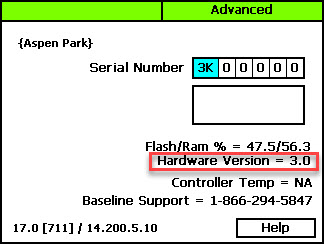
To check the hardware version on a BaseStation 3200 irrigation controller:
1. On the BaseStation 3200 controller or in LiveView, go to the Advanced dial position.
2. Choose the System Settings option.
3. Find the hardware version number as shown in the illustration below.
Important
We always recommend that you perform a system backup before you update the BaseStation 3200 firmware. If you experience issues with the firmware update, you can restore your BaseStation 3200 to the previous configuration.
Additionally, we recommend that you use a USB drive to do firmware updates on the BaseStation 3200.
For instructions, refer to the following article/documents:
Updating the BaseStation 3200 to V12 Firmware with a USB Drive
Updating the BaseStation 3200 to V16 Firmware with a USB Drive
Updating the BaseStation 3200 to V18 Firmware with a USB Drive
Updating the BaseStation 3200 Firmware
When a BaseStation 3200 is connected to the AppManager server, the firmware versi...
[insert-question 931367]
Caution
If you have a self-hosted Baseline server, contact Baseline Support before updating the BaseStation 3200 firmware. Baseline Support Toll-Free Phone Number: 866.294.5847
| Firmware Version | Description | Compatibility | Update Path | Notes |
|---|---|---|---|---|
|
12.34 DOWNLOAD |
Current legacy version | BaseManager, FlowStation V1, SubStation V1 |
Update to V16.6 before going to a higher version Choose the correct V16.6 version for the hardware version on your controller |
If updating from V12.29 or earlier, you must first update to V12.34 |
|
16.6 for Hardware Versions 2.0 and lower DOWNLOAD |
Current V16 version for Hardware Versions 2.0 and lower Includes bug fixes and support for the automatic security updater
|
AppManager BaseManager PipeView FlowStation App FlowStation V2 SubStation V1.2 |
Controllers with Hardware Versions 2.0 and lower cannot be updated to V17 They can continue to run on V16
|
TRC remote controls do not operate with BaseStation 3200 controllers that have been updated to V16. When updating from V12.34, all zones move to Mainline 1. Map out all zone-to-mainline assignments prior to updating to V16. Reassign the zones to each individual mainline following the update. Refer to Assigning Zones to Mainlines in the BaseStation 3200 User Manual. Export a Program Summary before updating. Refer to Exporting Controller Data in the BaseStation 3200 User Manual. |
|
16.6 for Hardware Versions 3.0 and higher |
Current V16 version for Hardware Versions 3.0 and higher Includes bug fixes and support for the automatic security updater
|
AppManager BaseManager PipeView FlowStation App FlowStation V2 SubStation V1.2 |
Update directly to V17 or continue on V16 |
TRC remote controls do not operate with BaseStation 3200 controllers that have been updated to V16. When updating from V12.34, all zones move to Mainline 1. Map out all zone-to-mainline assignments prior to updating to V16. Reassign the zones to each individual mainline following the update. Refer to Assigning Zones to Mainlines in the BaseStation 3200 User Manual. Export a Program Summary before updating. Refer to Exporting Controller Data in the BaseStation 3200 User Manual. |
|
17.0 DOWNLOAD |
Enhanced security features Ability to have security updates automatically pushed to the controller without a firmware update |
AppManager BaseManager PipeView FlowStation V3 SubStation V2 |
|
If updating from V12.34, you must first update to V16.6 Controllers with hardware version 3.0 and higher are compatible with V17
|
|
BaseStation 3200 v18.5
|
New scheduled and unscheduled flow tracking for reports. Faster notification of open circuit solenoids. Resolves compatibility issue with Cloud Network Module version 1.6. Resolves recurring Program Paused due to Water Window messages. |
AppManager BaseManager PipeView FlowStation V3 SubStation V2 |
For the Cellular Communication optimization to work, you will need to update the BaseStation 3200 to v18.5 and update your Cloud Network Module to v1.6. To do so, simply take a blank USB drive and upload both files (v18.5 and v1.6) onto the drive. Plug the USB into the BaseStation 3200 and power-cycle the controller. As the controller reboots, it will automatically update to the newest firmware for both devices. | |
|
BaseStation 3200S v19.8 |
New program priority overlap feature. New cell survey feature for multi carrier SIM Cloud Network Modules. |
AppManager BaseStation 3200S hardware only |
V19 firmware will not work on BaseStation 3200 hardware version 4.0 or lower. V19+ will only work with 3200S hardware. | |
|
BaseStation 3200S v19.9
|
New Zone Event Day feature. New scheduled and unscheduled flow tracking for reports. Resolves issue with Water Rationing not working as expected. |
AppManager BaseManager PipeView FlowStation V3 SubStation V2 BaseStation 3200S hardware only |
V19 firmware will not work on BaseStation 3200 hardware version 4.0 or lower. V19+ will only work with 3200S hardware. |
BaseStation 1000
Read me first, before updating
Baseline is proud to produce world-class irrigation control products. We're constantly adding new features and improving existing products. Firmware updates are always free, as long as your hardware is compatible. Check back often to see what's new!
Note
The BaseStation 1000 must have firmware version 1.25 or higher in order to communicate with the Cloud Network Module.
Update instructions can be found here:
Updating the Firmware from a USB Drive
Updating the BaseStation 1000 Firmware
When a BaseStation 1000 is connected to the AppManager server, the firmware versi...
[insert-question 931416]
| Firmware Version | Description | Notes |
|---|---|---|
|
BaseStation 1000 v1.27 DOWNLOAD |
BaseStation 1000 Firmware v1.27 Communication performance optimized for LTE cellular networking Quality of life changes AG-1000 Firmware is compatible with BaseStation 1000 Firmware v1.27 |
For the Cellular Communication optimization to work, you will need to update the BaseStation 1000 to v1.27 and update your Cloud Network Module to v1.6. To do so, simply take a blank USB drive and upload both files (v1.27 and v1.6) onto the drive. Plug the USB into the BaseStation 1000 and power-cycle the controller. As the controller reboots, it will automatically update to the newest firmware for both devices. |
SubStation
Read me first, before updating
We always recommend that you perform a system backup before you update the SubStation firmware. If you experience issues with the firmware update, you can restore your SubStation to the previous configuration.
Additionally, we recommend that you use a USB drive to do firmware updates on the SubStation. Refer to the instructions in this article:
Updating the Firmware from a USB Drive
| Firmware Version | Description | Compatibility | Notes |
|---|---|---|---|
| 1.0 DOWNLOAD |
Initial release | BaseStation 3200 V12.30 - 12.34 |
If the connected BaseStation 3200 is staying on the V12 firmware, the SubStation must remain on this firmware version. |
| 1.2 DOWNLOAD |
Support for the BaseStation 3200 V16 firmware | BaseStation 3200 V16.1 - 16.6 |
If the connected BaseStation 3200 is staying on the V16 firmware, the SubStation must remain on this firmware version. |
| 2.0 DOWNLOAD |
Enhanced security features | BaseStation 3200 V17 higher |
If the connected BaseStation 3200 is updated to the V17 firmware, the SubStation must be updated to this firmware version. |
| SubStation v2.5 DOWNLOAD |
Communication performance optimized for LTE cellular networking Support for Baseline Precip Sensor and Pressure Sensor. New manual irrigation functionality. |
BaseStation 3200 V17.3 - V18.5 BaseStation 3200S |
For the Cellular Communication optimization to work, you will need to update the SubStation to v2.5 and update your Cloud Network Module to v1.6. To do so, simply take a blank USB drive and upload both files (v2.5 and v1.6) onto the drive. Plug the USB into the SubStation and power-cycle the controller. As the controller reboots, it will automatically update to the newest firmware for both devices. To communicate with a BaseStation 3200 using Precip Sensor the BaseStation 3200 must be updated to v18.0 firmware or higher. |
SubStation RV / CP
Read me first, before updating
We always recommend that you perform a system backup before you update the SubStation firmware. If you experience issues with the firmware update, you can restore your SubStation to the previous configuration.
Additionally, we recommend that you use a USB drive to do firmware updates on the SubStation. Refer to the instructions in this article:
Updating the Firmware from a USB Drive
| Firmware Version | Description | Compatibility | Notes |
|---|---|---|---|
| 1.4 DOWNLOAD |
Added multiple quality of life changes. Added support for multi-carrier SIM cards. |
BaseStation 3200 v18+ BaseStation 3200S |
For the SubStation RV / CP optimization to work, you will need to update the SubStation RV / CP to v1.4. To do so, simply take a blank USB drive and upload the file (v1.4) onto the drive. Plug the USB into the SubStation RV / CP and the update will be applied automatically. |
FlowStation
Read me first, before updating
We always recommend that you perform a system backup before you update the FlowStation firmware. If you experience issues with the firmware update, you can restore your FlowStation to the previous configuration.
Additionally, we recommend that you use a USB drive to do firmware updates on the FlowStation. Refer to the instructions in this article:
Updating the Firmware from a USB Drive
| Firmware Version | Description | Compatibility | Notes |
|---|---|---|---|
| 1.0 DOWNLOAD |
Initial release | BaseStation 3200 V12.29 and earlier V12.30 - 12.34 | If the connected BaseStation 3200 is staying on the V12 firmware, the FlowStation must remain on this firmware version. |
| 2.0 DOWNLOAD |
Support for the new flow model. Support for PipeView and the FlowStation App | BaseStation 3200 V16.1-16.6 PipeView FlowStation App |
If the connected BaseStation 3200 is staying on the V16 firmware, the FlowStation must remain on this firmware version. |
| 3.0 DOWNLOAD |
Enhanced security features | BaseStation 3200 V17 and higher PipeView FlowStation App |
If the connected BaseStation 3200 is updated to the V17 firmware, the FlowStation must be updated to this firmware version. |
| FlowStation v3.8 DOWNLOAD |
Communication performance optimized for LTE cellular networking |
BaseStation 3200 V17 and higher BaseStation 3200S |
For the Cellular Communication optimization to work, you will need to update the FlowStation to v3.8 and update your Cloud Network Module to v1.6. To do so, simply take a blank USB drive and upload both files (v3.8 and v1.6) onto the drive. Plug the USB into the FlowStation and power-cycle the controller. As the controller reboots, it will automatically update to the newest firmware for both devices. |
Cloud Network Module
| Firmware Version | Description | Compatibility | Notes |
|---|---|---|---|
| Cloud Network Module v1.6 DOWNLOAD |
Communication performance optimized for LTE cellular networking |
BaseStation 3200 V18.5 and higher BaseStation 3200S BaseStation 1000 SubStation FlowStation |
For the Cellular Communication optimization to work, you will need to update your Cloud Network Module to v1.6. To do so, simply take a blank USB drive and upload the file (v1.6) onto the drive. For 3200S controllers, turn the dial to Advanced and update via the Firmware Update menu. For all other controller types, plug the USB into the controller and the update will be applied automatically. |