
Learn how to diagnose and troubleshoot when a newly installed soil moisture sensor is no found on a two-wire system.
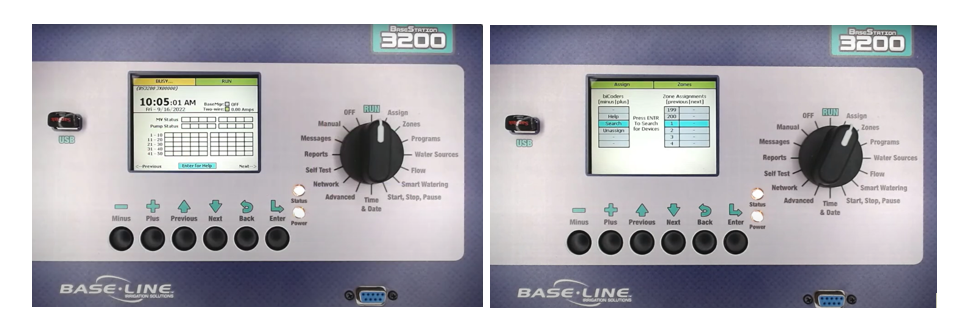
At the Controller
- Turn the dial to Assign.
- Open the device you want to assign (ex. Zones).
- Search should be highlighted → Enter.
- Once search completes, the left panel shows found serial numbers from wire path.
- Move the correct serial number to the right side to assign, Q245151 → Zone 1.
- If a serial number (Q245153) doesn’t appear, it may already be assigned.
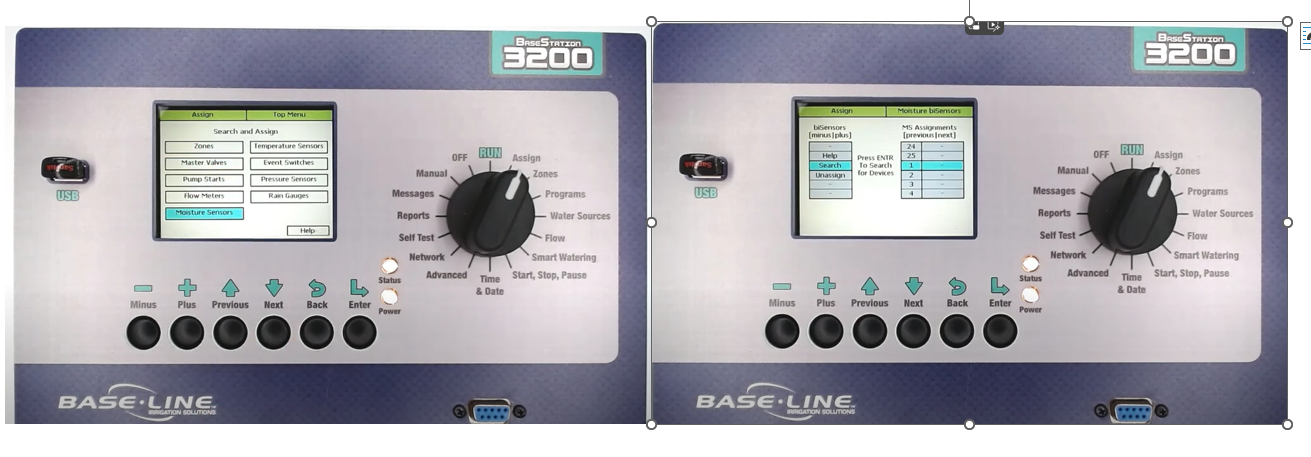
Soil Moisture Sensors
- Open Moisture Sensors → highlight Search → press Enter.
- If the sensor isn’t found, go out to the field and carefully dig it up.
- Carefully dig up the sensor.
- We do not want to cut the wire to the short.
- Remove the wire all the way back to the box where the original splice was made.
- Splices should be in a pull box with at least 18” of slack.
- Industry standard call for splices to be made in a pull box.
Direct Sensor Test at Controller
- Now test the device back at the controller.
- Power down the controller (unplug, switch breaker, or remove orange plug).
- Disconnect the existing two-wire path from terminals.
- Connect the moisture sensor directly to the red and black terminals.
- Power the controller back on and try assigning the sensor again.
- If the controller finds it now, the issue is likely in the wire path or splices.
Wire Troubleshooting
- Check splices, wire integrity, or damage.
- If still not detected, the sensor may be faulty.
- Contact Baseline support to check warranty eligibility.