
Info, impact, causes, and troubleshooting a "Mainline Low Flow Variance Shutdown" message.
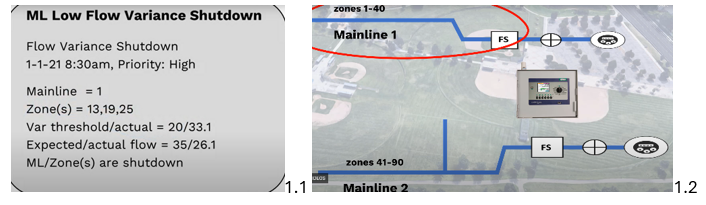
Common Causes
- Flow restriction on the mainline.
- Issue with a zone valve connected to the mainline that isn’t opening fully.
- Problems with pump performance or clogged pump intake could cause low flow.
- Flow variance limit may be set too low, causing the system to trigger a warning unnecessarily.
What Happens Now? From the alert message:
- Expected vs Actual Flow (measured in Gallons per a Minute (GPM)) are given. The controller expected a combined 35 GPM from the three active valves that were running but only measured 26.1 GPM. This means Mainline 1 is not pressurized, so it has been shut. None of the zones will receive water until the variance message is cleared. Mainline 2 is not impacted.
- Flow Variance threshold (measured in %) is set to allow 20% variance, but the controller detected a 33.1%.There is a flow issue in one of Mainline 1's zones; zones 13,19 and 25.
Troubleshooting
- Check for an obstructed mainline, such as a ball valve that isn’t fully open.
- Inspect the zone valves, as one may be partially closed or obstructed.
- Change the Flow Variance Thresholdif you believe it's too strict or wide:
- Go into BaseManager → under Mainlines section → Flow Setup tab → Flow Variance Limit → In Flow Management, a 20% variance is set by default.
- However, Advanced Flow Variance may be a better option, as it allows you to set different variance percentage based on expected flow ranges.
- Ex: when the controller expects a combined flow of 25 GPM from zones, you might set a 30% variance. But when the expected combined flow is 300 GPM, you can tighten the variance to 5% for greater precision.
- However, Advanced Flow Variance may be a better option, as it allows you to set different variance percentage based on expected flow ranges.
- Go into BaseManager → under Mainlines section → Flow Setup tab → Flow Variance Limit → In Flow Management, a 20% variance is set by default.