This process will help you to accurately copy data from an existing controller to a replacement or upgraded controller in NetSuite.
1. From the New Install Base Record click edit.
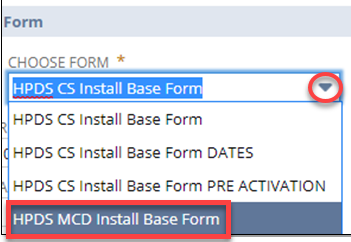
2. Scroll to the Form section and use the drop-down tab to change the form to HPDS MCD Install Base Form. This change will be instant and NetSuite will reorient you to the top of the page.
3. Scroll to the Deactivation section. Enter the serial number of the existing controller.

4. Click Save.
5. At the top of the page, click Edit. A new Copy Data from Old Install Base button will appear.
6. Click Copy Data from Old Install Base.
The following fields will be automatically updated with the existing controller’s data:
- Contract
- Contract Item
- Subscriber
- Subscription Start Date
- Subscription End Date
- Subscription Term
- Subscription Item
- Customer Site
- Install Address
- Install City
- Install State
- Install Zip Code
- Install Country
- Installation Name (Controller Name)
- Installation Description (Location Description)
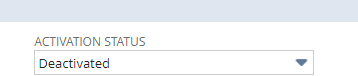
- Activation Status
- The following fields will populate to true:
- Controller replacement complete
- Contract items need update
7. Click Edit and check the Ready to Create Activation Sales Order box and enter in the Installer.
8. The standard warranty start and end date depend on whether the controller is having it's command panel getting replaced or if the controller is being upgraded.
- If it is a controller upgrade, then use the new [original activation date] as the new [standard warranty start date]. The [standard warranty end date] will be:
- If PRO3: [standard warranty start date] + 5 years
- If OXR: [""] + 10 years
- If it is a command panel (module) replacement (or an LC LTE UPG), then copy and paste the existing [standard warranty start date] and [standard warranty end date] from the old install base record into the new install base record.
9. Click Save.
Correcting a Serial Number Added Incorrectly:
If an incorrect serial number has been added to the Old Install Base Record field, please email the CRM-ERP team to help correct the record.
Confirm OLD install base record is deactivated
Because of the automatic scripting that SHOULD happen in the background when we use the MCD install base from process for replacements, all the info should be updated in the OLD record automatically. All we do is confirm that it did. If not alert tier 2 so they can escalate.
1. Open the old install base record.