
The purpose of this document is to outline the steps required for reactivating WeatherTRAK CIM controllers that have been deactivated due to delinquent subscription.
In addition, this document will outline the steps for deactivating past due subscription accounts and to provide background on how determination of shut off has been made.
Important!
If a deactivation request does not come from either the Renewals Team or Account Manager, make sure that it goes through them before the Support Team.
Deactivation of a Delinquent Subscription
WeatherTRAK Subscribers are sent three renewal notices through the NetSuite renewal generation process. In addition, Finance sends an email to users from WeatherTRAK approximately 30 days after the final notice has been sent to the customer notifying them of a past due subscription. It is important to note that if the user information is not found in WeatherTRAK then Finance will call the subscriber directly, or attempt to find another contact for the End User either in Salesforce or NetSuite. Notes on communication are found in NetSuite or in Outlook.
Customers who respond either are renewed at the time of the call or given a courtesy extension date which is updated by the Renewal Team on the install base to allow time for the customer to submit payment. If Sales is owning the renewal, then the courtesy extension date is added to the install base. Customers with a current courtesy extension date are not included in mass deactivation. However, if a courtesy extension date has expired then the devices are subjected to mass deactivation.
Controllers are approved for deactivation AFTER:
- Past due emails have been sent
- Finance re-runs the past due report and then sends a list of past due subscribers to the Sr. VP of Sales for review with the sales team to make a final attempt at renewal
If the customer does not respond in a timely manner to our communications, then the controllers are approved for deactivation.
Deactivation Process
1. Finance will import a list of approved controller shut-offs into the NetSuite Install Base by changing the status from “active” to “deactivated.”
2. The deactivation reason is updated to “Delinquent” and a deactivated date is entered.
3. Finance will send a list of deactivated devices to Support (for awareness) and IT (for bulk deactivation of SIM cards in the carrier portal).
4. IT works with Data Services to obtain a list of SIM’s from WeatherTrak.net for devices that were deactivated in NetSuite, and then turns the SIM off with the carrier.
5. Finance will review the install base records with check box of “reactivated” and set value to null if the subscription has been updated with a future date.
Reactivation Process
Occasionally, when a controller has been deactivated due to delinquency, the End User/Subscriber will call Support to reactivate so they can bring their service back on-line. The reactivation requests should be directed to the Renewal Team for processing and validation (see "Renewal Team Responsibilities for Reactivations" section below).
Important!
If the customer is expressing urgent concern, we can send those details to the Renewal Team and let them decide if a 10 day courtesy reactivation for those controllers is appropriate. Set the expectation that it could be up to 3 business days until Renewal Team responds. If there is still an issue, reach out to the Account Manager or Customer Engagement Specialist (CES) for their input or exception.
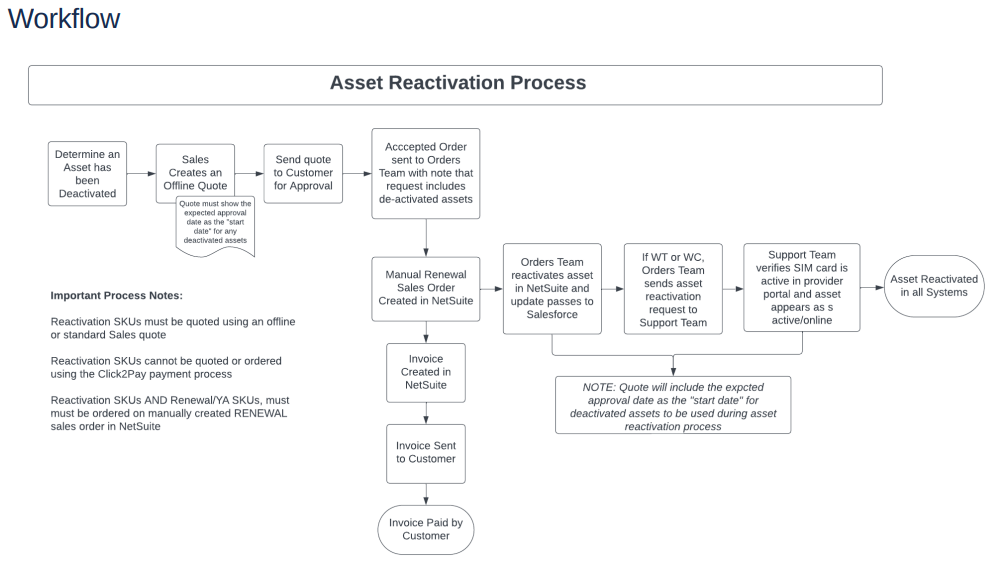
Following are steps in the controller reactivation process.
1. A Support request is received from the Renewals Team or Account Manager to reactivate the controller's SIM card(s).
2. Open the NetSuite Install Base record. Identify the Sim card Number. Use the relevant Carrier portal website to reactivate the sim card. If the controller uses a VERIZON sim card, NetSuite will NOT reflect this. Instead, we can visit weathertrak.net and view the controller admin page to see the last sim card # that the controller reported to the server and search that in Verizon if it s a 8914 vs. AT&T's 8904 prefix numbers.
NOTE
Verizon SIMS only - Instead of seeing them as "deactivated" you should see them as "suspended". If you get a request to reactivate a VZ SIM, you should only need to "resume" service.