
Valve alerts are viewed in the Alerts menu. If you have an alert, you will see a two-letter abbreviation (NC, SH, OC). A double dash (--) means there is no alert for the station you are viewing.
When a valve No Connect alert occurs, the current draw for the valve solenoid is below 75mA. The controller cannot operate that valve and raises a No Connect alert on it. If the valve is a Normally Closed Master Valve, the system will not irrigate.
Possible Causes
- Too many active stations. The number of Max Active Stations exceeds the number of stations physically connected to the controller.
- Ribbon cable or station keys. A ribbon cable between station PCB’s is partially disconnected, or station keys are missing.
- No field wire connected. No field wire is connected to a specific station output.
- Poor contact. The field wire terminated in the station output is not making proper contact.
- Broken wire or bad splice. The field wire is broken, or there is a corroded or failed splice.
- Burnt out solenoid.
Possible Fixes
- Check the connections. Make sure every connection in the controller and the valve boxes is seated properly.
- Reduce Max Active Stations. Lower the number of Max Active Stations in the SETUP menu.
- Check the ribbon cable. Re-insert or repair the ribbon cable, and verify there are sufficient station keys.
- Swap a station wire. Swap a working station wire with the problematic wire terminal, then clear the alert and see whether the alert follows the wire. If it follows the wire, the problem is the field wire. If it stays put, the problem may be the chassis hardware.
- Locate the wire break. Find the break out in the field. A wire tracer makes this much faster.
- Bridge low-draw solenoids. If the valve solenoids have a low current draw, bridge two valves to one station output.
- Run an Ohms test. With the solenoid disconnected, test the field wire. A reading above 10 Ohms means a bad field wire or splice. If the solenoid reads above 100 Ohms, replace the solenoid.
Clearing a No Connect Alert from the Controller
1. Press ALERTS.
2. Press the right arrow button until the VIEW VALVE STATUS screen displays.
3. Press * to clear the alert.
Clearing a No Connect Alert from WeatherTRAK Central
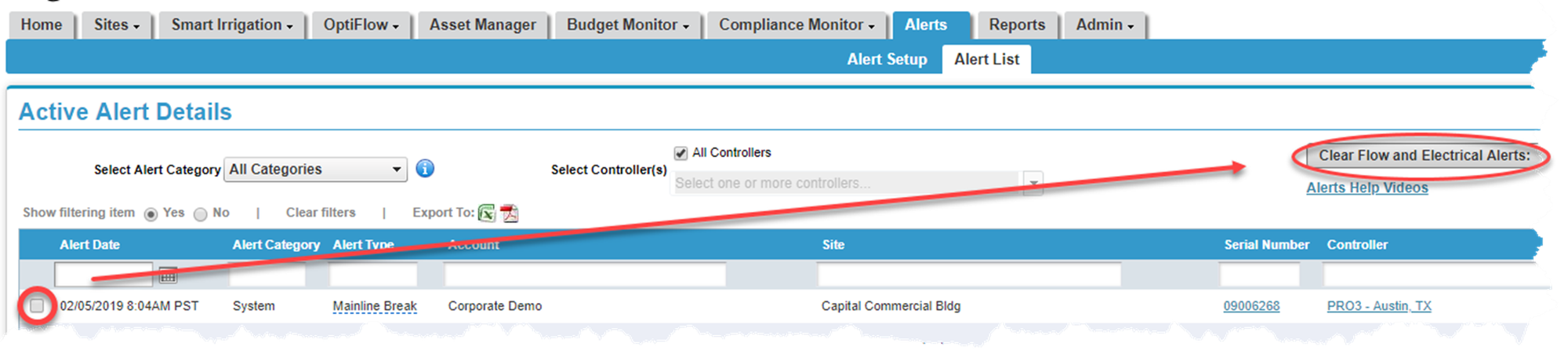
1. Hover over the Alerts tab and click Alert List. A list of all active alerts displays.
2. Place a checkmark next to the alert you want to clear.
3. Click the Clear Flow and Electrical Alerts button. A pop-up displays asking you to verify the change. Click Yes.
If you have questions, here are 3 ways to get answers:
1. Search within this HydroPoint knowledgebase
2. Visit the HydroPoint support page
3. Call 800-362-8774 or email support@hydropoint.com, hours are Mon-Fri 3:00 AM – 6:00 PM PT and Sat 9:00 AM – 2:00 PM PT.