When a master valve fault alert occurs, the master valve is closed, but flow is being detected above the alert threshold.
Possible Causes
- Someone is manually overriding the closed master valve state.
- There is a broken fitting
- The master valve could be hydraulically malfunctioning from a stuck diaphragm or other issues
Possible Fixes
- Prevent the unauthorized use of the master valve
- Locate and replace the broken fitting
- Troubleshoot the master valve to find out why it did not shut when the controller sent the signal to close
Clearing a Master Valve Fault Alert from the Controller
1. Press ALERTS.
2. Press à Until the VIEW VALVE STATUS screen displays.
3. Press * to clear the alert.
Clearing a Master Valve Fault Alert from WeatherTRAK Central:
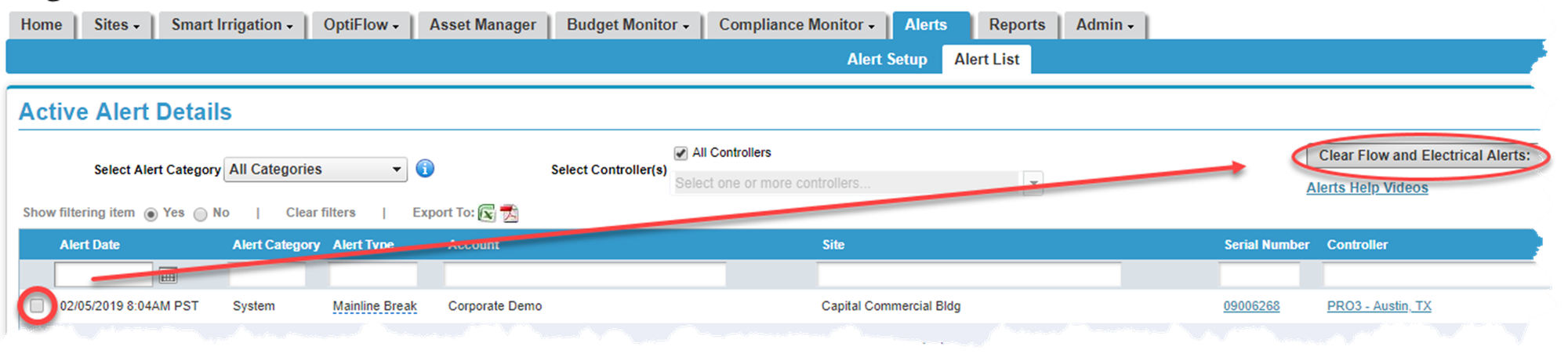
1. Hover over the Alerts tab and click on Alert List. A list of all active alerts will display.
2. Place a checkmark next to the alert you would like to clear.
3. Press the Clear Flow and Electrical Alerts button. A pop-up screen displays asking you to verify the change. Click Yes.