A Manager No Flow alert occurs when flow has dropped below the No Flow threshold for that mainline. An alert will be raised for a single OptiFlow XR, or for Manager and Member controllers in an OptiFlow Group. A Manager No Flow alert requires flow sensing capabilities for the POC on that mainline.
Note
The Manager No Flow alert does not affect irrigation. All stations will continue to irrigate even after the alert is raised.
Possible Causes:
- The solenoid plunger is not lifting to allow the valve to open
- The master valve is not opening if in use
- The pump start is not being activated
- A gate valve or isolation valve in the mainline has been closed
Possible Fixes:
- Bleed the corresponding valve manually to determine if water pressure exists
- Verify the Pump Start is operating correctly
- Locate and open any closed gate valves
Clearing a Manager No Flow Alert from the controller:
1. Press ALERTS.
2. Press à until VIEW FLOW STATUS screen displays.
3. Press * to clear the alert.
Clearing a Manager Low Flow Alert from WeatherTRAK Central:
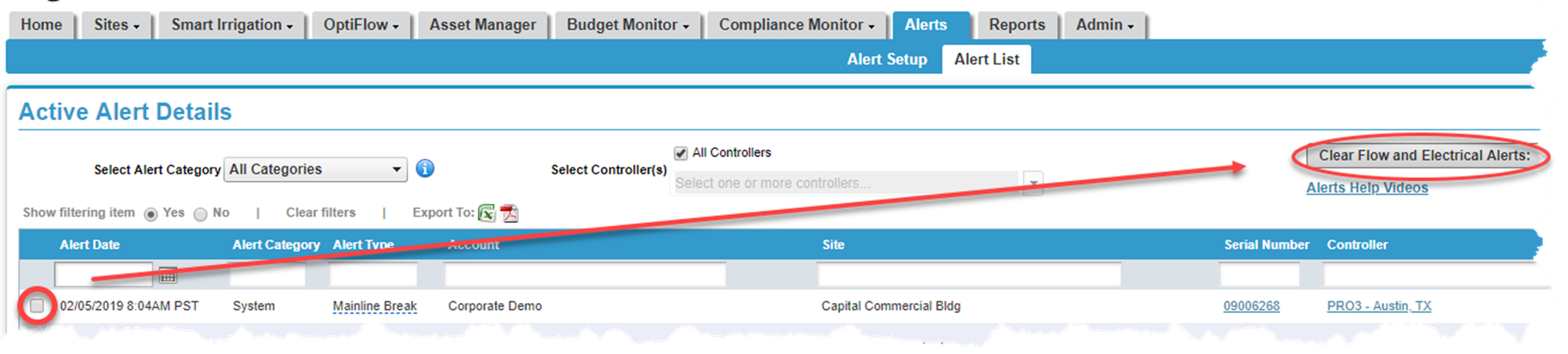
1. Hover over the Alerts tab and click on Alert List. A list of all active alerts will display.
2. Place a checkmark next to the alert you would like to clear.
3. Press the Clear Flow and Electrical Alerts button. A pop-up screen displays asking you to verify the change. Click Yes.