Note
This type of alert applies to OptiFlow controller only.
When a station break alert occurs, the mainline break threshold was crossed during irrigation. The controller has determined that stations were the cause of the high flow and that the mainline is OK and was not the cause of the high flow.
Possible Causes:
- A broken sprinkler head
- A broken lateral pipe
Possible Fixes:
- Identify the stations in the alert notification on WeatherTRAK central that are registering high flow
- Locate and replace the broken sprinkler heads
- Repair the broken lateral pipe
- Adjust the mainline break threshold
Clearing a Station Break Alert From the Controller:
1. Unlock the OptiFlow controller.
2. Press ALERTS.
3. Press à until the VIEW FLOW STATUS screen displays.
4. Press * to clear the alert.
Clearing a Station Break Alert from WeatherTRAK Central:
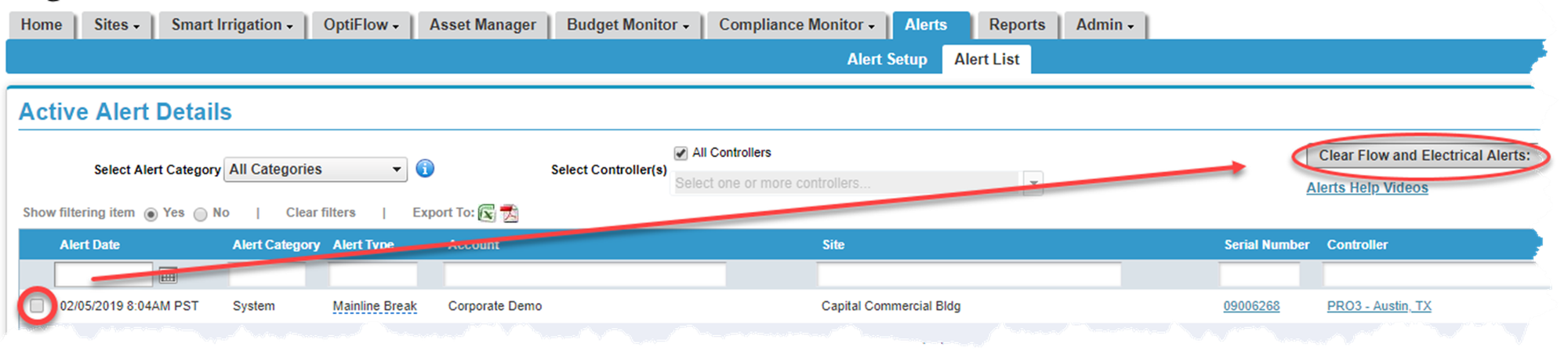
1. Hover over the Alerts tab and click on Alert List. A list of all active alerts will display.
2. Place a checkmark next to the alert you would like to clear.
3. Press the Clear Flow and Electrical Alerts button. A pop-up screen displays asking you to verify the change. Click Yes.