When a manager high flow alert occurs, flow has exceeded the station high flow threshold.
Possible Causes
- A broken sprinkler head
- A broken lateral pipe
- The station high flow threshold (SHFT) is too low
Possible Fixes
- Locate and replace the broken sprinkler heads
- Repair the broken lateral pipe
- Confirm the station high flow setting is correct
Clearing a Manager High Flow Alert From the Controller:
Note
This alert cannot be cleared from the controller panel. It can only be cleared from WeatherTRAK Central or WeatherTRAK Mobile.
Clearing a Manager High Flow Alert from WeatherTRAK Central
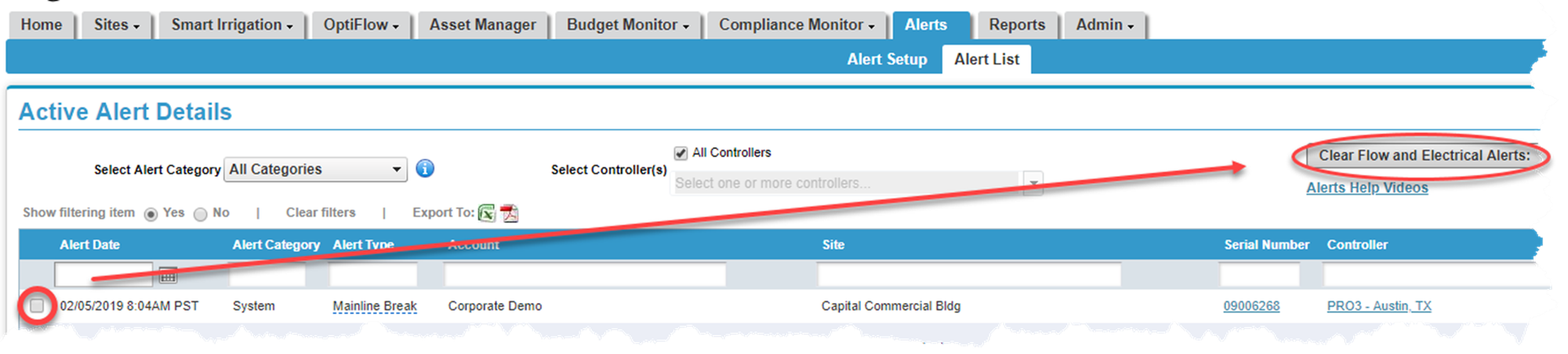
- Hover over the Alerts tab and click on Alert List. A list of all active alerts will display.
- Place a checkmark next to the alert you would like to clear.
- Press the Clear Flow and Electrical Alerts button. A pop-up screen displays asking you to verify the change. Click Yes.