A Manager Station Low Flow alert occurs when the total combined value of all active stations drops below the Station Low Flow threshold. An alert will be raised for a single OptiFlow XR, or for Manager and Member controllers in an OptiFlow Group. A Manager Station Low Flow alert requires flow sensing capabilities for the POC on the mainline.
Note
The Manager Station Low Flow alert does not affect irrigation. All stations will continue to irrigate even after the alert is raised.
Possible Causes
- Clogged heads
- Pump station malfunction
- Valve or master valve not fully opening
Possible Fixes
- Repair any valve issues
- Repair any local pump issues
- Ensure proper supply pressure
Clearing a Station Low Flow Alert from the controller:
1. Press ALERTS.
2. Press à until VIEW FLOW STATUS screen displays.
3. Press * to clear the alert.
Clearing a Station Low Flow Alert from WeatherTRAK Central:
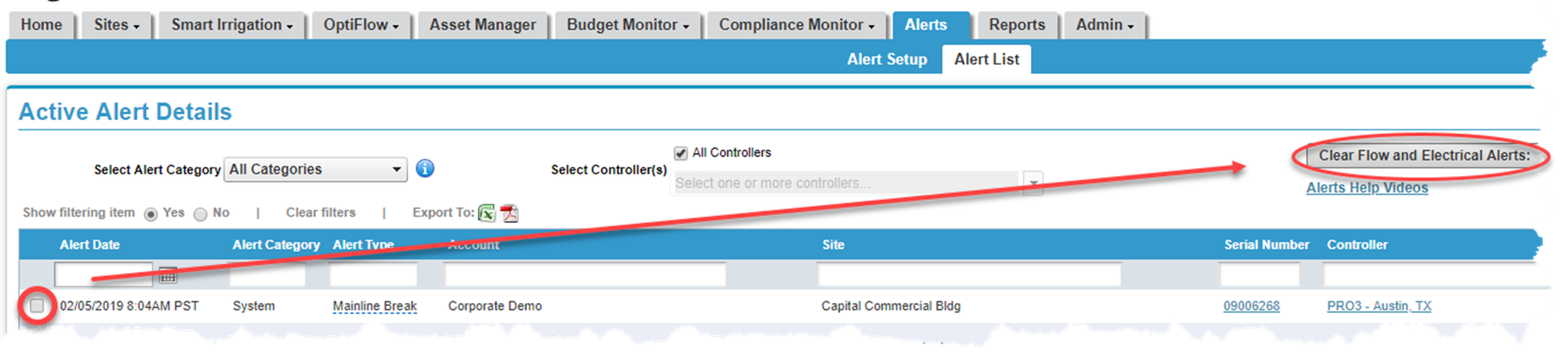
1. Hover over the Alerts tab and click on Alert List. A list of all active alerts will display.
2. Place a checkmark next to the alert you would like to clear.
3. Press the Clear Flow and Electrical Alerts button. A pop-up screen displays asking you to verify the change. Click Yes.