
📨Understanding Cloud Connectivity, LTE-M, with Smart Irrigation Systems.
- This section will walk you through definitions, related to WeatherTRAK communication, to help you fully understand how all of this works together to achieve a viable cellular connection.
🌐 Understanding the Cloud
- The cloud is the destination for your data, where it can be processed and used by applications.
- To understand this concept, think of the Internet that we all use today as the highway, and the server(s) as the destination.
- Nowadays that destination is typically to big commercial data centers.
- These centers now act like one huge computer, so you no longer need to use your local computer.
- All they do is facilitate services like storage, software, computing power, and are accessed remotely by devices like computers, cell phones, or in our case, WeatherTRAK Smart Irrigation Controllers.
Cloud RECAP:
Think of the combination of both the internet, and the server(s) = The Cloud.
📱 LTE-M Technology
- Cat M, also known as Cat M1 (Category M1) or LTE-M (Long-Term Evolution for Machines).
- Is a specific type of Cellular Communication technology embedded in existing LTE 4G/5G (Long-term Evolution fourth and fifth Generation) networks for IoT (Internet of Things) and M2M (Machine-to-Machine) enabled devices like WeatherTRAK Smart irrigation controllers.
Cat M Key Benefits:
- Intended for low-power, wide-area (LPWA) low-data applications, and operates on existing 4th/5th Generation long-term evolution (4G/5G LTE) networks, communicating on low and mid band frequencies.
How does this work?
Device Wake-Up: The IoT device typically stays in a low-power "sleep" mode (Power Saving Mode or PSM) most of the time to conserve battery/power. It wakes up periodically or in response to a specific trigger (like a sensor being activated).
Connection Establishment: The device connects to the nearest cellular base station (tower) using its licensed LTE spectrum.
Data Transmission: Small data packets (e.g., a temperature reading, location update, or sensor status, aka devices like WeatherTRAK controllers) are sent to the network at speeds around 300 Kbps to 1 Mbps.
Network Relay: The data is relayed through the cellular network infrastructure to the appropriate cloud platform or application server on the internet.
Return to Sleep: After the data transfer is complete, the device goes back into a deep sleep mode (PSM or eDRX - Extended Discontinuous Reception) for a set period, which could be minutes, hours, or even longer, drastically extending battery life/reducing power consumption.
Cat M Recap
Think of it like this, built for large-scale and bridges the gap for IoT devices needing long battery life or low power consumption and wide coverage without sacrificing too much speed, making cellular IoT more practical and widespread for low-data devices.
📻 Frequency Bands
- Radio frequencies “waves” within the electromagnetic spectrum, for example these are used for cellular network communication like 4G/5G LTE-M or Wi-Fi, Bluetooth even AM and FM radio.
- Acting as a highway for data signals, with different bands offering trade-offs between range (lower frequencies go farther) and speed (higher frequencies are faster).
- These bands are allocated by regulatory bodies (like the FCC (Federal Communication Commission) in the US) to prevent interference and ensure devices can connect to carriers (AT&T, Verizon, and T-Mobile, these are also known as the service provider(s) to allow us to connect to the "cloud').
How do frequencies work?
- Electromagnetic spectrum: All wireless communication uses portions of the electromagnetic spectrum, which is divided into bands or “channels”.
- Defined Limits: Each band has a specific lower and upper frequency limit.
- Carriers & Devices: Network providers “carriers” use specific bands for their networks for coverage, and your device must support those bands for good connectivity.
Examples of common bands & their characteristics:
Low-Frequency Bands
Example: 700 MHz
Better for wide coverage, penetrate buildings well, but offer slower speeds.
High-Frequency Bands
Example: 2.5 GHz, 5 GHz Wi-Fi
Faster speeds and more capacity, but shorter range and easily blocked by obstacles.
Wi-Fi Bands
2.4 GHz: Better range (good for smart home devices)
5 GHz: Faster speeds for streaming/gaming
6 GHz: Even faster
Frequencies Recap:
Think of it this way, this is the Signal, frequencies or “channels referred to as bands” are waves that allow data to be transmitted, understanding frequency bands help you know why your devices works better in some areas than others and why choosing a device compatible with your network providers bands is crucial for performance/connectivity.
📊 Frequencies & Measurements
- Frequencies are measured using standard cellular testing equipment, like a Wilson Cellular signal Scanner, focusing on key metrics like, RSRP (Reference Signal Received Power), RSRQ (Reference Signal Received Quality), RSSI (Received Signal Strength Indicator), and SINR (Signal-to-Interference-plus-Noise Ratio), which assess signal strength, quality, and overall interference by analyzing the reference signals (RS) sent from base stations, or tower serving cells, to the User Equipment (UE), often using spectrum analyzers for the available frequency bands being broadcasted in an area to UE “device(s)” like WeatherTRAK controllers.
Frequencies Measurement Parameters:
RSRP
Reference Signal Received Power
- Measures the power of the specific reference signals (RS) from the tower serving cell.
RSRQ
Reference Signal Received Quality
- A measure of signal quality in LTE M networks expressed in decibels (dB).
RSSI
Received Signal Strength Indicator
- Measures total power of all signals in a frequency band.
SINR
Signal-to-Interference-plus-Noise Ratio
- Measures quality and clarity of cellular connection.
RSRP- Detailed
RSRP indicates signal strength, crucial for cell selection and handover decisions. It is measured in dBm (decibels relative to one milliwatt); higher is better (e.g., -80 dBm is strong, -110 dBm is weak).
Noise Floor
- The noise floor is the absolute minimum signal strength level below which a signal is effectively unusable or indistinguishable from background noise or also referred to as interference.
- For 4G LTE and 5G networks, this floor is typically around -120 dBm to -125 dBm.
- Signals at or below this level result in frequent disconnections, extremely slow speeds, and essentially no usable service.
Why negative values?
- Tower serving cells (where devices get signal from) emit frequencies signals generated by power measured in dBm (decibels relative to one milliwatt).
- The closer you are to the tower, the greater the signal power.
- 0 represents the tower location, strong signal power.
- The further you move away from the tower, the signal power measured in dBm becomes weaker, and this is why we see negative values.
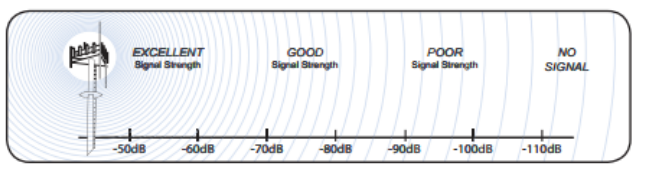
Higher (less negative) is better: A signal of -90 dBm is stronger than -100 dBm.
Excellent: Around -80 dBm or better (higher).
Weak/Poor: Below -100 dBm, often leading to slow speeds or disconnections.
RSRP Recap:
RSRP provides a reliable indicator of cell coverage and the direct power of the network's signal reaching your device, helping optimize network performance and user experience, basically how well a device can hear a towers signal power.
RSRQ - Detailed
- RSRQ is a measure of signal quality in LTE-M networks and is expressed in decibels (dB).
- Higher RSRQ values (closer to zero) indicate better signal quality and less interference.
RSRQ Values Ranges:
- Excellent: Above -10 dB
- Good: -10 dB to -15 dB
- Poor/Unusable: Below -15 dB to -20 dB
How It Compares to RSRP:
RSRP (Strength): Measures the actual power of the reference signal from a tower.
RSRQ (Quality): Measures the quality of that signal.
The Combo: A strong RSRP with a good RSRQ means a great connection; a strong RSRP but poor RSRQ means lots of noise, potentially slowing you down.
RSRQ Recap:
A good RSRQ allows the network to use more efficient data encoding, boosting speeds.
Basically, how well a tower can communicate to a device.
RSSI - Detailed
- RSSI (Received Signal Strength Indicator) measures the total power of all signals (wanted signal, noise, interference) in a frequency band, reported as a negative dBm value.
- This helps determine connection quality for Wi-Fi, Bluetooth, and cellular. A higher (less negative) RSSI means better, stronger signal connections.
- While it shows if a signal is present, it's a broad measure and less reliable for quality than RSRP, RSRQ, and SINR, as high RSSI could mean strong noise, not a good connection.
Interpretation:
-60 dBm or higher: Strong.
-80 dBm: Basic connectivity, potentially unreliable.
-90 dBm or lower: Weak/unusable
Why It's Less Useful in LTE?
Because it includes noise and interference, a strong RSSI (e.g., -68 dBm) doesn't guarantee a good connection; high interference can mask a weak useful signal.
RSSI Recap:
- While RSSI is still a valid metric, it helps us validate if any signal is present in a given area but could not be a stable connection.
- Basically, think of your cell phone signal indicator "bars" represented in RSSI.
- It may indicate that a signal is present, but if you try and stream, you might have long buffering times, but you may be able to still make a call or text, or in some cases not.
SINR - Detailed
- In LTE-M, SINR measures the quality of the cellular connection, indicating the desired signal's power relative to unwanted interference and background noise.
- Higher values signify a cleaner, better signal crucial for data rates and network performance, though not directly reported by LTE-M devices to the network.
- While LTE-M offers excellent coverage gains, optimizing SINR ensures efficient data transmission, preventing connection loss and maximizing throughput, even though standard LTE 4G/5G uses RSRP/RSRQ for network feedback.
Interpretation:
Excellent: ≥ 20 dB (Strong signal, max data rate)
Good: 13 dB to 20 dB (Strong signal, good rates)
Fair/Poor: 0 dB to 13 dB (Acceptable, but performance drops)
Very Low/Loss: ≤ 0 dB (Connection loss likely)
SINR Recap:
SINR in LTE-M measures the quality and clarity of the cellular signal received by a device - how well the tower and device can communicate back and forth effectively.
Chart
Category |
RSRP |
RSRQ |
Expected Behavior |
Action |
|
Excellent |
> -85 dBm |
> -8 dB |
Rock solid, rare disconnects |
None needed |
|
Good |
-85 to -100 |
-8 to -12 |
Reliable, occasional reconnects OK |
Monitor only |
|
Marginal |
-100 to -110 |
-12 to -15 |
Works but may have spotty periods |
Consider a different sim and or antenna. |
|
Poor |
-110 to -120 |
-15 to -18 |
Frequent disconnects, slow data |
Tier 2 or 3 intervention. |
|
Critical |
< -120 dBm |
< -18 dB |
Unreliable or non-functional |
Tier 3 intervention. |
Frequencies Recap:
- RSRP:
- Think of RSRP as asking, "How loud is the cell tower's specific signal at my device's location?"
- RSRQ:
- Think of RSRQ as asking, "How clearly you can hear that voice in a crowded room full of other people (devices)?"
- RSSI:
- Think of RSSI as, "A microphone listening to a whole room. It picks up the speaker you want to hear (your cell tower), but also people talking nearby (devices), the air conditioning hum (noise), and other conversations (interference)."
- SINR:
- Think of SINR as, "Trying to have a conversation (your desired signal between device and tower) in a busy room (in a given environment) compared to all the unwanted 'junk' (interference and background noise from devices) around you (the device).
- Provides the most complete picture by combining signal strength, interference, and noise for overall signal quality."
📶 LTE Antennas
- An LTE antenna is a specialized device designed to connect devices like phones, tablets, and irrigation systems to 4G/5G LTE cellular networks, boosting signal strength, improving speed, and enabling reliable internet access, especially in areas with weak coverage, by efficiently receiving and transmitting electromagnetic waves across various LTE frequency bands.
- These antennas come in different shapes and sizes.
How It Works:
Signal Conversion: It converts the cellular network's electromagnetic waves into electrical signals for your device, and vice-versa.
Types of Antennas:
Omni-Directional Antenna (Light Bulb💡)
How it Works:
- Radiates and receives LTE signals equally in all directions (like a bare bulb spreading light everywhere).
- These types could require a grounding plane to optimize its radiating characteristics to receive a better signal, but not all.
Analogy:
- A bare light bulb illuminates a whole room, but not intensely in one spot.
Best For:
- Cellular use (like WeatherTRAK controllers, which are standard on all new controllers that are shipped) or areas with multiple nearby towers where you need general, all-around coverage
Directional "Yagi" (Flashlight🔦)
How it Works:
- Focuses its signal on a narrow, concentrated beam, increasing strength and range in that direction (like a flashlight beam).
Analogy:
- A flashlight or spotlight, intensely lighting one specific spot, not the whole room.
Best For:
- Fixed locations (buildings, poles) far from cell towers to grab a strong, stable signal from a specific tower, minimizing interference from other directions.
Antenna Recap:
- Think of the antenna as the "ears" of your body (WeatherTRAK Controller).
🔑 SIM Cards
- LTE-M SIM cards work like traditional standard SIMs but are specialized for IoT, storing credentials to authenticate devices on LTE-M networks for low-power, wide-area IoT communication.
- They enable sensors and trackers to send small data packets efficiently, often with enhanced management features like remote activation/deactivation and global roaming, using secure elements (UICC) Universal integrated circuit card for network access.
What do they do?
- Stores Identity: IMSI number and related keys.
- Authenticates: Verifies identity to the network.
- Links to Plan: Connects to your carrier (AT&T, T-Mobile, Verizon).
- Enables Service: Allows cellular data communication.
📱 Standard Carrier SIM
- One specific profile for a single carrier (AT&T or Verizon).
- Limitation: Could limit available signal if that provider's service is weak or non-existent in the area.
🌐 Multi-Carrier SIM
- Multiple profiles for switching between carriers.
- Advantage: Automatically switches between AT&T, T-Mobile, and Verizon for best coverage.
SIM Card Recap:
- Think of SIM cards as your “digital key”, allowing you to go through a door (tower) telling the network who you are and linking your IoT device to your specific wireless service plan to communicate on that carrier's protocols.
📡 Cellular Modem
- An LTE cellular modem is a device that enables connectivity to 4G/5G cellular networks, acting as a bridge to convert data between a device's standard interface (like serial) and IP data for wireless transmission.
- These modems are crucial for IoT, industrial automation, and mobile broadband by providing reliable, high-speed internet access where wired connections aren't feasible.
- These modems vary in performance categories like CAT-M supporting different speeds and features for applications from basic mobile hotspots to complex machine-to-machine (M2M) communication.
How it works:
- Data Conversion: It takes data from a device (like sensor readings) and packages it into IP (Internet Protocol) packets (TCP/UDP **More on this in the next section**) for the cellular network, or vice versa.
- Network Connection: Connects to a cellular service provider's network, getting internet access wirelessly, often acting as the gateway for other devices.
- Transmission: Transmits and receives data over cellular frequencies, offering a reliable, wireless internet connection.
Modem Recap:
- The word "modem" is short for modulator-demodulator.
- A cellular modem is a device that acts as a translator and bridge, allowing your WeatherTRAK to connect to the internet (IoT) (this is what is called M2M as two machines can now communicate to the internet of things, using the cellular network.
🔄 Internet Protocols
TCP (Transmission Control Protocol)
IP (Internet Protocol): This is like the street address on an envelope. It gets the packet (data) to the right general location (computer/device(s)) but doesn't guarantee it arrives or stays intact.
TCP (Transmission Control Protocol): This is the service that handles the contents and ensures delivery.
How TCP Works:
- Connection (Handshake): Before sending, TCP establishes a connection, like calling ahead to confirm the recipient is ready to receive a package.
- Packetizing & Numbering: It chops your large file (like a book) into small, numbered packets (like individual pages).
- Sending & Acknowledging: It sends the packets and waits for the receiver to send back an "ACK" (acknowledgment) for each one.
- Ordering & Resending: If a packet gets lost or out of order, the receiver asks for it again (retransmission), and TCP puts everything back in the right sequence.
- Connection Closed: Once everything is delivered and confirmed, the connection is closed.
TCP Recap:
- TCP (Transmission Control Protocol) is like a reliable postal service (think FedEx or registered mail) for the internet, ensuring messages are sent, received, and reassembled correctly.
UDP (User Datagram Protocol)
- IP (Internet Protocol): This is like the street address on an envelope. It gets the packet (data) to the right general location (computer) but doesn't guarantee it arrives or stays intact.
UDP (User Datagram Protocol): This is the service that sends contents.
How UDP Works:
- You write and send the postcard (Sender): You simply drop the postcard into a mailbox. You don't need to call the recipient first to make sure they are ready to receive it, and you don't wait for a confirmation that they got it.
- The mail service (Network): The postal service does its best to deliver the postcard quickly, but there are no guarantees. It might get lost, arrive out of order if you send multiple, or be slightly damaged (e.g., a little wet).
- The recipient (Receiver): The recipient receives the postcard and can read the message, even if it has a little smudge. If they were expecting several postcards and one is missing, they won't know for sure or be able to request a specific one be resent.
UDP Recap:
- UDP (User Datagram Protocol) - You can think of the UDP protocol like sending a regular postcard, but you really don't know if it made it to the recipient.
UDP vs. TCP
- UDP (User Datagram Protocol): Faster, less overhead, connectionless, less reliable (good for real-time).
- TCP (Transmission Control Protocol): Slower, more overhead, connection-oriented (handshake), reliable (good for file transfers, web browsing).
🎯 Conclusion
Understanding these core concepts - from cloud connectivity and LTE-M technology to frequency bands, signal metrics, modems, protocols, and antennas - is essential for optimizing WeatherTRAK Smart Irrigation Controllers and other IoT devices.
Each component plays a crucial role in ensuring reliable, efficient communication between your devices and the cloud.
By monitoring signal metrics like RSRP, RSRQ, RSSI, and SINR, and choosing the right antenna type for your environment, you can maximize the performance and reliability of your cellular IoT deployment.
⚙️Hardware/Specifications
- This section will cover communication related hardware and specifications that WeatherTRAK offers.

Controllers
All WeatherTRAK controller are compatible with LTE-M.
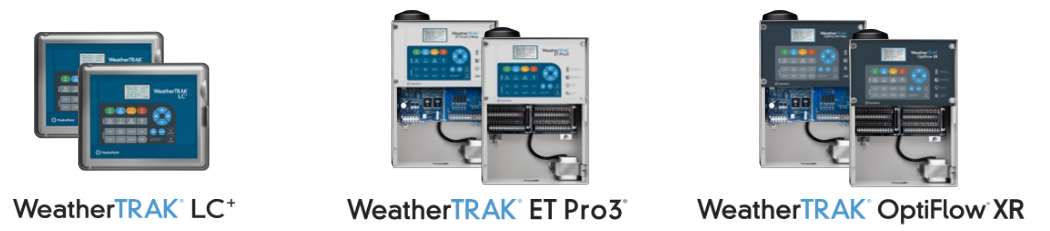
Make a chart that shows stock antenna modem and sim. Then add compatible antennas sims and modems.
📱Modems
ME910C1-NA
- This modem is only approved to work in Noth America (US and Canada) and is what the NA indicates.
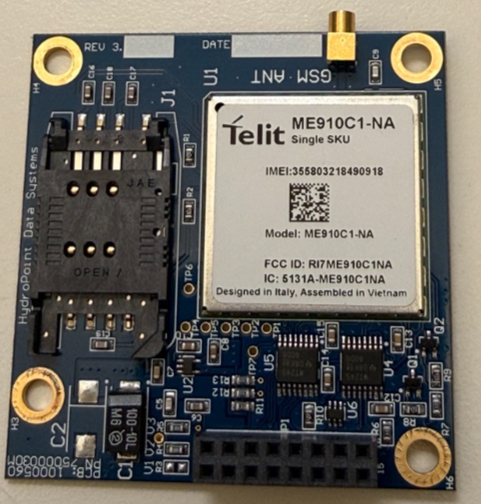
| Supported Bands | Technology | Compatible SIMS | Antennas |
|---|---|---|---|
|
LTE-M |
AT&T Verizon Ibasis SemTech |
Flex Pancake Omni Yagi Saltshaker |
Minimum Firmware Version
The controller must have the following firmware version or higher in order for the NA LTE modem to work:
- Pro3 or LC Controllers: 7.10.4
- OptiFlow Controllers: 8.6.4
ME910G1-WW
- This modem is approved to work Worldwide and is what the WW indicates.
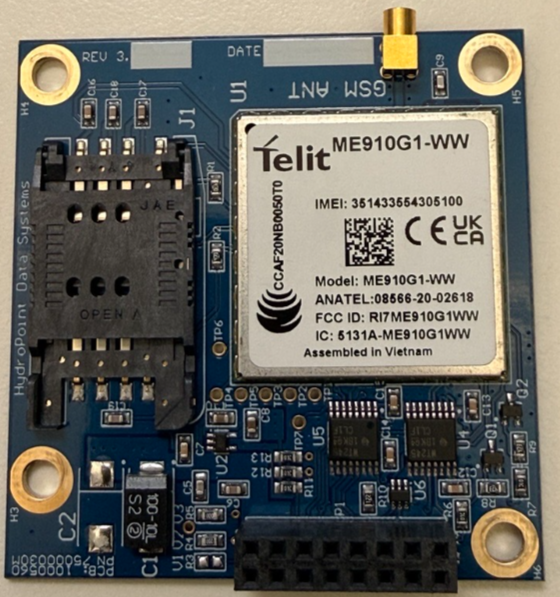
| Supported Bands | Technology | Compatible SIMS | Antennas |
|---|---|---|---|
|
LTE-M |
AT&T Verizon Ibasis SemTech |
Flex Pancake Omni Yagi Saltshaker |
Minimum Firmware Version
The controller must have the following firmware version or higher in order for the WW LTE modem to work:
- Pro3 or LC Controllers: 7.13.2
- OptiFlow Controllers: 8.10.2
🔑 SIM Cards
- All of these SIM cards are compatible with all WeatherTRAK controllers.
AT&T
- This is a standard sim and will only work on the AT&T network.
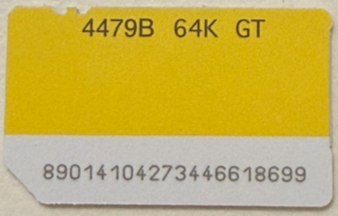
| Supported Bands in the US. | Technology |
Starts with |
|---|---|---|
|
B2 (1900) B4 (1700/2100) B5 (850) B12 (700) B66 (1700/2100) |
LTE-M Standard SIM |
8901 |
Verizon
- This is a Standard sim and will only work on the Verizon network.
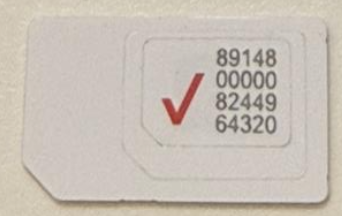
| Supported Bands in the US. | Technology |
Starts with |
|---|---|---|
|
B2 (1900) B4 (1700/2100) B5 (850) B13 (700) B66 (1700/2100) |
LTE-M Standard SIM |
8914 |
SEMTECH
- Also called Serria Wireless, this sim is a multi-carrier sim. This means that it will allow connection to either AT&T, T-Mobile, or Verizon.
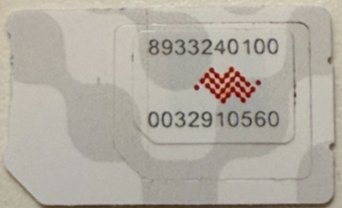
| Supported Bands in the US. | Technology |
Starts with |
|---|---|---|
B2 (1900) B4 (1700/2100) B5 (850) B12 (700) B14 (700) B66 (1700/2100)
B2 (1900) B4 (1700/2100) B5 (850) B13 (700) B66 (1700/2100)
B2 (1900), B4 (1700/2100) B5 (850) B12 (700) B66 (1700/2100) B71 (600) |
LTE-M Multi-carrier |
8933 |
(Add Ibasisb)
📶 Antennas
Pancake (omni)
- This type of antenna is called a Pancake or Puck style antenna.
- Compatible with all 4G/LTE & 5G Networks
- Style - Omni.
- Ground Plane Required.
- SMA Pin connector.
- This is an OEM for Pro3/OXR. Can be used on an LC as long as it meets the minimum grounding plain.
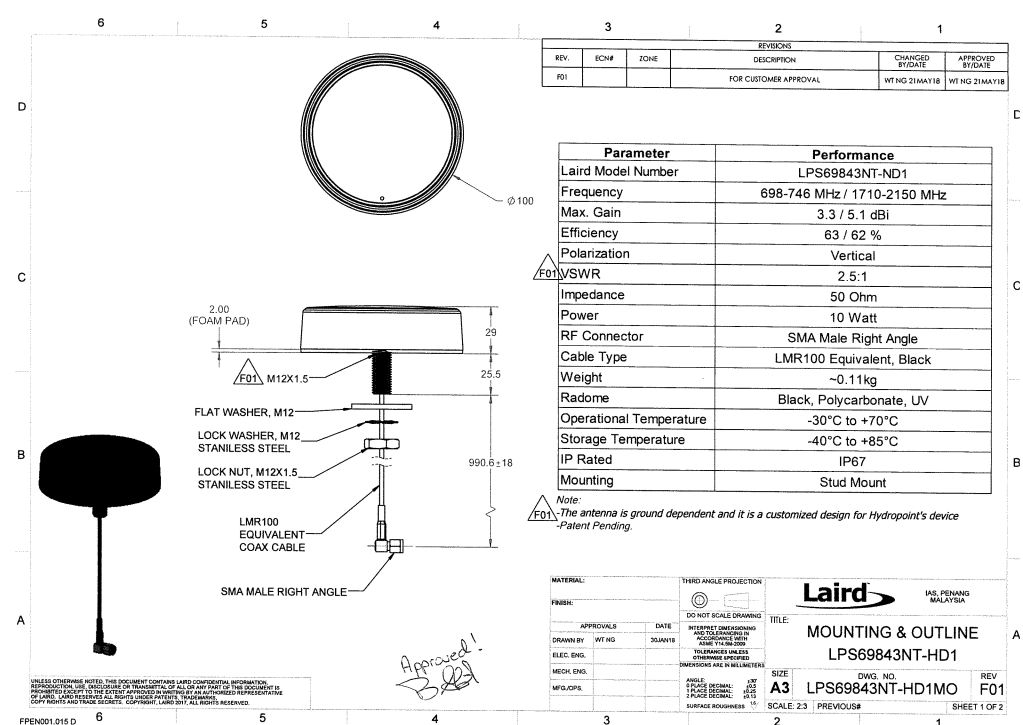
- For mor details click link below.
https://ghost.hydropointone.dev/content/files/2026/07/Hydropoint-4G-LTE-WeatherTRAK.pptx
Flex (Omni)
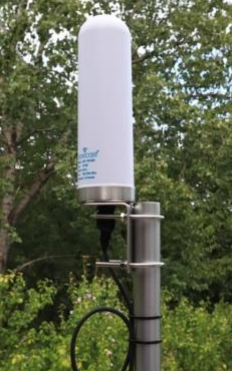
Proxicast (Omni)
- Compatible with all 4G/LTE & 5G Networks
- Integrated N Female Connector
- No Ground Plane Required
- Stainless Steel Mounting Bracket & Hardware.
- Only 9 inches Tall.
- Beset used for location that have weak signal.
- Compatible with LC/Pro3/OXR.
- *Might require a LMR400 extension cable. (Add link for Extension cables
Electrical Specifications
| Parameter | Rating |
|---|---|
| Frequency Range | 600-6000 MHz includes all 2G, 3G, 4G, LTE and Sub-6 5G Bands used worldwide and 2.4 GHz & 5.8 GHz WiFi bands |
| Peak Gain | 10 dBi |
| VSWR | ≤ 2.8:1 |
| Input Impedance | 50 Ohm |
| Polarization | Vertical |
| Ground Plane | Not Required |
| Lightning Protection | Direct Ground |
Mechanical Specifications
| Parameter | Rating |
|---|---|
| Connector Type | Type-N, Jack |
| Length | 9.1 inches / 23 cm with bracket: 12.3 in / 31 cm |
| Diameter | 2.8 inches / 70 mm |
| Weight | 10.7 oz / 303 g with bracket: 20.5 oz / 581 g |
| Materials | UV Stabilized ABS, stainless steel, zinc, brass, nickel - RoHS compliant |
| Antenna Color | White |
| Operating Temperature | -40°C to +70°C |
| Mounting | Pole/Rail/Wall Mount via integrated bracket (2.0” dia. U-bolts included) |
For more information click on the link below.
https://ghost.hydropointone.dev/content/files/2026/07/ANT-126-002-Specifications.pdf
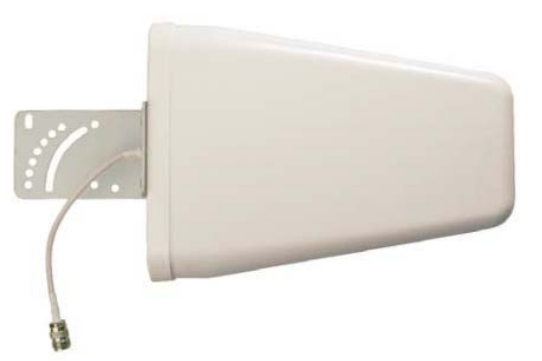
YAGI (Directional)
- High-gain
- Directional
- Pipe mounting hardware included
- Easy to install
- Weather resistant
- Wide bandwidth
- Best used for location for poor signal.
- Compatible with LC/PRO3/OXR.
Electrical Specifications
| Parameter | Rating |
|---|---|
| Frequency Range |
700 MHz 800-915 MHz 915-1710 MHz 1710-1850 MHz 1850-1990 MHz 1990-2500 MHz |
| Peak Gain | 10.0 dBi |
| VSWR max | >2.0:1 |
| Horizontal Beamwidth | 70° to 90° |
| Vertical Beamwidth | 85° to 110° |
| Nominal Impedance | 50 ohms |
| Polarization | Vertical |
| Lightning Protection | DC grounded |
Mechanical Specifications
| Parameter | Rating |
|---|---|
| Connector | Type-N Jack |
| Dimension | 11.42” x 8.27” x 2.56” In |
| Weight | 3.31 lbs |
| Temperature Range | -40° to 158° F |
| Rated Wind Velocity | 134 MPH |
For more information click on the link below.
https://ghost.hydropointone.dev/content/files/2026/07/ANT-126-002-Specifications-1.pdf
(Add RMA table, add part numbers.)
(Add a section for Upgrade path (this would fit more for sales and support))
LTE Modem Installation Guides -ET PRO 3 - Article Editor
LTE Antenna Upgrades Kits - Article Editor
🔌Cables/Connections
SMA/SMB/N-Type
- The LC/PRO3/OXR front disapply panels come with an LTE modem included.
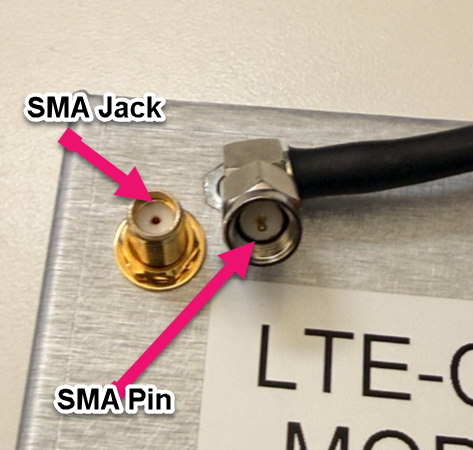
- The Modem is an SMA threaded Jack.
- Both the Pancake & Flex antenna have pin SMA threaded connections.
Pro3/OXR Modem
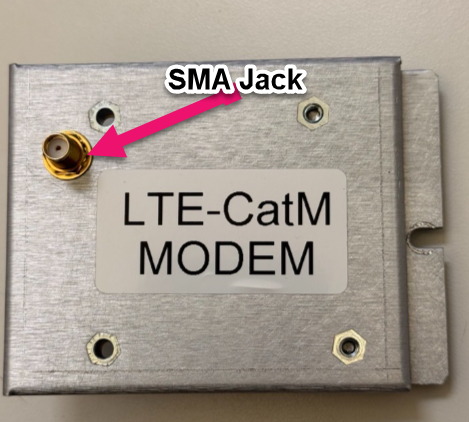
LC Modem
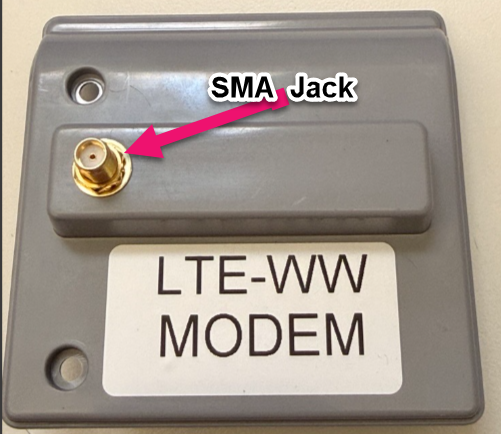
LC Modem and Flex antenna connections
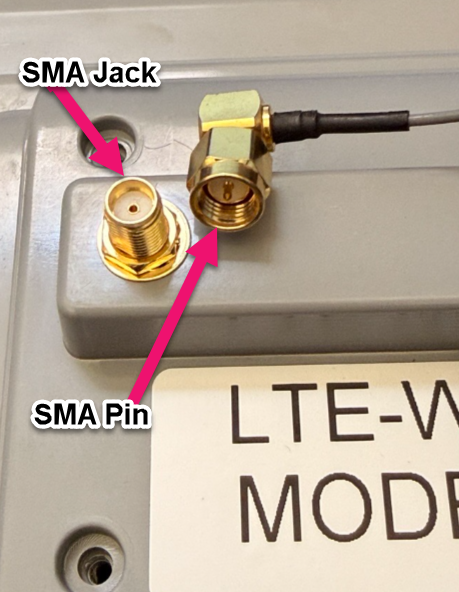
PRO3/OXR Modem and pancake connections.
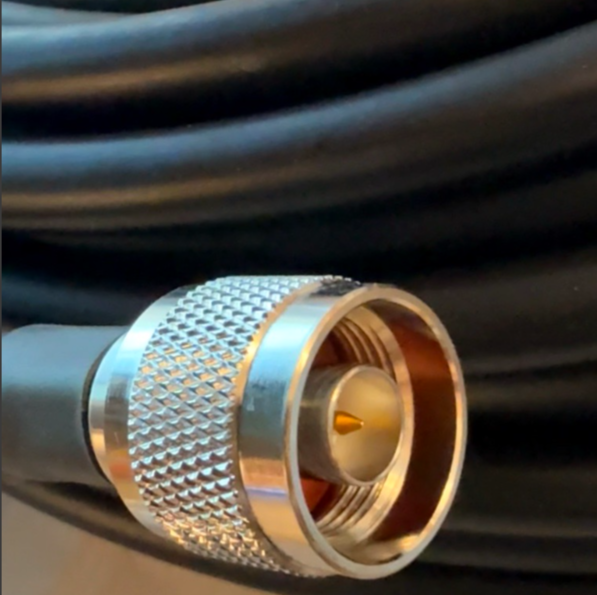
LMR400 Length
- Low-loss.
- Connection type, N-Pin.
- Offered in different lengths.
- Outdoor rated.
- Direct burial.
- Waterproof.
- Compatible with LC/PRO3/OXR.
This cable is offered in different lengths; each have cable ends fitted with a N-type -Pin.
| Part number | Length |
|---|---|
| ANT-CX-CBL-10 | 10 feet |
| ANT-CX-CBL-25 | 25 feet |
| ANT-CX-CBL-50 | 50 feet |
| ANT-CX-CBL-100 | 100 feet |
*These part numbers are ONLY for the cables. *
🚧 Troubleshooting Processes
- This section will cover communication related troubleshooting.
▶️Activation/ Assignment
Does the controller have valid EOS?
- Log into NetSuite.
- Ask the customer for the serial number of the controller (what does the display screen actually show- Help menu, Help: 02)
- In the search field start entering the serial number (but do not hit enter, just wait till it populates the Install base record (IBR).
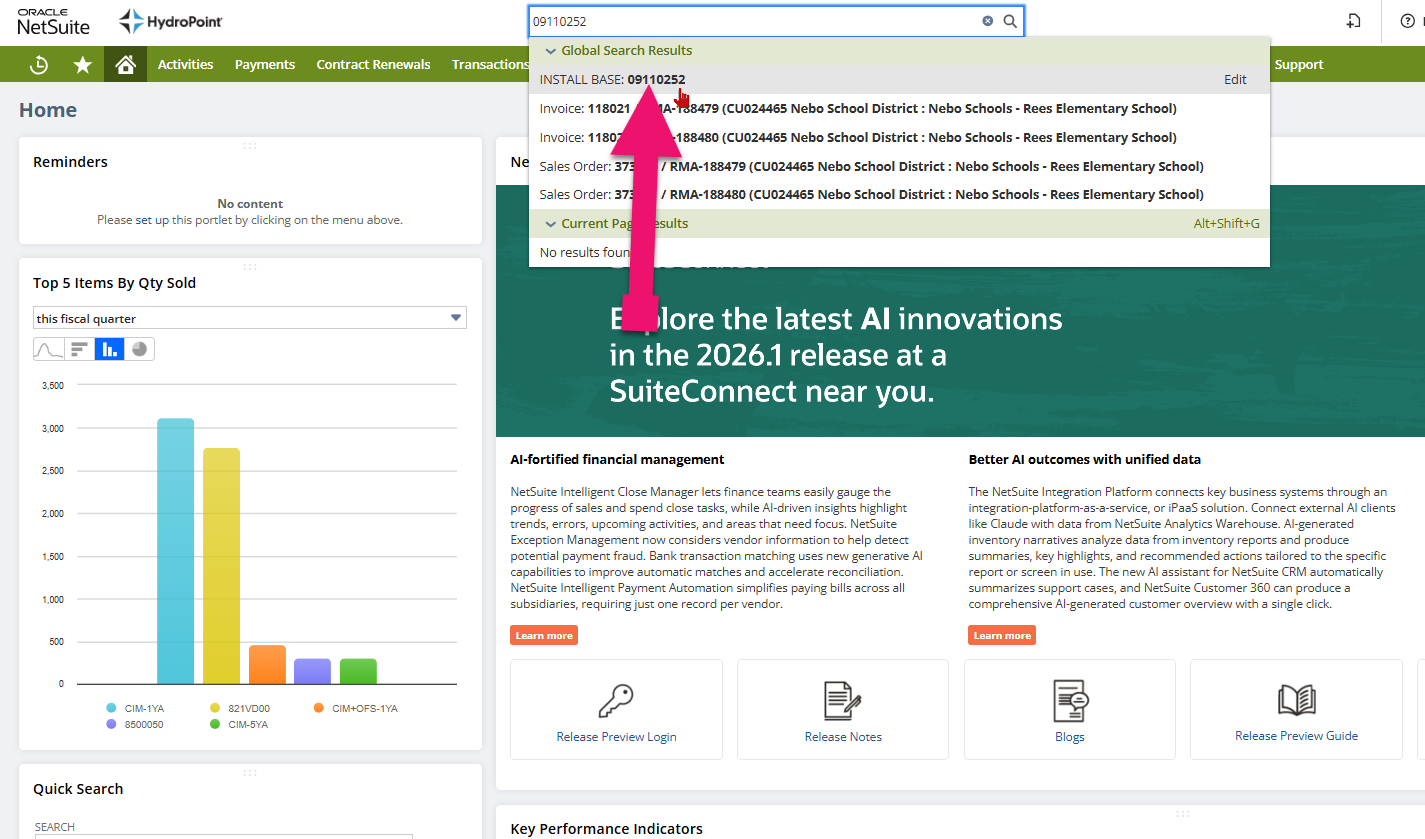
- Validate that the controller is activated and that the End of subscription is correct.
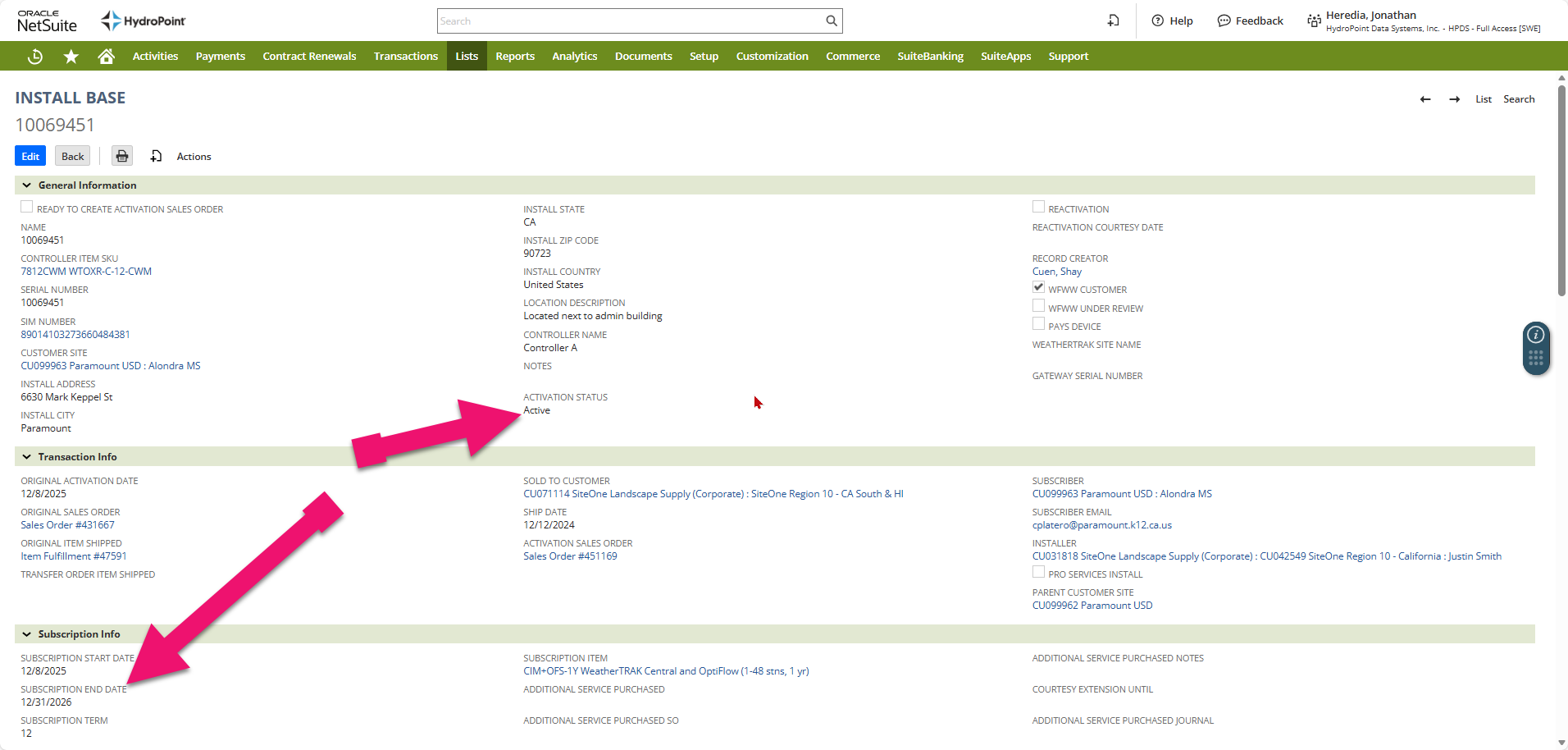
- If the controller is Deactivated and has an expired end of subscription date this will indicate the reason for the controller being Offline. If the customer wishes to reactivate click on this link for more information: Subscription Renewal Process - Article Editor
Is the controller properly assigned in WT Admin
- Login to: Login - WeatherTRAK
- Go to the Admin Tool page.
- Click on Controllers.
- In the serial number search field type the controller serial number.
- Click on the serial number.
- Reference the Account Name and the Site name and validate that it matches both in WTC and IBR in NetSuite.
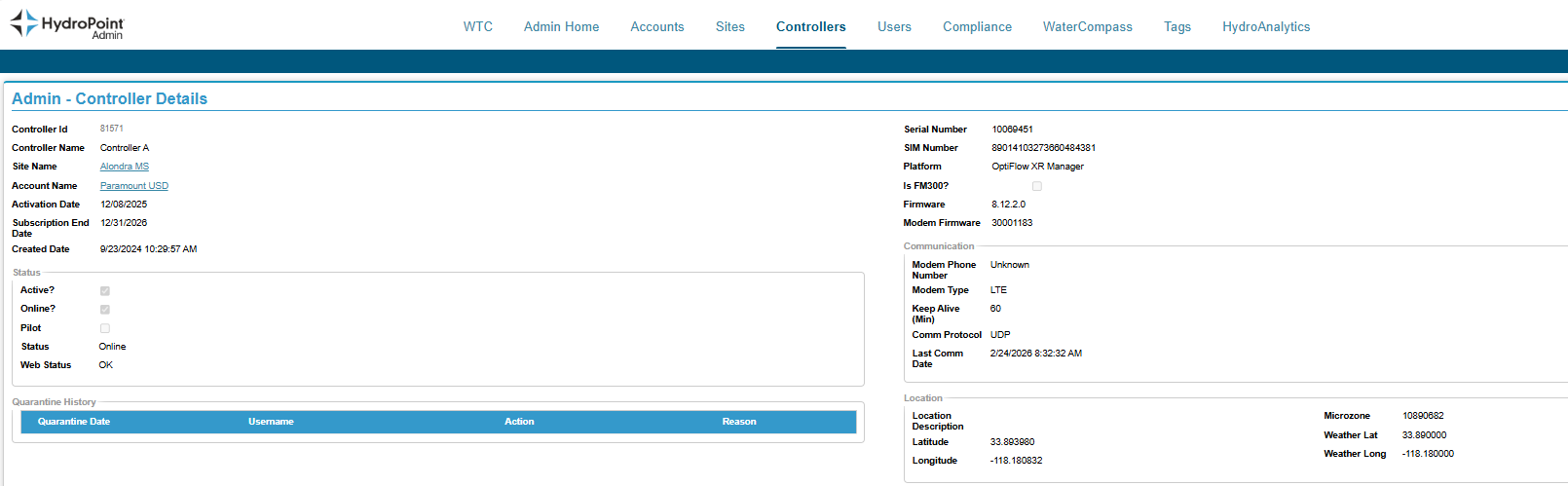
Quarantined?
Is the controller Quarantined?
Using WT Central Admin tool check and see if the controller is quarantined.
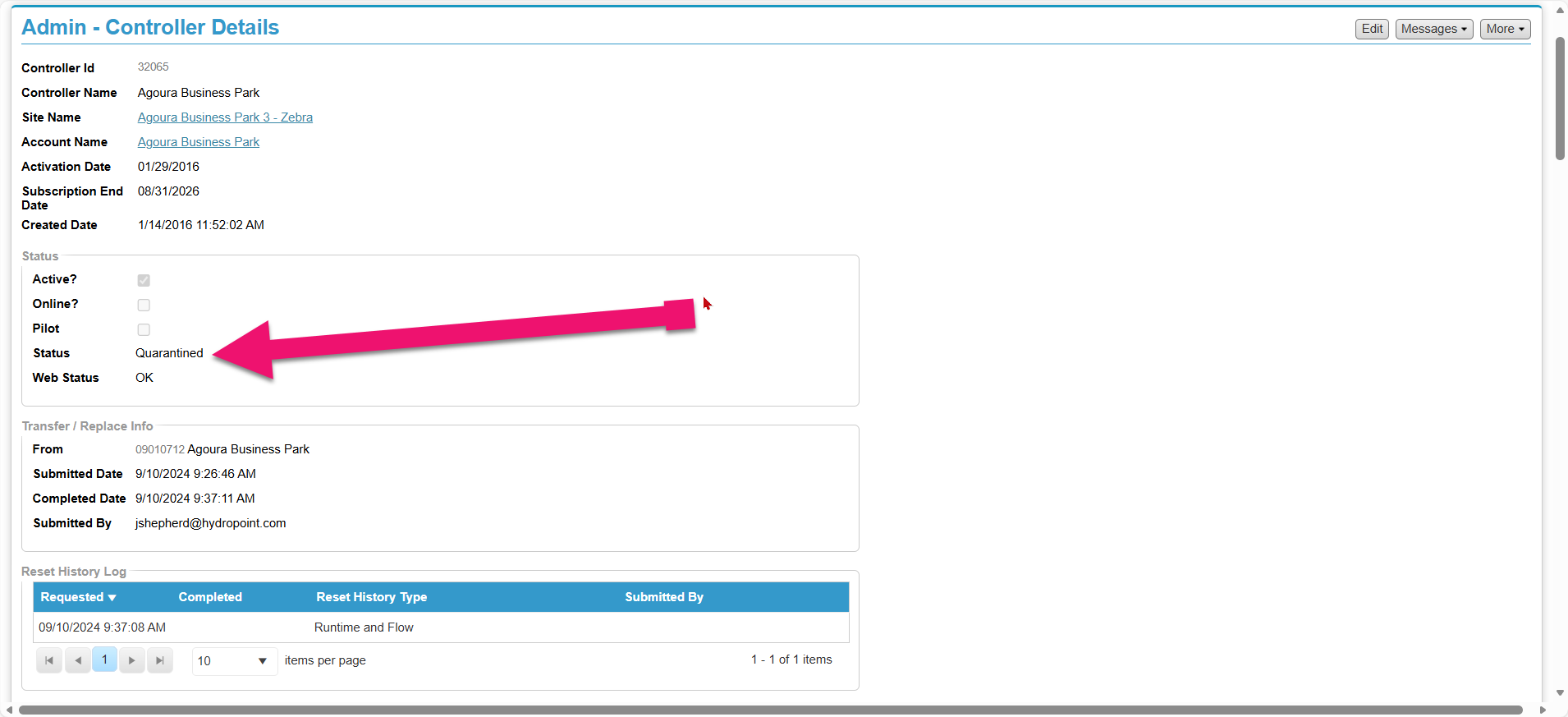
Click on the link below for this process.
Controller Quarantined document.
Is the Sim card activated?
If the customer is onsite have them check the Sim card serial number
Sim card (what type and is it activated? {add KB articles if they exist)
Controller alert report- Paint a picture, what does the communication look like within the last 30 days?
If yes Move on
⚡Is Power On
Does the controller have power?
As the customer if the screen is illuminating.
- If the screen is not illuminated have them check the LED diagnostic lights on the terminal board or mini chassis. Also validate the power is not disconnected from the terminal board or mini chassis.
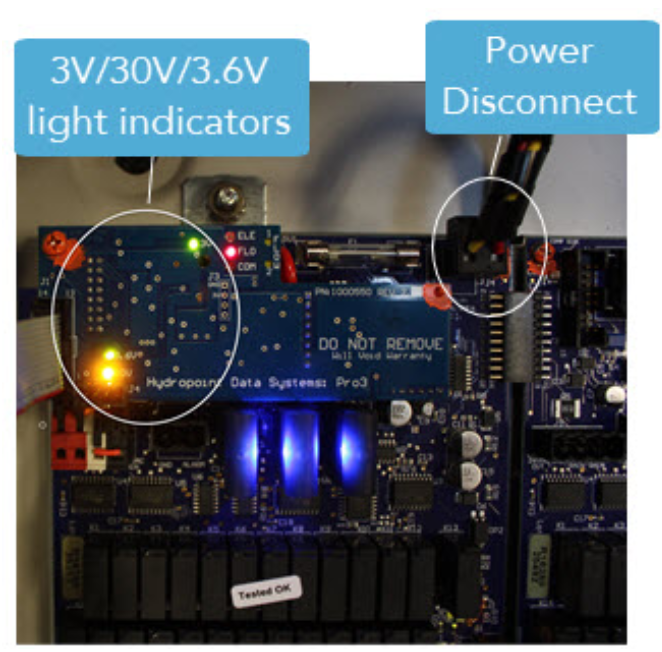
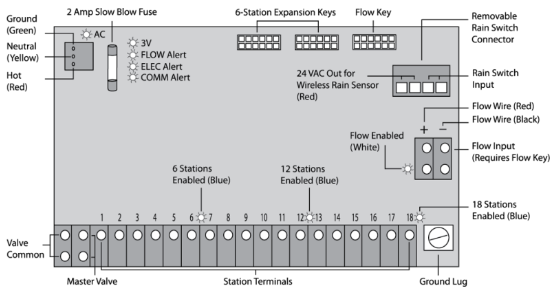
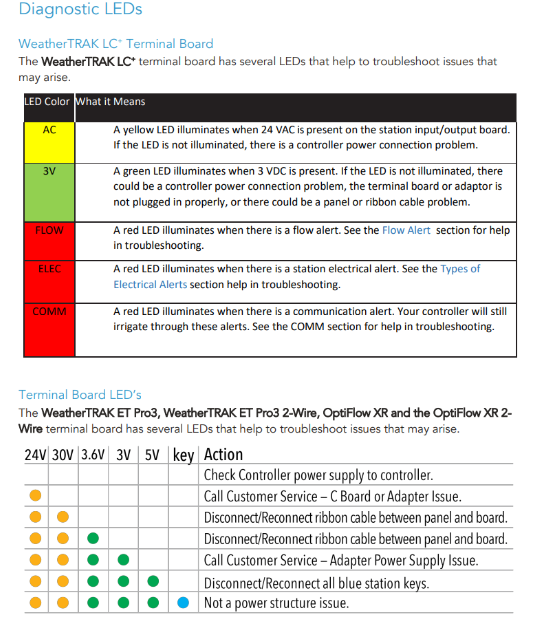
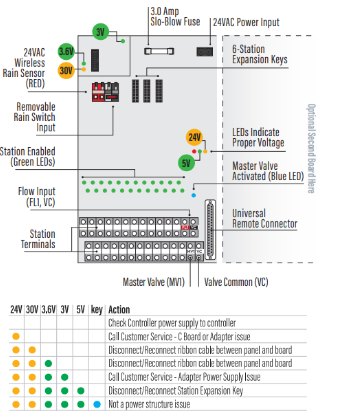
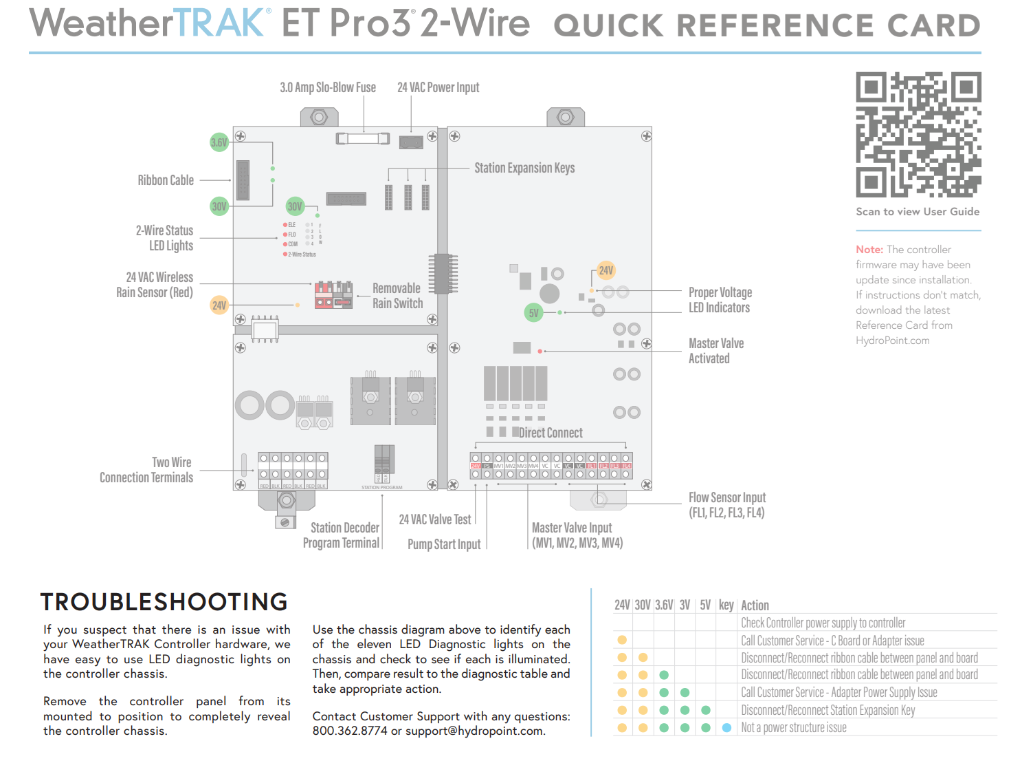
- If there is now power and the power disconnect on the terminal board or mini chassis is not connected click on the link below.

Is this controller located in Canada?
Note:
- As of now, Verizon service is not an option for Canadian customers, only AT&T.
💾 Is the Sim card Activated?
Which sim card is being used?
At the controller:
- Press the COMM button.
- Press the → button to the screen Comm: 05.
On WT central:
- Login to: Login - WeatherTRAK
- Go to the Admin Tool page.
- Click on Controllers.
- In the serial number search field type the controller serial number.
- Click on the serial number.
- The last reported sim card that this controller registered will be displayed next to SIM Number.
| Sim Starts with | Carrier | Portal |
|---|---|---|
| 8933 | SemTech | |
| 8901 | AT&T | |
| 8914 | Verizon | |
| LEGECY | ||
| 8904 -LEGECY | iBasis | |
| 8931 - LEGECY | Aeris |
📶Antenna Connections
Check connections.
- Validate that the antenna is properly connected to the modem on the panel.
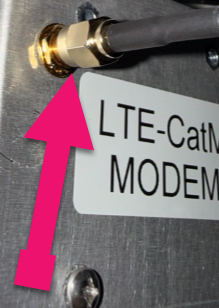
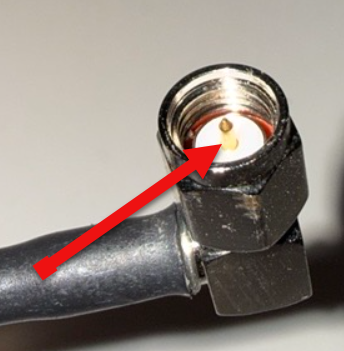
- Inspect the antenna connection and validate the pin is intact and not missing. Rember no tools should be used to tighten the antenna connection.
✨GPRS
How far does the GPRS go?
Add a KB article that talk about the GPRS status and its cycles.
✅APN/IP Port/Domain
APN
(Talk about all the different APN)
IP Port
(Talk about all the different IP)
Domain
(Talk about the different domains)
🔓Signal Monitor
Is there sufficient signal?
- Press Comm and go to the right to submenu Comm: 02. Does the controller have sufficient signal?
Category |
RSRP |
RSRQ |
Expected Behavior |
Action |
Excellent |
> -85 dBm |
> -8 dB |
Rock solid, rare disconnects |
None needed |
Good |
-85 to -100 |
-8 to -12 |
Reliable, occasional reconnects OK |
Monitor only |
Marginal |
-100 to -110 |
-12 to -15 |
Works but may have spotty periods |
Consider a different sim and or antenna. |
Poor |
-110 to -120 |
-15 to -18 |
Frequent disconnects, slow data |
Tier 2 or 3 intervention. |
Critical |
< -120 dBm |
< -18 dB |
Unreliable or non-functional |
Tier 3 intervention. |
💚Known Good Location
Is this Location specific?
- Check to see if this is the only controller on this site that is offline, if so, have the customer take this panel to a different location and validate to see if it comes back online.
- If the controller does connect verify, this will indicate that a different antenna and or modem will be needed. A Cell signal survey is suggested that this point to help determine a resolution.
📦Optional Solutions
Do they Need an RMA?
(Add RMA process here)
Do they need an E-sim?
(Talk about what is needed and how this could resolve the comm issue)
They have E-sim and still Disconnected.
(Talk about the Wilson cell test Kit)
Do they need a new Antenna?
(Break this down and why this would be a last option as cell survey will be used in conjunction to try and resolve comm issue)
1. User Computer/AppWeatherTRAK CentralSends message2. HPDS ServerCloud Platform (Secured IP)Processes packets3. Network ProviderCellular InfrastructureRelays through network4. Cell TowerDigital → Analog Conversion(Binary to RF Waves)Broadcasts RF signalSignal Journey Through Environment• May encounter obstacles (buildings, trees)• Subject to interference (other devices, weather)5. Controller AntennaReceives RF → DigitalSignal travels6. LTE ModemVerifies SIM & ProcessesApplies signal7. Controller Circuit BoardExecutes Command(Turn on station, save program)