
Problem Statement
Issue overview: Advanced Leak alerts are not working as expected for these controllers. All controllers listed are using normally open master valves. They are trying to
simulate an advanced leak alert so that the master valve can close. When being tested the flow through the system that meets their leak thresholds in both GPM and duration, but master valves are not shutting down, and an alert is not populating
Expected behavior: If leak thresholds are surpassed, this will be alarm only then, the alert is set to alarm + action, the controller should shut down after the Evaluation delay.
How was this tested and verified that the expected behavior is not working.
Account: Rancho Mission Viejo
Site: Rienda
Controller: 10056554 001 A- Cow Camp Rd
Key steps taken to help validate behavior.
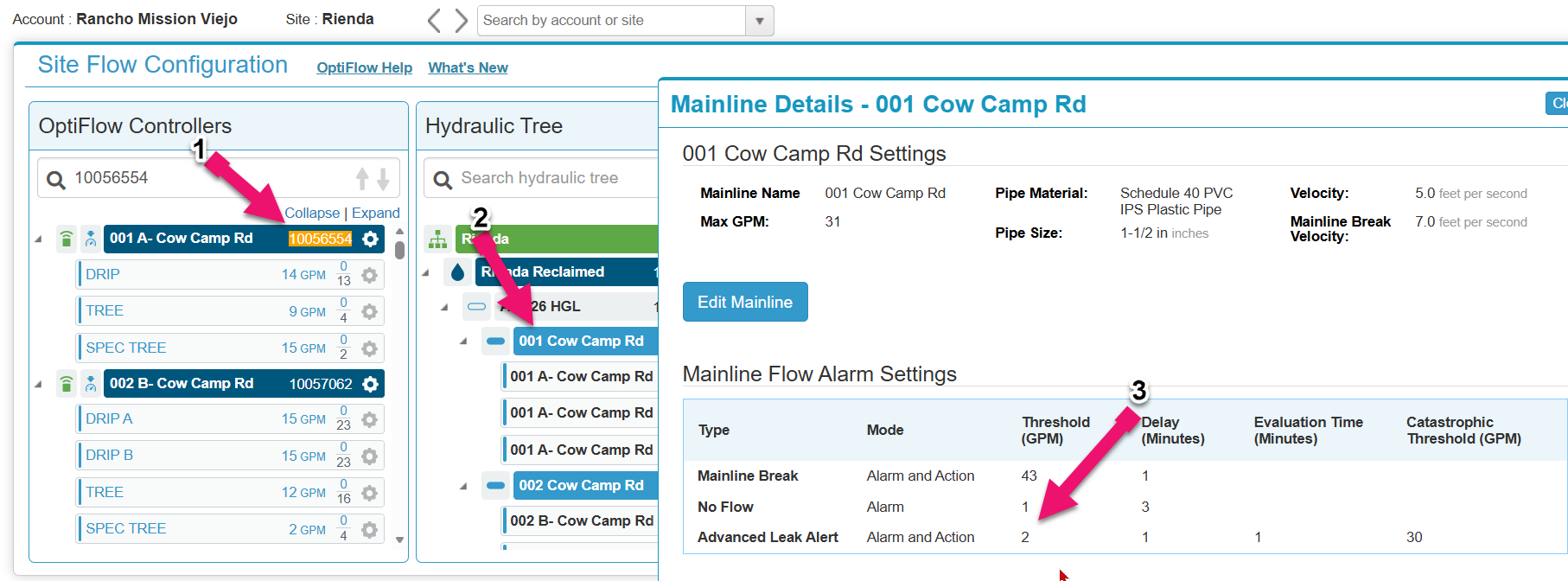
Step 1: I For the controller(s) in question I went to the Hydraulic Tree and figured out what pipe that controller was associated to.
Step 2: I then went into the mainline settings.
Step 3: I then validated that the advance Leak Alert was set to Alarm + Action and lowered the thresholds to 1 gallon and the delay to 1 minute and the Evaluation time to 1 minute to make this more sensitive for testing.
Validation
I then had the customer use a quick coupler then ensure that the flow that was being used by the quick coupler exceeded 1 GPM. This can also be done if a customer manually bleeds a valve. The key points here are to turn on the water without the controller and ensure that the flow being measured does exceed the Advanced Leak Alert Threshold.
Next, I verified that the flow being measured consistently flowed above the threshold (in this example 1GPM). After the delay in this example of 1 minute, the expected OptiFlow behavior is that the controller should fault an unexpected usage alert.
Then if the flow continues to exceed the Threshold (in this example 1 GPM) consistently above this threshold after the delay of 1 minute the controller faults an unexpected usage alert, after the evaluation time (in this example of 1 minute) if the flow is still being monitored to be flowing above the threshold then the controller should close the master valve and fault an Advanced Leak alert. If the master valve does not close after the Evaluation time the controller should fault a Master valve Fault Alert. This is the expected behavior of an Advanced Leak Alert.
In this case the customer verified that after the Delay time had expired that no unexpected usage Alert was triggered and that after the evaluation time had expired that the Advanced Leak Alert was not triggered. I used Update operating status to validate that the flow being monitored during this test was being measured to be flowing at 20 GPMS. This is how we were able to validate that the Advanced Leak Alert was not working.
Workaround Solution
1: Take a screenshot of the Controller programs to validate what pipe they are assigned to.
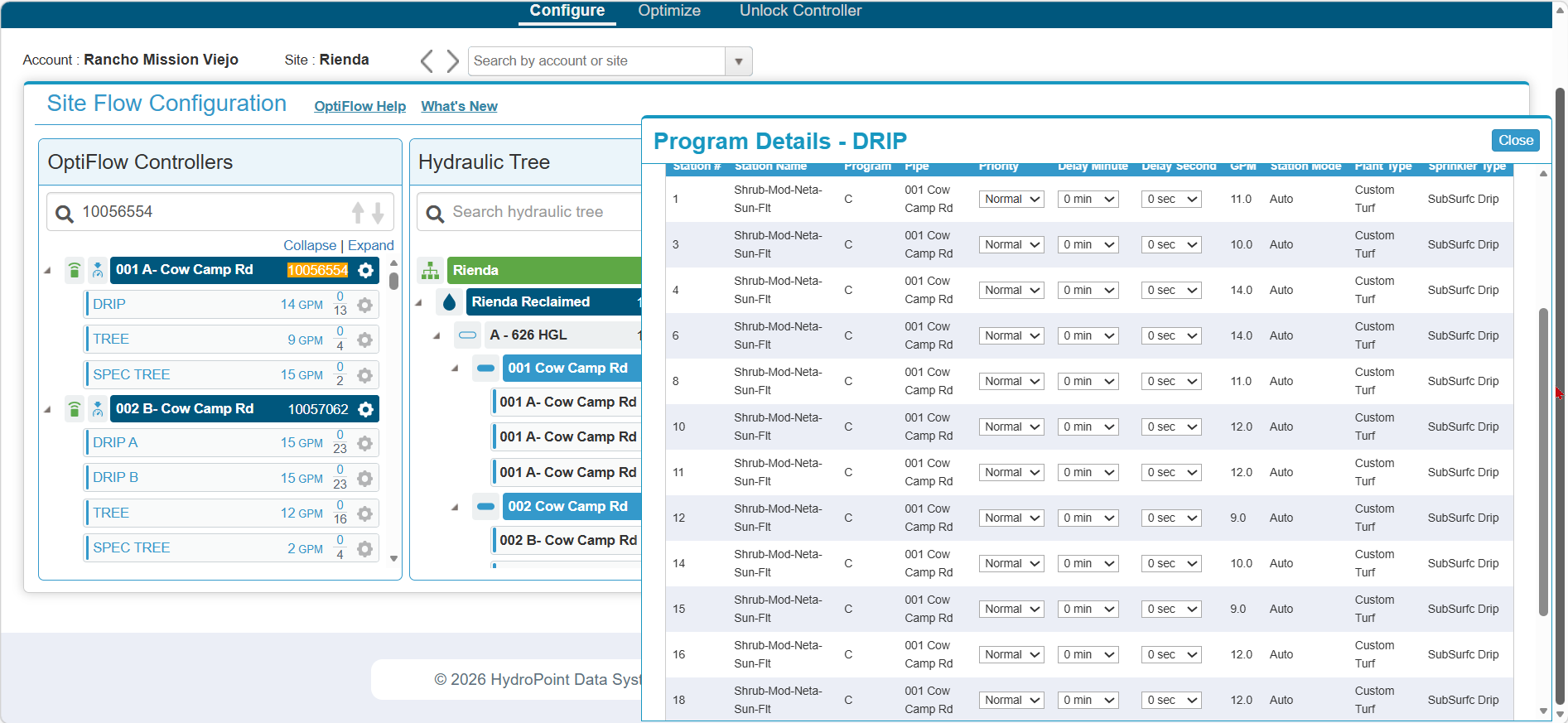
2: Take a screenshot of the Mainline and POC settings.
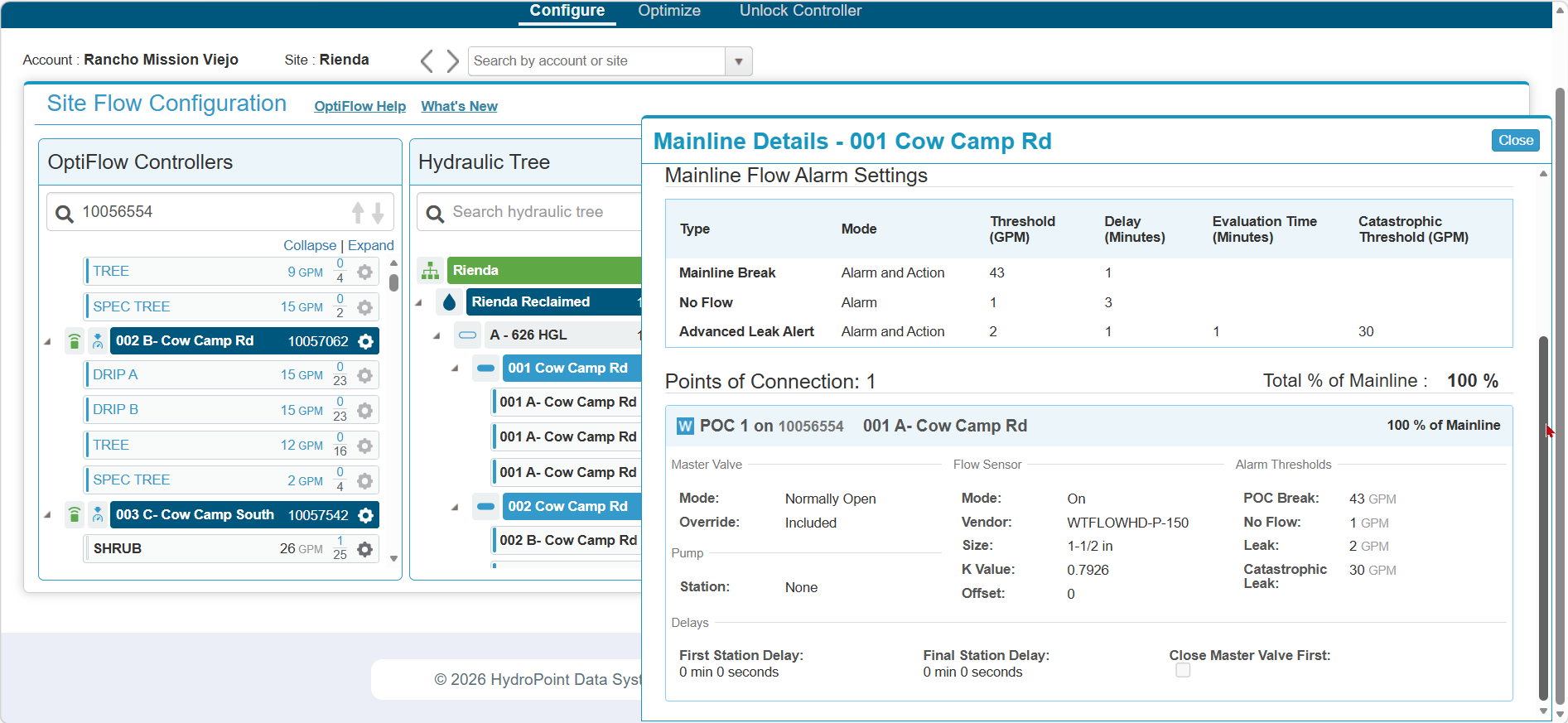
3: Eidt the mainline settings. Remove the POC. If there are multiple POC's remove all. Save the settings.
4: Edit the mainline settings and Add the POC(s) and validate that the mainline and POC settings are correct based off of the screenshots you took. Save the settings.
5: Reassigned the needed Programs/Station back to the mainline.
6: Give the controller 15 minutes to synchronize, then test the Advanced Leak alert.
Test and validate.
1: To test that the master valve will close, validate that you manually bleed a valve open or use a quick coupler, make sure that the flow is above the Advanced leak Alert Threshold and below the Catastrophic leak Threshold.
2: Validate that the Flow is constantly above the leak threshold and below the catastrophic leak threshold for the set Delay time and verify that after the delay time, that an unexpected usage alert is triggered.
3: Verify that if the measured flow is above the Leak alert constantly for the delay and below the Catastrophic threshold, that after the evaluation time has expired, the system should trigger an advanced Leak Alert and then close the master valve, after that Flow will no longer be monitored.
4: If after the Evaluation time the systems triggers a Advanced Leak alert followed by a Master valve fault this will indicate that the master valve is not closing and is either a mechanical or electrical issue and not the OptiFlow software.
Add notes and report back to the Escalation Ticket.
- If you encounter this on a site and several controllers are not triggering the advanced leak alert.
- Fix just one of the controllers with the recommended workaround and validate that it did solve the issue.
- Add your notes and the other affected controllers to the escalation ticket.
- Do Not fix the rest of the controller and make sure that the Assignee to the ticket is notified immediately. The reason for this is that we do not know the root cause of this and having more examples will help us find that root cause so that we can implement a fix for this issue.